## Templates and patterns

Product: Arche - Interactive Portfolio FSE WordPress Theme
URL: https://hub.jkdevstudio.com/docs/arche/pages-blog-and-patterns/patterns-and-templates
Updated: 2026-10-30
Summary: The templates and patterns the Arche theme and Arche Pro ship, what each one shows, and how to start a page from the Home, About or Contact pattern.

Templates decide the layout of each kind of page. Patterns are ready sections and pages you insert. Edit both at [[Appearance > Editor]].

## Start a page from a pattern

The page patterns come with Arche Pro.

:::steps

### Add a page

Go to [[Pages > Add Page]].

### Pick a pattern

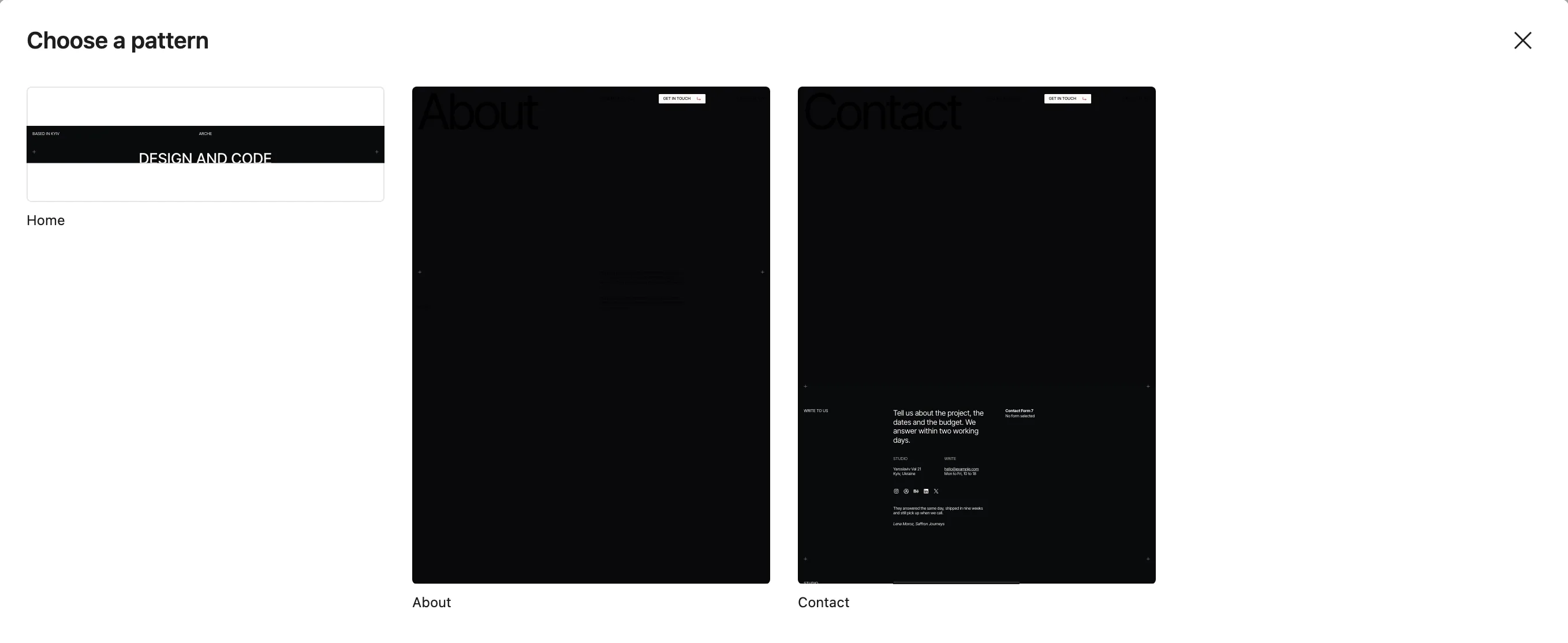
The **Choose a pattern** window opens with Home, About and Contact. Pick one. The same patterns sit in the **Arche pages** category of the inserter.

<figure class="doc-figure" data-align="center"><img src="https://hub.jkdevstudio.com/storage/docs/2026/10/c9332b7f-50a6-4733-8738-b79492d1b20a.webp" alt="The Choose a pattern window of a new page with the Home, About and Contact patterns"><figcaption>The page patterns in a new page.</figcaption></figure>

### Pick the template

In the page sidebar, set **Template**. Use **Home screen** for the home page and **Hero page** for About and Contact.

:::

## Theme templates

<table> <thead> <tr> <th>Template</th> <th>Shows</th> </tr> </thead> <tbody> <tr> <td>Blog home and Index</td> <td>Header, the Blog title, the post rows, footer</td> </tr> <tr> <td>Archive</td> <td>The archive title and description, the post rows</td> </tr> <tr> <td>Search</td> <td>The search title, a search field, then the results in sections: Posts as blog rows and Pages as a grid of titles. Each section has its own pages, and an empty one hides</td> </tr> <tr> <td>Single</td> <td>The post with comments, post navigation, then recent posts</td> </tr> <tr> <td>Page</td> <td>The title with breadcrumbs under it, the featured image, content and comments</td> </tr> <tr> <td>Canvas</td> <td>Header, the page content with no text styling, footer. For pages built from patterns</td> </tr> <tr> <td>404</td> <td>A full-width cover with "Not here", a link home, then the footer</td> </tr> </tbody> </table>

<div data-callout="tip">

The 404 cover has no image of its own. Add one in [[Appearance > Editor > Templates]], template **Page: 404**.

</div>

With Arche Pro, search results also get a **Projects** section of cards on top. An empty search lists nothing.

## Pro templates

<table> <thead> <tr> <th>Template</th> <th>Shows</th> </tr> </thead> <tbody> <tr> <td>Work</td> <td>Every project full screen, one after another. No header or footer: the list loops from the last project back to the first</td> </tr> <tr> <td>Project category</td> <td>A category's projects, as on Work</td> </tr> <tr> <td>Case study</td> <td>A project: cover, details, story, media and the next project</td> </tr> <tr> <td>Home screen</td> <td>One screen without the header or footer, for the home page</td> </tr> <tr> <td>Hero page</td> <td>A page that opens on its own hero: no header, with the footer</td> </tr> </tbody> </table>

## Theme patterns

The theme patterns sit in the **Arche** category of the inserter. The ones you can insert while editing a template:

- **Blog header**: the Blog title in the Display style.
- **Post rows**: the blog rows with date, title, image and categories.
- **Search results**: the sections of the search page.
- **Archive header** and **Search header**: the title of an archive or of search results.

The rest are used by the templates: Header, Footer, Footer bar, Post, Post navigation, Comments, Page, Page not found and Recent posts.

## Pro patterns

:::deflist

Home
: Header bars, a headline between crosses, the contact bar and the Project slider.

About
: A portrait hero with your intro, then journey, services, awards and questions.

Contact
: A hero, a form beside your address, hours, social links and a client quote, then a studio picture with a map and the newsletter sign-up. Needs the Contact Form 7 integration.

Full-screen projects
: Each project fills the screen: title, year, credits and summary over its cover.

Project slider
: The latest projects in a row of covers.

Contact bar
: When you are free, a small email button and your local time in one bar.

FAQ
: Your questions and answers as an accordion. Needs the FAQ integration.

Newsletter
: One line about your newsletter and a sign-up form. Needs the Mailchimp integration.

:::

A pattern built on an integration shows up once that integration is on.

## Block styles Pro adds

<table> <thead> <tr> <th>Style</th> <th>Block</th> </tr> </thead> <tbody> <tr> <td>Credit</td> <td>Paragraph</td> </tr> <tr> <td>Full-width hero</td> <td>Cover</td> </tr> <tr> <td>Full screen</td> <td>Group</td> </tr> <tr> <td>Section with label</td> <td>Columns</td> </tr> <tr> <td>Timeline</td> <td>Group</td> </tr> <tr> <td>Service</td> <td>Details</td> </tr> <tr> <td>Awards</td> <td>List</td> </tr> <tr> <td>Numbers, no reload, Load more, Infinite scroll</td> <td>Pagination</td> </tr> <tr> <td>Boxed, Plain</td> <td>Page Numbers</td> </tr> <tr> <td>Shuffle on hover</td> <td>Paragraph, Heading, List, Navigation, Buttons, Social Icons</td> </tr> <tr> <td>Small</td> <td>Button</td> </tr> </tbody> </table>