## Theme Options General settings
Product: Arche - Interactive Portfolio FSE WordPress Theme
URL: https://hub.jkdevstudio.com/docs/arche/styles-and-settings/theme-options-general
Updated: 2026-10-30
Summary: Every setting on the General page of Arche Theme Options: page transitions, smooth scrolling, reveal on scroll, pointer effects and the preloader.
Availability: Pro only.
The General page turns the site's motion and effects on and off. Open it at [[Arche Pro > Theme Options > Arche > General]].
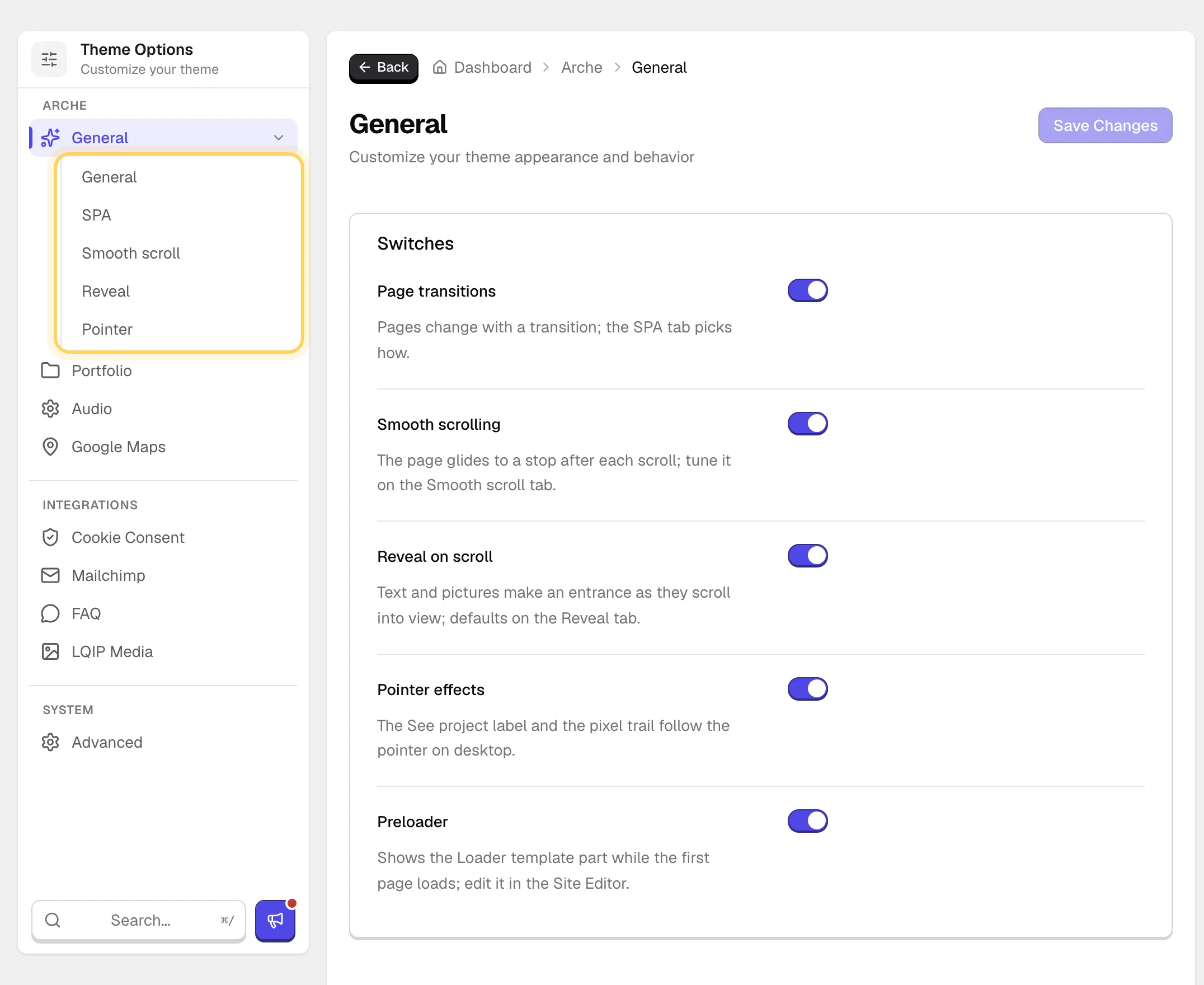
The first tab holds five switches. Each of the first four, while on, adds a tab of its own with its details.
The General page and its tabs.
Visitors who turn on reduced motion on their device see none of these effects.
## General tab
:::options
- **Page transitions** (toggle, default: on): Pages change with a transition. The SPA tab picks how.
- **Smooth scrolling** (toggle, default: on): The page glides to a stop after each scroll. Tune it on the Smooth scroll tab.
- **Reveal on scroll** (toggle, default: on): Text and pictures make an entrance as they scroll into view. Off also removes the Reveal panel from the block sidebar.
- **Pointer effects** (toggle, default: on): The See project label and the pixel trail on desktop.
- **Preloader** (toggle, default: on): Shows the Loader template part while a page loads in full. See [Edit the loader and the ticker](https://hub.jkdevstudio.com/docs/arche/pages-blog-and-patterns/loader-and-ticker).
:::
## SPA tab
Shown while **Page transitions** is on.
:::options
- **Provider** (select, default: Barba): **Barba** swaps the page without a reload, so background music keeps playing. **View Transitions API** loads every page in full and lets the browser fade between them. With View Transitions the preloader shows on the first page of a visit only.
- **Pixel veil** (toggle, default: on): Barba only. The next page appears through a black veil that breaks into pixels, and a slider cover grows into its project. Off gives a plain fade.
:::
## Smooth scroll tab
Shown while **Smooth scrolling** is on.
:::options
- **Smoothness** (range 1 to 10, default: 7): Higher values glide longer after each wheel turn.
- **Wheel speed** (range 0.4 to 1.6, default: 0.8): How far one turn of the wheel moves the page.
- **Smooth on touch** (toggle, default: off): Gives finger scrolling the same glide. Off leaves phones on their native scroll.
- **Glide to anchors** (toggle, default: on): Links to a section of the same page glide there instead of jumping.
:::
## Reveal tab
Shown while **Reveal on scroll** is on. These are the entrances a block gets when it has no choice of its own.
:::options
- **Text** (select, default: Typing): How headings, paragraphs and other text appear. The choices are Typing, Glitch, Characters in random order, Lights up while scrolling, Rises out of a blur, Fades in and None.
- **Media** (select, default: Picture uncovers): How images and videos appear. The choices are Picture uncovers, Rises out of a blur, Fades in and None.
:::
To give one block its own entrance, see [Set the motion of a block](https://hub.jkdevstudio.com/docs/arche/styles-and-settings/motion-and-reveal).
## Pointer tab
Shown while **Pointer effects** is on.
:::options
- **See project label** (toggle, default: on): A glass label follows the pointer over the active slide of the Project slider.
- **Pixel trail** (toggle, default: on): Blocks of color light up behind the pointer on groups and covers that turn it on.
- **Block size** (range 10 to 60 px, default: 30): The side of one pixel block.
- **Reach** (range 2 to 8, default: 4): How many blocks around the pointer can light up.
- **Density** (range 10 to 60%, default: 25): The share of blocks within reach that light up.
- **Fade time** (range 300 to 2000 ms, default: 800): How long a block stays before it fades out.
- **Lighten** (range 0 to 30%, default: 10): How much lighter a block is than the picture under it.
:::
The last five settings show while **Pixel trail** is on.