## Pro blocks: Slider, Authors, Logo strip, and Steps with photo
Product: Enardo - Minimal Blog & Magazine FSE WordPress Theme
URL: https://hub.jkdevstudio.com/docs/enardo/blocks-and-patterns/pro-blocks
Updated: 2026-11-28
Summary: Settings of the Enardo Pro Slider, Authors, Logo strip and Steps with photo blocks, with their defaults, ranges, and how each behaves on phones and with reduced motion.
Availability: Pro only.
This is a Pro feature. Enardo Pro adds six blocks in the **Enardo** category of the inserter. Two have their own pages: [the Search modal](https://hub.jkdevstudio.com/docs/enardo/header-and-footer/search-modal) and [Summarize with AI](https://hub.jkdevstudio.com/docs/enardo/the-single-post/post-page-pro). The other four are below. Their settings are in the block sidebar, in the **Settings** panel.
## Slider
Slides that move one at a time, with autoplay. Each block inside the slider is a slide. In the **Featured posts** and **Editor's picks** sections, the slides are the posts of the Query Loop inside it, and the arrows and counter sit beside the section title.
:::options
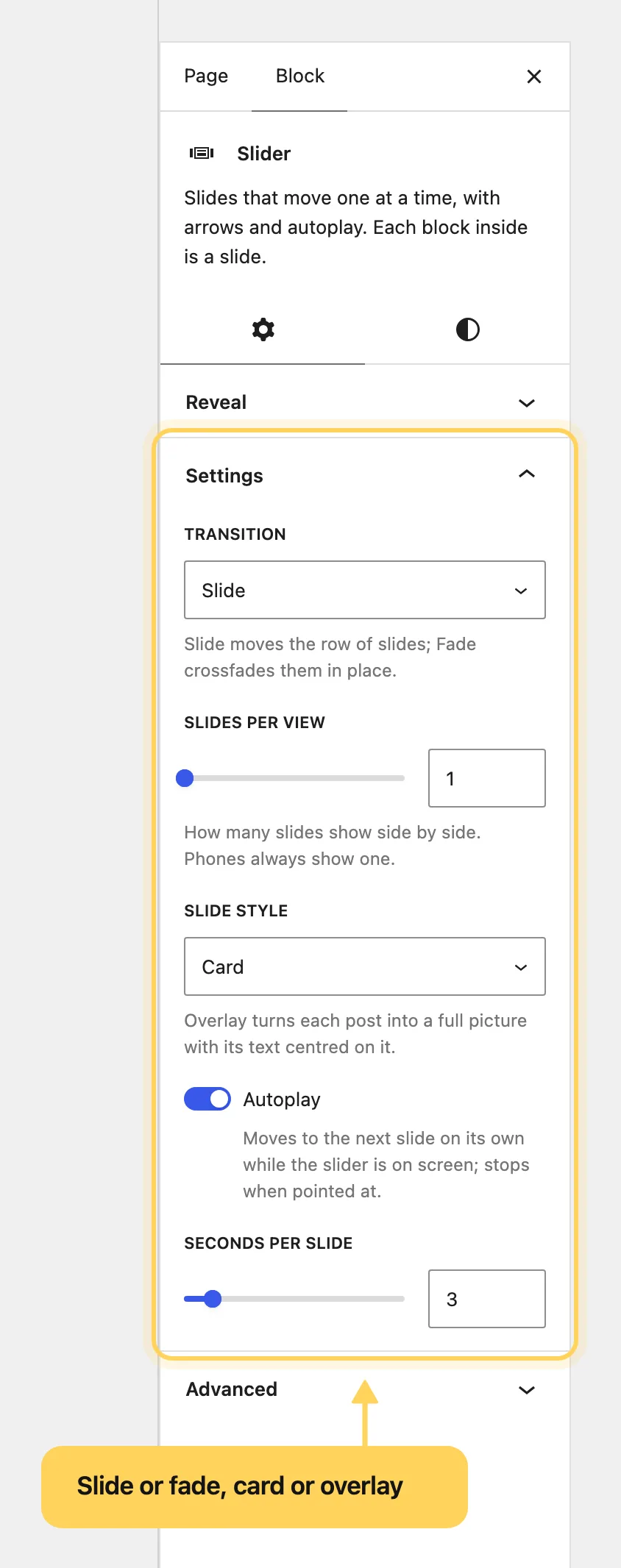
- **Transition** (default: Slide): **Slide** moves the row of slides. **Fade** cross-fades them in place.
- **Slides per view** (default: 1): From 1 to 3 slides side by side. Phones always show one. Shown with the Slide transition only.
- **Slide style** (default: Card): **Overlay** turns each post into a full picture with its text centered on it.
- **Overlay height (px)** (default: 440): From 320 to 800. Phones show it a little lower. Shown with the Overlay style only.
- **Autoplay** (default: on): Moves to the next slide by itself while the slider is on screen, and stops while the pointer or keyboard focus is on it.
- **Seconds per slide** (default: 3): From 2 to 10. Shown while Autoplay is on. Featured posts uses 5.
:::
The Slider block's Settings panel.
With keyboard focus inside the slider, the left and right arrow keys change slides. With reduced motion, there is no autoplay and slides change at once. In the editor, the slides are listed one under another so you can edit each.
**Overlay** only switches the slider into overlay mode. The picture-with-centered-text card comes from the Featured posts pattern, so start from that pattern when you want overlay slides.
## Authors
One row per person who has published posts: a round photo, the name linking to their archive, a short biography and the number of stories, with a line under each row. The photo is the [profile photo](https://hub.jkdevstudio.com/docs/enardo/the-single-post/post-page-pro) from their user profile, or Gravatar.
:::options
- **Order** (default: Most stories first): Or **Name, A to Z**.
- **How many** (default: 0): From 0 to 50. 0 shows everyone.
:::
The biography is cut to two lines. The block shows the same list in the editor as on the site.
## Logo strip
A looping row of logos that moves by itself. Each block inside is one item, usually an image.
:::options
- **Speed** (default: 5): From slow (2) to fast (10).
- **Pause on hover** (default: on): Holds the strip still while the pointer is over it. Keyboard focus always holds it.
:::
With reduced motion, the logos stand still in wrapped rows.
## Steps with photo
Steps beside a photo. Pointing at a step or tapping it shows that step's photo. Each group inside the block is one step, with an icon, the text and a photo. The first step is shown when the page opens.
The block has no settings. Add, remove or reorder steps by editing the groups inside it.
## Questions
Can the Slider show my own content instead of posts?
Yes. A new Slider starts with sample slides. Replace them with any blocks, such as Groups with a quote and a photo; each block inside becomes a slide.
The Authors block leaves someone out.
It lists only people with at least one published post. Publish a post under their name, or check **How many**.