## Customizer settings: motion, glow, and music
Product: Enardo - Minimal Blog & Magazine FSE WordPress Theme
URL: https://hub.jkdevstudio.com/docs/enardo/theme-settings/customizer-settings
Updated: 2026-11-28
Summary: Every switch in Enardo's General, Glow and Sound Customizer sections: reveal on scroll, page transitions, smooth scroll, page glows and background music.
Enardo keeps behavior in the Customizer and design in Styles. Open [[Appearance > Customize > Enardo Theme]] to find four sections: **General**, **Color scheme**, **Glow** and **Sound**. Color scheme has its own page, [Set up the light and dark schemes](https://hub.jkdevstudio.com/docs/enardo/theme-settings/color-schemes). Colors, fonts and sizes are in [[Appearance > Editor > Styles]].
Reveal, page transitions, smooth scroll and the glow drift turn off for a visitor whose device asks for reduced motion.
## General: how content moves
[[Appearance > Customize > Enardo Theme > General]]
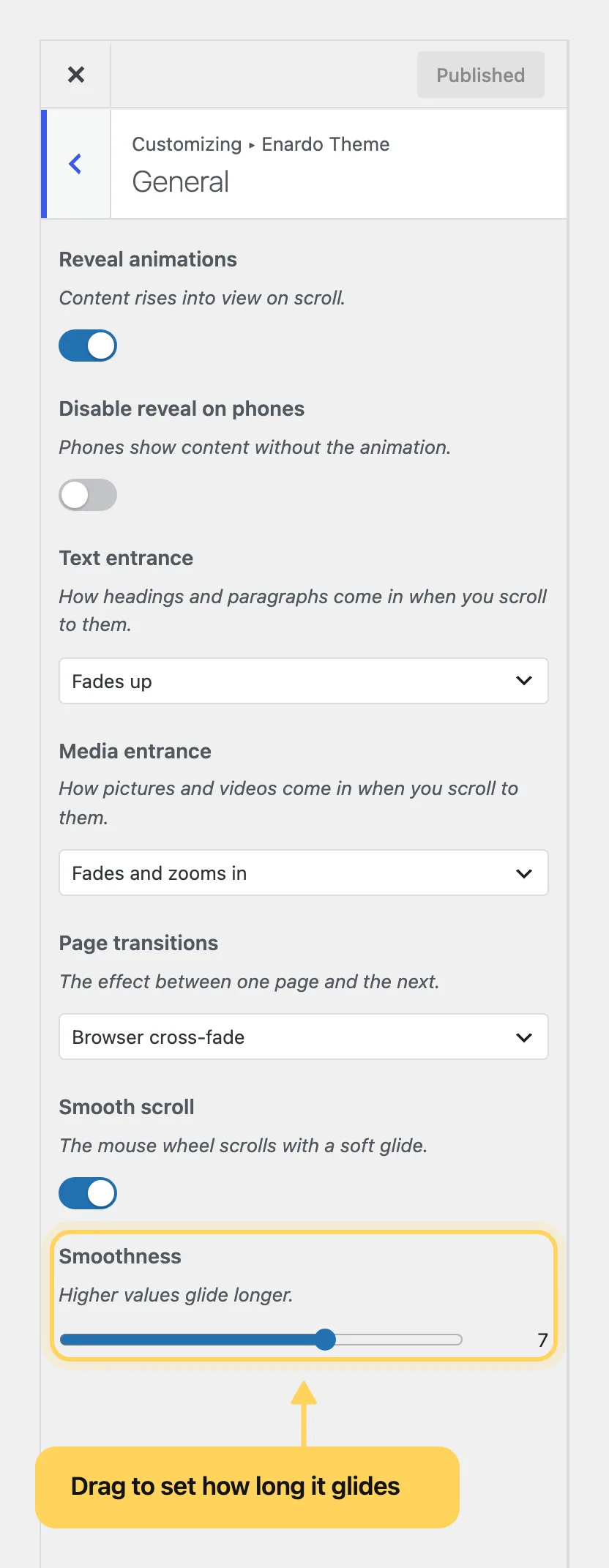
The General section in the Customizer.
:::options
- **Reveal animations** (default: on): Headings, paragraphs and pictures rise into view as they reach the screen, one after another in reading order. The three settings below are hidden while it is off.
- **Disable reveal on phones** (default: off): Phones show content at once, without the animation.
- **Text entrance** (default: Fades up): How headings and paragraphs come in. **None** shows them at once.
- **Media entrance** (default: Fades and zooms in): How pictures and videos come in. The frame fades in while the picture inside settles from a slight zoom. **None** shows them at once.
- **Page transitions** (default: Browser cross-fade): The effect between one page and the next. **None** switches pages with no effect.
- **Smooth scroll** (default: on): The mouse wheel scrolls with a soft glide. Touch scrolling stays native.
- **Smoothness** (default: 7): From 1 to 10. Higher values glide longer. Hidden while Smooth scroll is off.
:::
With Pro, the **Reveal** panel in the block sidebar overrides these entrances for a single block. See [Choose how a block enters with the Reveal panel](https://hub.jkdevstudio.com/docs/enardo/blocks-and-patterns/reveal-panel).
## Glow: color above the header and under the footer
[[Appearance > Customize > Enardo Theme > Glow]]
A blurred shape of color sits above the header and another under the footer. Each has its own switch, shape and color.
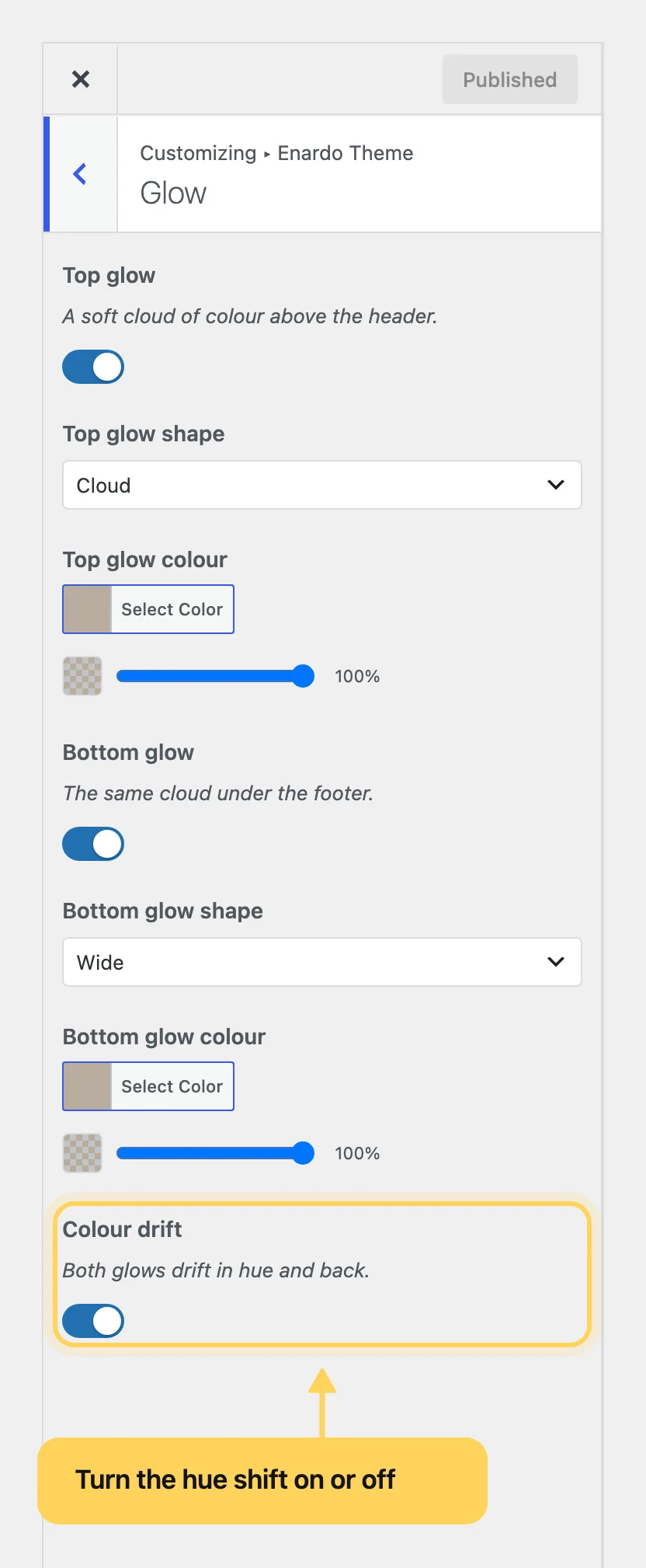
The Glow section in the Customizer.
:::options
- **Top glow** (default: on): The glow above the header. Its shape and color are hidden while it is off.
- **Top glow shape** (default: Cloud): Cloud, Wide, Split or Beam.
- **Top glow colour** (default: #b8ad9f): The color of the top glow.
- **Bottom glow** (default: on): The glow under the footer.
- **Bottom glow shape** (default: Wide): Cloud, Wide, Split or Beam.
- **Bottom glow colour** (default: #b8ad9f): The color of the bottom glow.
- **Colour drift** (default: on): Both glows drift slowly in hue and back. With reduced motion they stay still.
:::
## Sound: background music
[[Appearance > Customize > Enardo Theme > Sound]]
A speaker button at the top left plays a looped track. The theme ships no track, so the button appears only after you choose one.
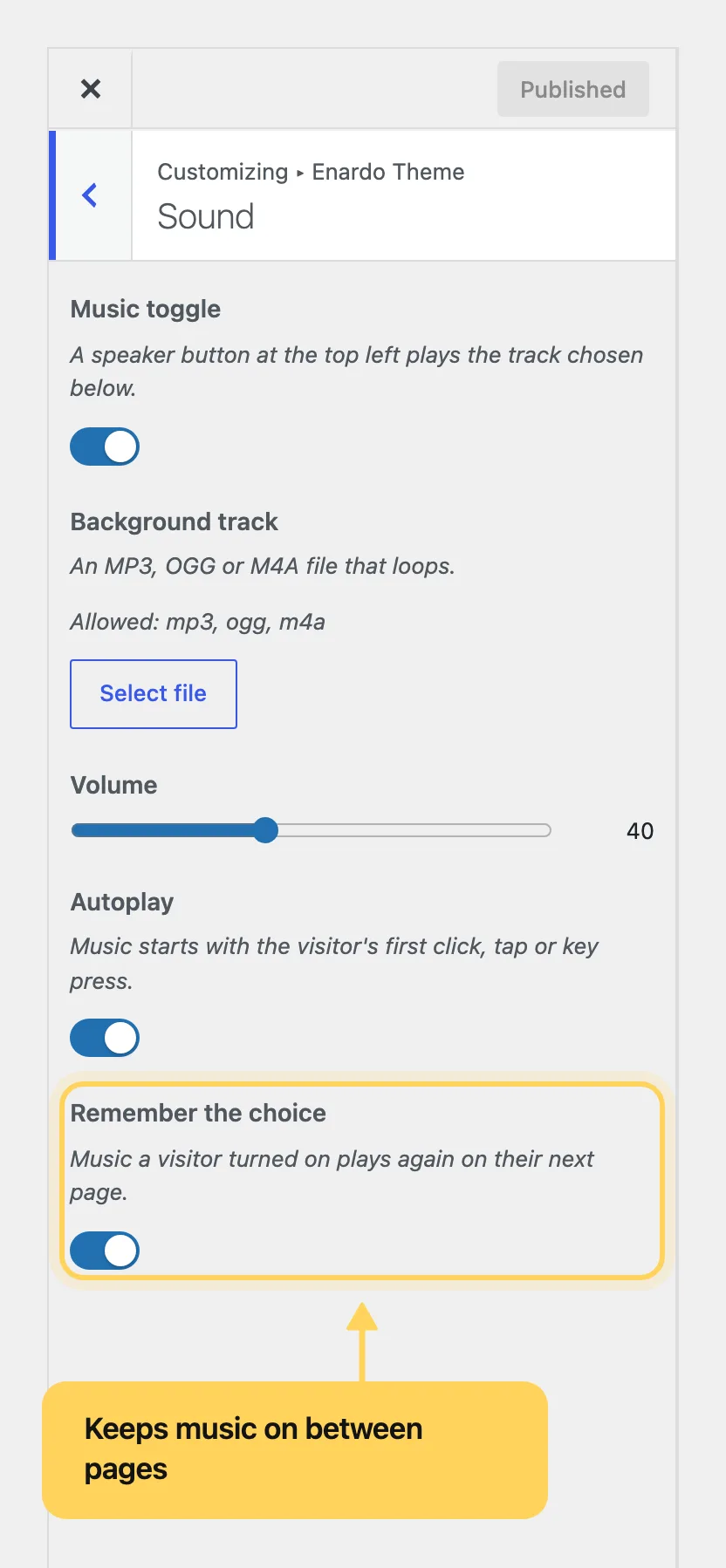
The Sound section in the Customizer.
:::options
- **Music toggle** (default: on): Shows the speaker button. The settings below are hidden while it is off.
- **Background track** (default: none): An MP3, OGG or M4A file from the media library. It loops.
- **Volume** (default: 40): From 0 to 100.
- **Autoplay** (default: on): Music starts with the visitor's first click, tap or key press. Browsers block sound until then.
- **Remember the choice** (default: on): Music a visitor turned on plays again on their next page.
:::
## Questions
Where are the cursor settings?
The cursor ring has its own page in Theme Options, which comes with Enardo Pro. See [Cursor ring settings](https://hub.jkdevstudio.com/docs/enardo/theme-settings/cursor-ring).
Why is there no color or font setting in the Customizer?
Enardo is a block theme, so colors and fonts live in Styles. The two glow colors are the only colors set here. [The Customizer has no color or font settings](https://hub.jkdevstudio.com/knowledge-base/full-site-editing/block-theme-colors-and-fonts) explains where everything moved.
I changed a setting and the site looks the same.
Check that you clicked **Publish** in the Customizer, then clear any page cache. If your own device asks for reduced motion, the motion settings have no visible effect for you.