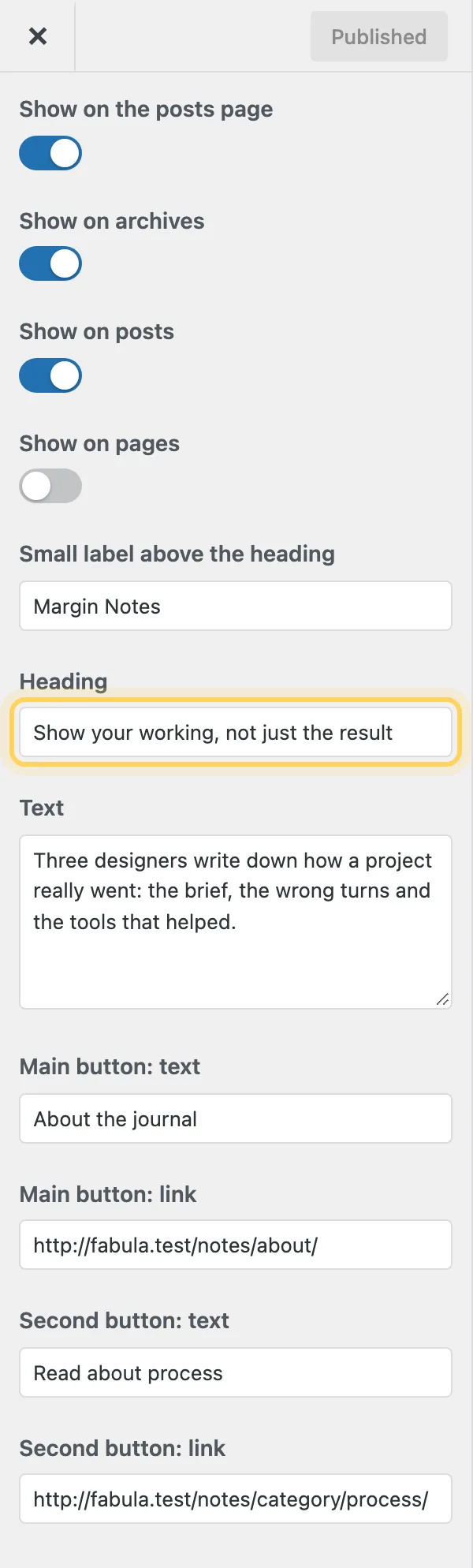
## Call to action above the footer
Product: Fabula - News & Magazine WordPress Theme
URL: https://hub.jkdevstudio.com/docs/fabula/header-and-footer/call-to-action-above-the-footer
Updated: 2026-11-28
Summary: Add a full-width call to action band above the Fabula footer with a heading, text, two buttons, and a background image, and choose which pages show it.
The call to action is a full-width band above the footer with a heading, a line of text, up to two buttons, and an optional background image. It is off on every kind of page until you choose where it shows.
## Add the band
:::steps
### Open the section
Go to [[Appearance > Customize > Fabula Theme > Call to action]].
### Write the heading
Fill in **Heading**. The band does not show while this field is empty, whatever else you set.
### Choose where it shows
Turn on the page types that should carry it. They are listed under **Where it shows** below.
### Add text and buttons
Fill in **Text** and the button fields, then publish.
:::
The Heading field decides whether the band shows.
## Where it shows
:::options
- **Show on the posts page** (default: off): Your blog page.
- **Show on archives** (default: off): Category, tag, author, and date archives.
- **Show on posts** (default: off): Single posts.
- **Show on pages** (default: off): Pages, except the front page.
:::
Search results and the 404 page never show the band.
The band as visitors see it.
## Content
:::options
- **Small label above the heading** (default: empty): A short badge, such as "New".
- **Heading** (default: empty): The band's title. Required for the band to show.
- **Text** (default: empty): A paragraph under the heading.
- **Main button: text** and **Main button: link** (default: empty): The first button.
- **Second button: text** and **Second button: link** (default: empty): The second button, styled as a secondary button.
- **Background image** (default: none): A picture behind the content.
:::
A button shows only when both its text and its link are filled in. Fill in one without the other and that button is skipped.
The background image is decorative and has no alt text. Put anything the visitor must read in the heading and the text, not in the picture.
While Fabula Pro is active, the free Customizer sections for **Call to action**, **Blog**, and **Navigation** are hidden, because Pro draws those parts of the page itself.
For what sits just below the band, see [The footer](https://hub.jkdevstudio.com/docs/fabula/header-and-footer/the-footer).