## Elementor widgets
Product: Fabula - News & Magazine WordPress Theme
URL: https://hub.jkdevstudio.com/docs/fabula/plugins-and-widgets/elementor-widgets
Updated: 2026-11-28
Summary: All 28 Fabula Pro widgets for Elementor, grouped by purpose, with what each one shows and the controls you set. Needs Elementor and the Pro plugin.
Availability: Pro only.
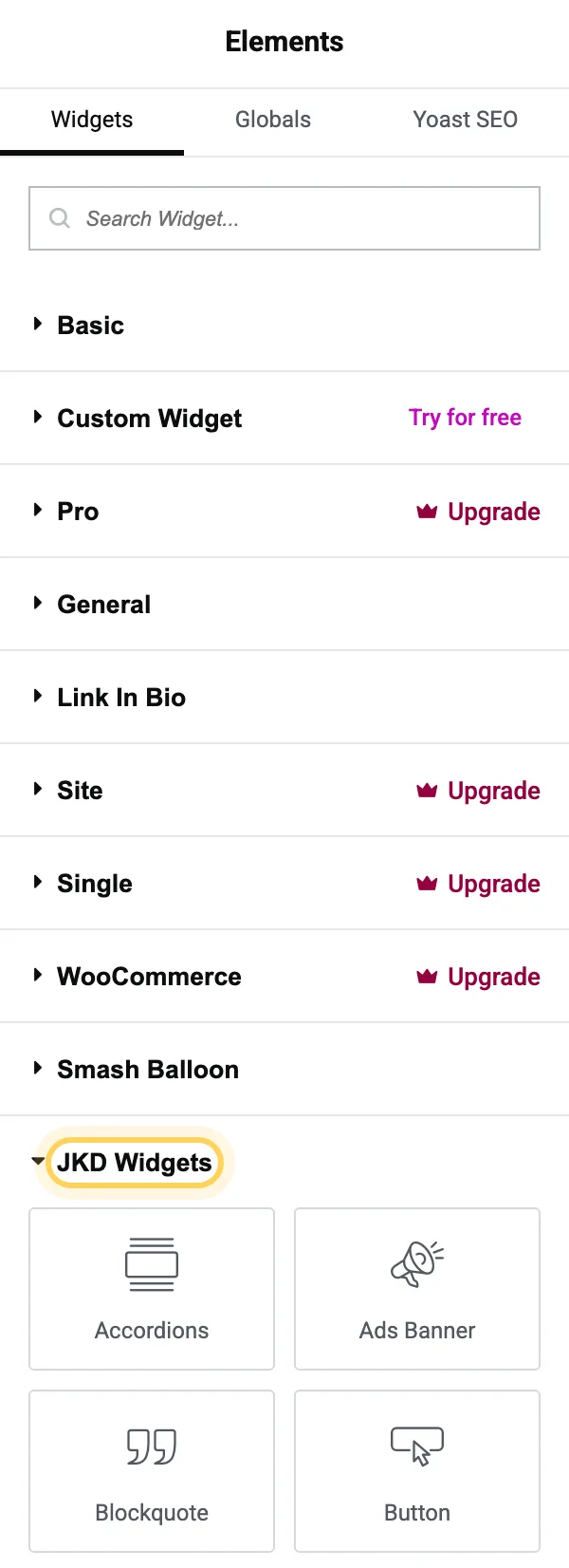
Fabula Pro adds 28 widgets to Elementor. They need the Pro plugin with an active license and Elementor itself (the free version is enough). They appear in the Elementor panel under the category **JKD Widgets**.
The widgets sit in the JKD Widgets category.
Each entry below gives the widget name as the panel shows it, what it renders, and the controls you will use most. Styling controls such as typography, colors, and spacing are left out.
## Posts and listings
Five of these widgets (**Posts Grid**, **Posts Slider**, **Posts Featured**, **Single Post**, and **Ticker**) share one set of post query controls. They let you pick which posts appear, and the exact list can vary a little from widget to widget:
:::deflist
Sorting
: **Posts Sorting** offers `Latest`, `Likes`, `Views`, `Reviews`, `Sticky`, and `Random`. **Order** is `Descending` or `Ascending`.
Filters
: **Categories**, **Tags**, **Authors**, **Minimum Views**, **Minimum Likes**, and **Date Range** (from `All Time` down to `Past 24 Hours`). **General Relation** sets how the filters combine.
Post options
: **Title length**, **Excerpt length**, **Prevent Duplicate Posts**, **Ignore Sticky Posts**, and **Offset** to skip the first posts of the list.
:::
The widgets themselves:
:::deflist
Posts Grid
: Posts in a grid. Set **Grid Style**, **Columns Per Row**, **Enable Masonry Layout**, and **Title HTML Tag**, then switch each meta item on or off (thumbnail, category label, date, author, bookmark icon, excerpt, and the activity counters for likes, views, comments, and review score). **Display Pagination** has a **Pagination Type**, and **Enable AJAX Filters** adds a filter bar with **Filter Type**, **Max Filter Items**, and **Enable Sorting**.
Posts Slider
: Posts in a slider. **Slider Type** picks the layout, and the controls cover **Slider Speed**, **Enable Looping**, **Autoplay** with **Autoplay Delay**, **Slider Height**, **Display Pagination**, and **Show Navigation Arrows**. The same meta switches as the grid apply.
Posts Featured
: A featured posts block. **Section Style** picks the layout, **Show Posts** sets how many posts it shows (keep it at `0` to use the amount built into the style), and the meta switches match the grid.
Single Post
: One post as a card. Choose **Post Style**, then **Post Selection Mode** and **Select Post**. Further controls are **Title Tag**, **Title Length**, **Excerpt Length**, **Post Height**, and **Category Label Style**.
Ticker
: A ticker of posts. Controls are **Show Thumbnail**, **Show Category**, **Category Label Style**, and **Show Review Score**, plus the shared query controls.
Reviews
: Shows one review post. **Select Review** lists the posts that have a review, and switches control the image, title, description, score, author, score label, criteria list, pros and cons list, and the read more button. **Enable Schema Markup** adds review structured data.
Newsletter List
: An archive of all your published posts, grouped by year, month, and day. It has no controls of its own.
:::
## Categories, tags, and people
:::deflist
Category List
: A list of categories. Set **Category List Style**, **Show Subcategories** with **Choose Parent Category**, **Number of Categories to Display**, **Sort Categories By**, **Order Categories**, **Display Post Count**, and **Display Category Name**.
Categories slider
: The same categories in a slider. **Slider Type**, **Show Thumbnails**, **Display Subcategories**, **Select Parent Category**, **Number of Categories**, **Sort Categories By**, and **Category Order** choose the content. **Enable Looping**, **Show Pagination Dots**, and **Show Navigation Arrows** control the slider.
Tags Cloud
: A cloud of tags. Set **Sort Tags By**, **Display Order**, and **Number of Tags to Display**.
Users List
: A list of your site's users. It has one control, **Style**. A user's position comes from the position field on their profile.
Team Member
: A team member card. Fill in **Select Member Image**, **Member Name**, and **Position/Role**, then add links under **Social Media Profiles** (each with an icon, a color, and a link). **Social Icon Style** sets how they look.
Testimonials Slider
: A slider of quotes. Add items under **Testimonials List**, each with **Author Image**, **Author Name**, **Author Position**, and **Testimonial Message**.
:::
## Navigation and site
:::deflist
Logotype
: Prints your site logo. **Logo Type** is `Default` or `Small`, and **Logo Width** sets the size. The images come from the logos you set on the [[Fabula Pro > Theme Options > Branding]] page, and the dark scheme logo is used in dark mode.
Copyright
: Prints the **Copyright Notice** from the [[Fabula Pro > Theme Options > Branding]] page. `{year}` in that text becomes the current year. The widget adds typography, color, and alignment controls.
Social Icons
: Prints the social profiles you add on the [[Fabula Pro > Theme Options > Social]] page. **Select Style** is `Style 1` to `Style 6`, with **Alignment** and **Spacing Between Icons**.
Login / Register Form
: A sign-in form. **Enable Register Tab** adds a registration tab, and **Redirect After Login** sends visitors to a page you choose.
:::
## Forms and marketing
:::deflist
CF7 Contact Form
: Shows a Contact Form 7 form. **Select Contact Form** lists your forms. Without Contact Form 7 or without any form, the list reads `Create a Form First`.
M4WP Form
: Shows a Mailchimp for WordPress form. **Select Form** lists the forms you created in that plugin, and **Form Style** is `Style 1` or `Style 2`.
Ads Banner
: An ad slot. **Select Ad Type** is `Internal Ad (Image)` or `External Ad (Code)`. For an image, set **Upload Ad Image**, **Image Alt Text**, **Select Image Size**, and **Ad Link URL**. For a code ad, paste the snippet into **External Ad Code**.
Button
: A button. Controls are **Button Label**, **Button Icon**, **Button URL**, **Link Target**, **Button Size**, **Button Style**, and **Rounded Corners**.
:::
## Media
:::deflist
Video Banner
: A banner built from one video post. **Select Post to Display** chooses it, and the controls cover **Post Title Length**, **Banner Height**, **HTML Title Tag**, and the category, date, author, bookmark, review score, activity, and excerpt switches.
Video Playlist
: A playlist of video posts. **Show Posts** sets the count. The rest are the same meta switches as the grid, plus **Title length** and **Excerpt length**.
:::
## Content blocks
:::deflist
Section Title
: A heading for a page section. **Title Appearance Style** is `Basic Style`, `Highlighted Style`, `Framed Style`, `Iconic Style`, or `Border Style`. Fill in **Main Title**, **Secondary Heading**, and **Subtitle Text**, and set **HTML Title Tag**, **Title Icon Class**, **Icon Color**, and **Title Alignment**. **Button Label** and **Button Link** add a link next to the title.
Accordions
: Collapsible items. Add them under **Accordion Items**, each with a **Title** and **Content**.
Faq
: A list of questions and answers with a category menu on the side. It shows the entries of the FAQ post type that Fabula Pro registers, grouped by FAQ category. It has no controls of its own.
Blockquote
: A styled quote. Fill in **Quote Text** and **Quote Author**, and choose **Heading Size**.
Resources List
: A list of links. Add them under **Page Links**, each with a **Link Title** and **Link URL**.
:::
The widgets are missing from the Elementor panel
Check that Elementor and Fabula Pro are both active and that the Pro license is active. Fabula Pro registers the widgets only while Elementor is loaded.
Do I need Elementor Pro?
No. Every widget on this page works with the free version of Elementor.