## Single post settings in Theme Options
Product: Fabula - News & Magazine WordPress Theme
URL: https://hub.jkdevstudio.com/docs/fabula/the-single-post/single-post-settings
Updated: 2026-11-28
Summary: Every option on the Single Post page of Fabula Pro Theme Options, tab by tab, with defaults: layout, meta, Read Also, Recent Posts, ads, reading progress, and more.
Availability: Pro only.
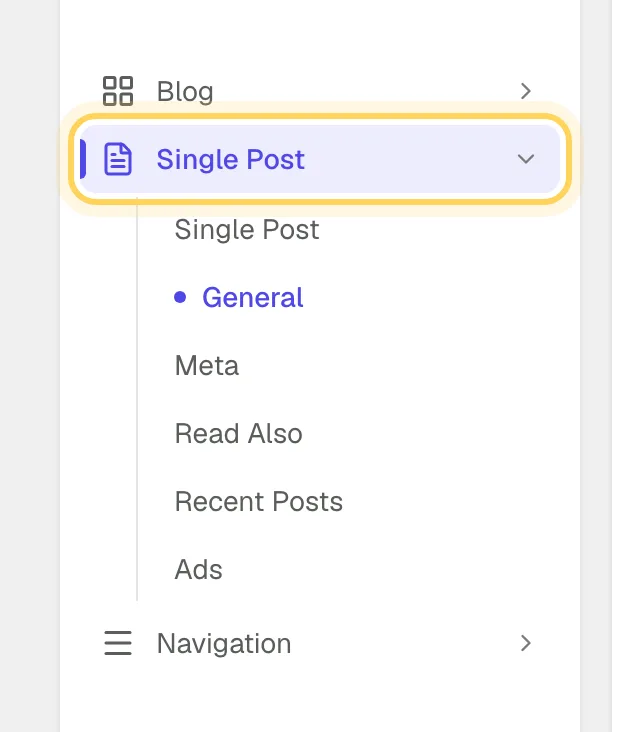
The **Single Post** page of Theme Options controls how a post is laid out and which extras it shows. It needs the Pro plugin with an active license. Open it at [[Fabula Pro > Theme Options > Single Post]]. It has six tabs: **Single Post**, **General**, **Meta**, **Read Also**, **Recent Posts**, and **Ads**.
The six tabs of the Single Post page.
The table of contents has its own page: [Add a table of contents to posts](https://hub.jkdevstudio.com/docs/fabula/the-single-post/table-of-contents). Comments, likes, views, bookmarks, and reviews are covered on their own pages too, linked at the end.
## Single Post tab
:::options
- **Enable Photo Credits** (default: off): Shows the caption of the featured image under the post's meta row.
:::
## General tab
### Layout
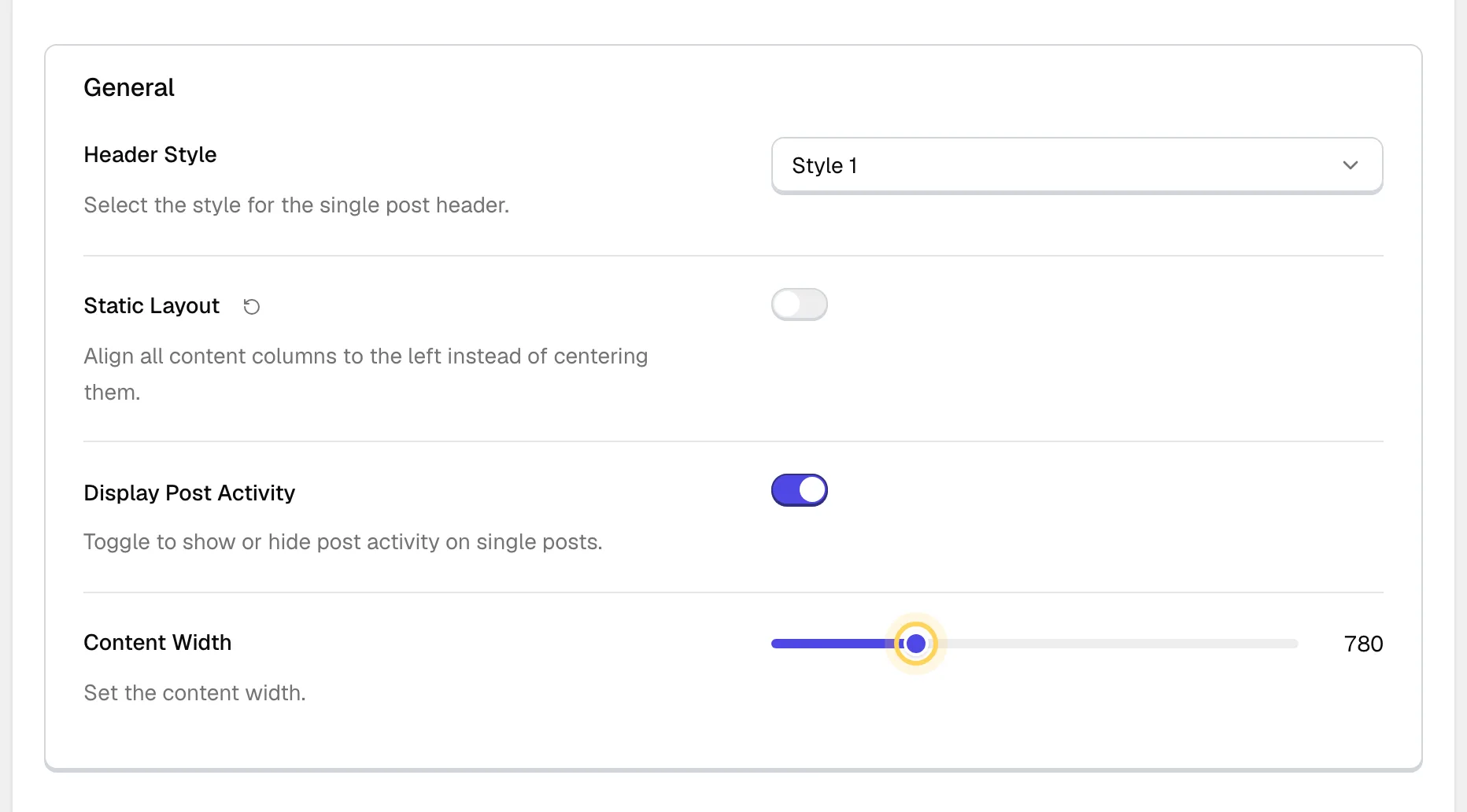
The first layout options on the General tab.
:::options
- **Header Style** (default: Style 1): One of five header styles. See [Post header styles](https://hub.jkdevstudio.com/docs/fabula/the-single-post/post-header-styles).
- **Static Layout** (default: on): Aligns all content columns to the left instead of centering them.
- **Content Width** (default: 780): The width of the text column, from 600 to 1280.
- **Display Single Post Sidebar** (default: off): Adds a sidebar filled from the **Single sidebar** widget area.
- **Sidebar Alignment** (default: Left): **Left** or **Right**.
- **Display Post Activity** (default: on): The activity block with the comments, views, and likes counters in the sticky column.
- **Scroll Top Button** (default: on): A button that returns the reader to the top.
- **Share Button** (default: on): The share buttons in the sticky column. Nothing shows until you enter a **Share Shortcode**.
- **Share Shortcode**: The shortcode of your sharing plugin.
:::
### Author, navigation, and subscribe form
:::options
- **Display Post Navigation** (default: off): Previous and next post links under the post.
- **Display Post Bio** (default: off): The author box.
- **Bio Style** (default: Sticky): **Sticky** puts the box in the sticky column. **Default** puts it under the post.
- **Display Subscribe Form** (default: off): A newsletter block under the post. Fill in **Form Shortcode** with your form plugin's shortcode, and optionally **Form Title**, **Form Subtitle**, and **Form Image**.
:::
### Reading aids
:::options
- **Reading Progress Bar** (default: off): A thin bar fixed to the screen that fills as the reader scrolls.
- **Progress Bar Position** (default: Top): **Top** or **Bottom**.
- **Progress Bar Height (px)** (default: 3): From 1 to 10.
- **Listen to Article** (default: off): Adds a **Listen** button above the text. It reads the article aloud with the speech engine built into the visitor's browser. No outside service or API key is involved, and the button hides itself in browsers without speech support.
:::
The comment settings on this tab are explained in [Set up comments on posts](https://hub.jkdevstudio.com/docs/fabula/the-single-post/comments).
## Meta tab
:::options
- **Title Tag** (default: H1): The HTML tag of the post title.
- **Display Sticky Pin** (default: on): A pin in the sticky column on posts you stuck to the top of the blog.
- **Display Categories** (default: on): The category labels.
- **Category Label Style** (default: Style 1): **Style 1** to **Style 6**.
- **Display Tags** (default: on): The tag list under the post.
- **Display Author** (default: on) and **Display Author Position** (default: on): The author's name, and the position under it.
- **Display Date** (default: on): The publish date.
- **Source Attribution** (default: on): The source line below the content. See the **Source** box below.
- **Reading Time** (default: off): An estimated reading time in the meta.
- **Reading Speed (words per minute)** (default: 200): Used to work out the reading time, from 100 to 400.
- **Word Count** (default: off): The total number of words, next to the reading time.
- **Display Comments Counter**, **Display Views Counter**, **Display Likes Counter**, **Display Like Button**, **Display Bookmark Button**, and **Display Review Score** (all default: on): See [Likes, views, and bookmarks](https://hub.jkdevstudio.com/docs/fabula/the-single-post/likes-views-bookmarks).
:::
### Fields you fill in on each post
Three boxes in the post editor feed the page.
:::deflist
Source
: **Source Name** and **Source URL**. The post then shows "Source:" and the name below the content. With a URL, the name is a link that opens in a new tab. With a URL and no name, the site's address is the label.
Post Disclaimer
: Turn on **Enable Disclaimer Box** to show a box above the text. You can set a **Label Text**, a **Disclaimer Title** (default: Disclaimer), a **Label Color**, and the **Disclaimer Text**.
Post Settings
: The **Header Style** override and **Hide Table of Contents**.
:::
## Read Also tab
A list of posts below the content of every post.
:::options
- **Display "Read Also"** (default: on): Shows the block.
- **"Read Also" Text** (default: Read Also:): The heading above the list.
- **Read Also Posts** (default: Latest): The order: **Latest**, **Likes**, **Views**, or **Random**.
- **"Read Also" Posts Count** (default: 5): From 1 to 15.
:::
## Recent Posts tab
The cards under a post.
:::options
- **Recent Posts** (default: on): Shows the section.
- **Recent Posts Count** (default: 6): From 1 to 15.
- **Recent Posts Grid Style** (default: Type 1): The card design, **Type 1** to **Style 9**.
- **Number of Columns** (default: 2): From 1 to 10.
- **Grid Item Offset** (default: 10): The offset between items, from 0 to 100.
- **Title Length** (default: 10): The maximum number of words in a title, from 1 to 50.
- **Excerpt Length** (default: 30): The maximum number of words in an excerpt, from 5 to 100.
- **Section Heading Tag** (default: H6): The tag of the **Recent Posts:** heading, from **H2** to **H6**, or **Div (no heading)**.
- **Post Title Tag** (default: H6): The tag of each card title.
- **Category Label Style** (default: Style 4): **Style 1** to **Style 6**, used when **Category Label** is on.
:::
These switches choose what a card shows. All default to on except **Post Activity**, which defaults to off: **Post Thumbnail**, **Category Label**, **Post Date**, **Author Name**, **Share Buttons**, **Bookmark Button**, **Post Activity**, **Review Score**, **Post Excerpt**. With **Post Activity** on, **Comments Count**, **Likes Count**, and **Views Count** (all default: on) appear.
## Ads tab
:::options
- **Display Ad Areas** (default: off): Turns the ad spots on.
- **Ad Type** (default: Image): **Image** or **HTML**.
:::
There are four spots: **Sidebar**, **Content Top**, **Content Bottom**, and **Post Bottom**. For the **Image** type, each spot has an image and a URL field, for example **Sidebar Ad (Image)** and **Sidebar Ad (URL)**. For the **HTML** type, each spot has a code field, for example **Sidebar Ad (Code)**.
## Related pages
- [Add a table of contents to posts](https://hub.jkdevstudio.com/docs/fabula/the-single-post/table-of-contents)
- [Add widgets to the left column of a post](https://hub.jkdevstudio.com/docs/fabula/the-single-post/left-column-widgets)
- [Add a review and score to a post](https://hub.jkdevstudio.com/docs/fabula/the-single-post/reviews-and-scorecards)
- [Likes, views, and bookmarks](https://hub.jkdevstudio.com/docs/fabula/the-single-post/likes-views-bookmarks)