## Lazy Load Elements

Product: Lazyline – Innovative Lazy-Load & LQIP WordPress Plugin
URL: https://hub.jkdevstudio.com/docs/lazyline/settings-reference/lazy-load-elements
Updated: 2026-04-05
Summary: Control which HTML elements get lazy loaded — images, background images, videos, and iframes. Each element type can be toggled independently.

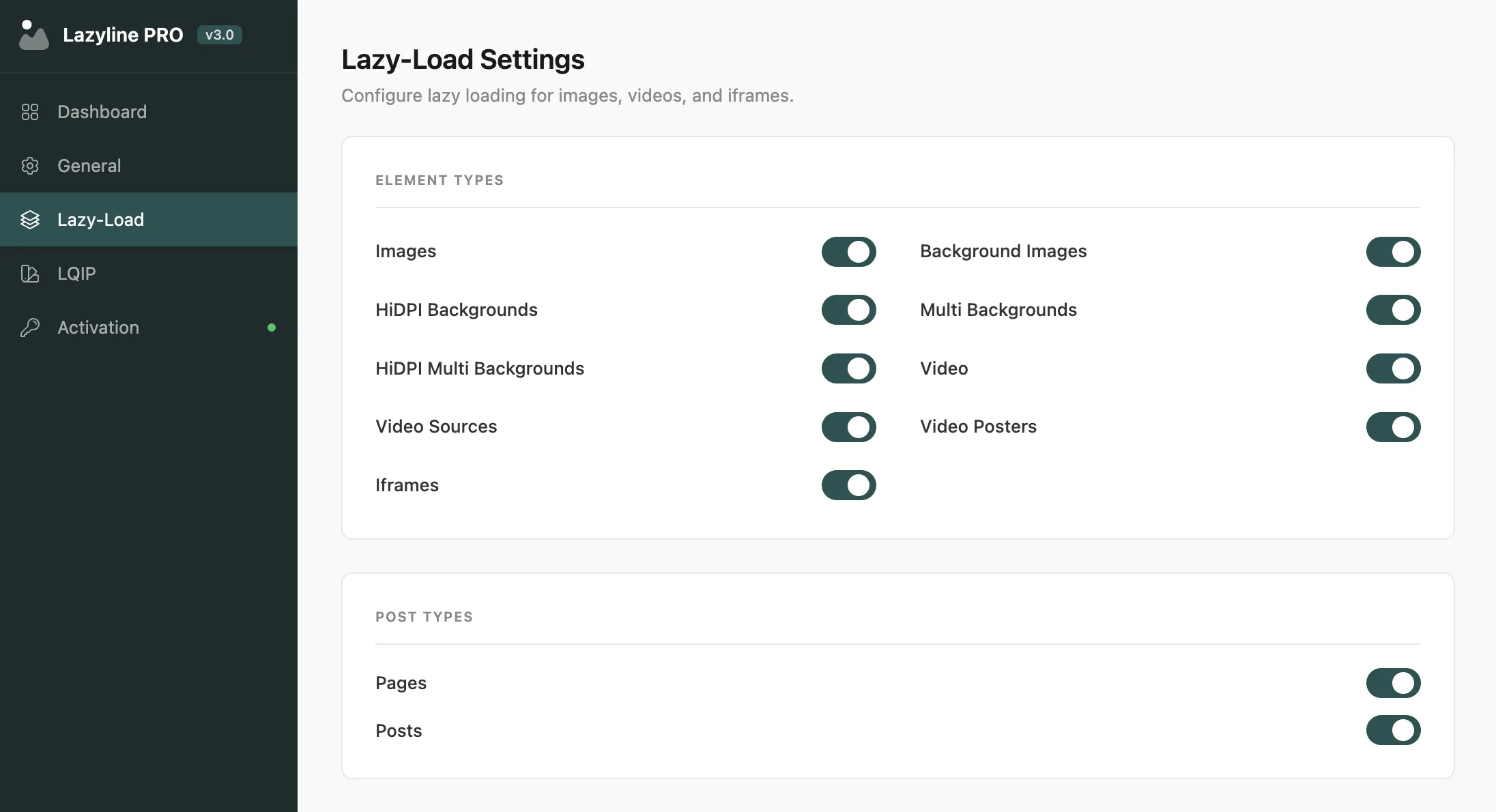
This page controls which HTML elements get lazy loaded. Every element type can be toggled independently - enable only what your site actually uses.

<figure class="doc-figure" data-align="center" style="margin-left: auto; margin-right: auto;"><img src="https://hub.jkdevstudio.com/storage/docs/2026/04/a5585447-81f7-4e67-abf2-e1ccd723e882.webp" alt="" class="doc-image rounded-xl max-w-full"></figure>

## Element Types

<table style="min-width: 75px;"><colgroup><col style="min-width: 25px;"><col style="min-width: 25px;"><col style="min-width: 25px;"></colgroup><tbody><tr><th colspan="1" rowspan="1"><p>Element</p></th><th colspan="1" rowspan="1"><p>What it targets</p></th><th colspan="1" rowspan="1"><p>Default</p></th></tr><tr><td colspan="1" rowspan="1"><p>Images</p></td><td colspan="1" rowspan="1"><p>Standard <code>&lt;img&gt;</code> tags</p></td><td colspan="1" rowspan="1"><p>On</p></td></tr><tr><td colspan="1" rowspan="1"><p>Backgrounds</p></td><td colspan="1" rowspan="1"><p>Elements with CSS <code>background-image</code></p></td><td colspan="1" rowspan="1"><p>On</p></td></tr><tr><td colspan="1" rowspan="1"><p>HiDPI Backgrounds</p></td><td colspan="1" rowspan="1"><p>Retina <code>background-image</code> with device-pixel-ratio media queries</p></td><td colspan="1" rowspan="1"><p>On</p></td></tr><tr><td colspan="1" rowspan="1"><p>Multi Backgrounds</p></td><td colspan="1" rowspan="1"><p>Elements with multiple <code>background-image</code> values</p></td><td colspan="1" rowspan="1"><p>On</p></td></tr><tr><td colspan="1" rowspan="1"><p>HiDPI Multi BG</p></td><td colspan="1" rowspan="1"><p>Retina + multiple backgrounds combined</p></td><td colspan="1" rowspan="1"><p>On</p></td></tr><tr><td colspan="1" rowspan="1"><p>Videos</p></td><td colspan="1" rowspan="1"><p><code>&lt;video&gt;</code> elements (poster and src)</p></td><td colspan="1" rowspan="1"><p>On</p></td></tr><tr><td colspan="1" rowspan="1"><p>Sources</p></td><td colspan="1" rowspan="1"><p><code>&lt;source&gt;</code> elements inside <code>&lt;picture&gt;</code> or <code>&lt;video&gt;</code></p></td><td colspan="1" rowspan="1"><p>On</p></td></tr><tr><td colspan="1" rowspan="1"><p>Posters</p></td><td colspan="1" rowspan="1"><p>Video poster attributes</p></td><td colspan="1" rowspan="1"><p>On</p></td></tr><tr><td colspan="1" rowspan="1"><p>Iframes</p></td><td colspan="1" rowspan="1"><p><code>&lt;iframe&gt;</code> elements (YouTube embeds, maps, etc.)</p></td><td colspan="1" rowspan="1"><p>On</p></td></tr></tbody></table>

<div data-callout="tip">

If your site doesn't use videos or iframes, disabling those types saves a small amount of processing on each page load. Leave **Images** and **Backgrounds** on for most sites.

</div>

## Post Types

Choose which post types get lazy loading applied. **Pages** and **Posts** are enabled by default. Any custom post types registered by your theme or plugins appear here automatically.

<div data-callout="info">

Disabling a post type means lazy loading won't run on that content type at all - useful if you have a landing page builder or custom template that handles images differently.

</div>

## How It Works

For each enabled element type, Lazyline PRO:

1. Moves `src` to `data-src` (and `srcset` to `data-srcset`)
2. Wraps the element in a `.lazyline-wrapper` div
3. Injects the selected preloader and LQIP placeholder
4. When the element enters the viewport, the real source loads and the placeholder fades out