## Preloader & Placeholders

Product: Lazyline – Innovative Lazy-Load & LQIP WordPress Plugin
URL: https://hub.jkdevstudio.com/docs/lazyline/settings-reference/preloader-placeholders
Updated: 2026-04-05
Summary: What visitors see while images load — preloader animations, placeholder background colors, fade-in effects, and how they combine with LQIP methods.

Configure what visitors see while images are still loading. A good combination of preloader and background color makes the experience feel polished even on slow connections.

<figure class="doc-figure" data-width="50%" data-align="left" style="max-width: 50%; width: 100%; margin-left: 0px; margin-right: auto;"><img src="https://hub.jkdevstudio.com/storage/docs/2026/04/d56ad870-229b-4fb9-bd20-773903a4964e.webp" alt="" class="doc-image rounded-xl max-w-full"></figure>

<figure class="doc-figure" data-width="50%" data-align="left" style="max-width: 50%; width: 100%; margin-left: 0px; margin-right: auto;"><img src="https://hub.jkdevstudio.com/storage/docs/2026/04/cf78a1f1-ebc9-4a45-8644-9eba347262af.webp" alt="" class="doc-image rounded-xl max-w-full"></figure>

## Preloader Animation

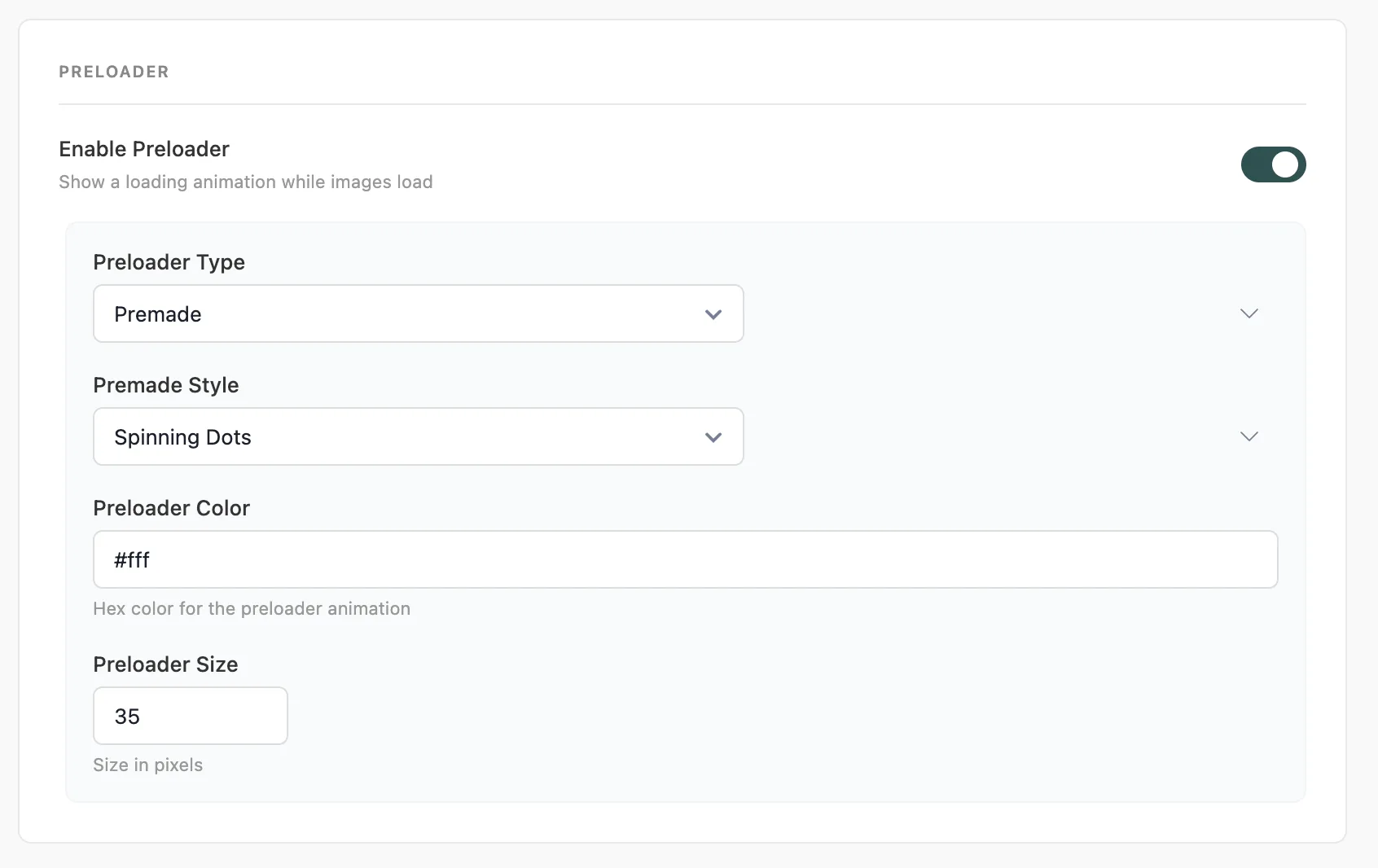
<table style="min-width: 50px;"><colgroup><col style="min-width: 25px;"><col style="min-width: 25px;"></colgroup><tbody><tr><th colspan="1" rowspan="1"><p>Setting</p></th><th colspan="1" rowspan="1"><p>Description</p></th></tr><tr><td colspan="1" rowspan="1"><p>Enable Preloader</p></td><td colspan="1" rowspan="1"><p>Show a loading animation centered on each image while it loads</p></td></tr><tr><td colspan="1" rowspan="1"><p>Preloader Type</p></td><td colspan="1" rowspan="1"><p><strong>Premade</strong> - choose from built-in SVG animations. <strong>Custom SVG</strong> - paste your own SVG code</p></td></tr><tr><td colspan="1" rowspan="1"><p>Premade Style</p></td><td colspan="1" rowspan="1"><p>Select from available preloader animations (e.g. <code>spin-circles</code>)</p></td></tr><tr><td colspan="1" rowspan="1"><p>Preloader Color</p></td><td colspan="1" rowspan="1"><p>Color for the animation, applied via CSS custom property</p></td></tr><tr><td colspan="1" rowspan="1"><p>Preloader Size</p></td><td colspan="1" rowspan="1"><p>Size in pixels. Default: <code>35px</code></p></td></tr></tbody></table>

The preloader fades out automatically once the image finishes loading or encounters an error.

<div data-callout="tip">

The preloader color should contrast with your background. Use white or a light accent for dark backgrounds; use your brand color or a mid-tone for light backgrounds.

</div>

## Background &amp; Fallback

<table style="min-width: 50px;"><colgroup><col style="min-width: 25px;"><col style="min-width: 25px;"></colgroup><tbody><tr><th colspan="1" rowspan="1"><p>Setting</p></th><th colspan="1" rowspan="1"><p>Description</p></th></tr><tr><td colspan="1" rowspan="1"><p>Background Color Toggle</p></td><td colspan="1" rowspan="1"><p>Show a solid background color behind images while they load</p></td></tr><tr><td colspan="1" rowspan="1"><p>Background Color</p></td><td colspan="1" rowspan="1"><p>Hex color value. Default: <code>#232323</code></p></td></tr><tr><td colspan="1" rowspan="1"><p>Fallback Image</p></td><td colspan="1" rowspan="1"><p>URL shown if the original image fails to load</p></td></tr><tr><td colspan="1" rowspan="1"><p>Placeholder Image</p></td><td colspan="1" rowspan="1"><p>Default placeholder used as <code>src</code> before lazy loading triggers</p></td></tr></tbody></table>

<div data-callout="info">

The **Background Color** fills the space before any LQIP placeholder appears. If you're using LQIP, this is only visible for a few milliseconds. Set it close to your LQIP dominant color for a seamless transition.

</div>

## Exclude Rules

<table style="min-width: 50px;"><colgroup><col style="min-width: 25px;"><col style="min-width: 25px;"></colgroup><tbody><tr><th colspan="1" rowspan="1"><p>Setting</p></th><th colspan="1" rowspan="1"><p>Description</p></th></tr><tr><td colspan="1" rowspan="1"><p>Ignore IDs</p></td><td colspan="1" rowspan="1"><p>HTML element IDs to skip. One per line. Example: <code>hero-image</code></p></td></tr><tr><td colspan="1" rowspan="1"><p>Ignore Classes</p></td><td colspan="1" rowspan="1"><p>CSS class names to skip. Space-separated. Example: <code>no-lazy skip-lazyline</code></p></td></tr></tbody></table>

<div data-callout="tip">

Always add your hero or banner image to **Ignore IDs** or **Ignore Classes**. Loading your LCP element eagerly (not lazy) is the single most impactful thing you can do for your Largest Contentful Paint score.

</div>