## Blog Post Creation

Product: Monogram - Personal Portfolio WordPress Theme
URL: https://hub.jkdevstudio.com/docs/monogram/content-management/blog-post-creation
Updated: 2026-09-06

Monogram enhances standard WordPress blog posts with additional layout options, rich metadata display, and built-in engagement features.

## Creating a Blog Post

Go to **Dashboard &gt; Posts &gt; Add New**. Write your post using the WordPress block editor (Gutenberg) as usual. Monogram adds a per-post settings panel and enriches the front-end display with theme-specific features.

## Per-Post Layout Override

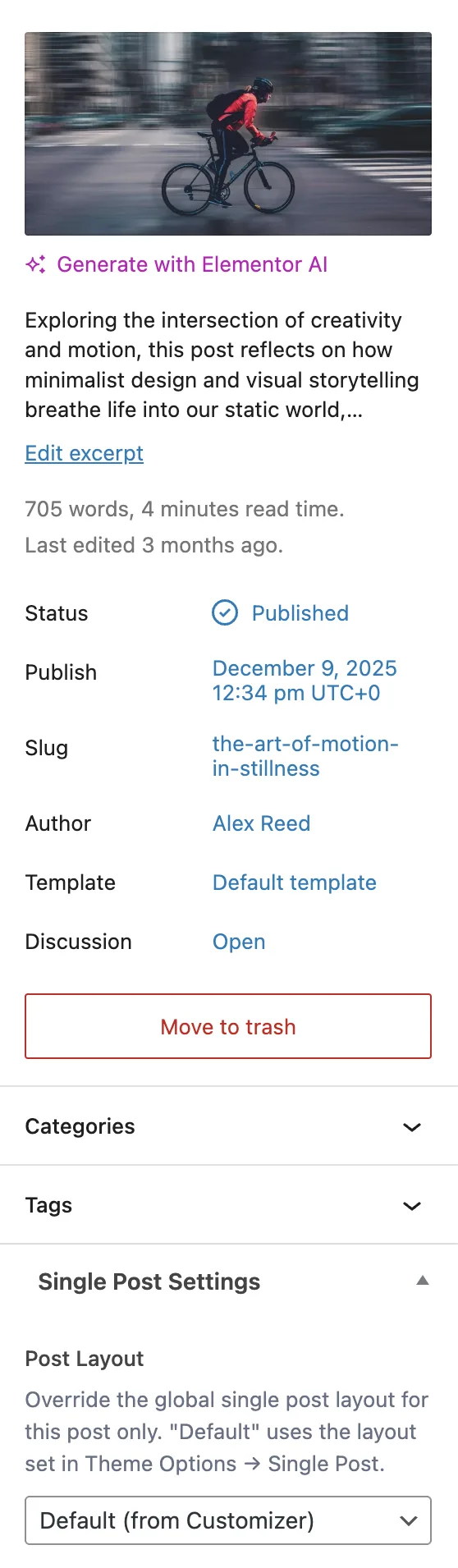
Each post has a **Single Post Settings** panel in the editor sidebar with one field:

<table style="min-width:100px;"><colgroup><col style="min-width:25px;"><col style="min-width:25px;"><col style="min-width:25px;"><col style="min-width:25px;"></colgroup><tbody><tr><th colspan="1" rowspan="1"><p>Field</p></th><th colspan="1" rowspan="1"><p>Key</p></th><th colspan="1" rowspan="1"><p>Options</p></th><th colspan="1" rowspan="1"><p>Default</p></th></tr><tr><td colspan="1" rowspan="1"><p><strong>Post Layout</strong></p></td><td colspan="1" rowspan="1"><p><code>sp_layout</code></p></td><td colspan="1" rowspan="1"><p>Default (from Customizer), Classic, Split</p></td><td colspan="1" rowspan="1"><p>Default</p></td></tr></tbody></table>

- **Default** uses whichever layout is set globally in **Appearance &gt; Customize &gt; Single Post**
- **Classic** places the featured image above the content in a traditional blog format
- **Split** divides the header into two columns - metadata on one side, featured image on the other

This lets you override the global layout on a per-post basis without changing the site-wide setting.

## Single Post Features

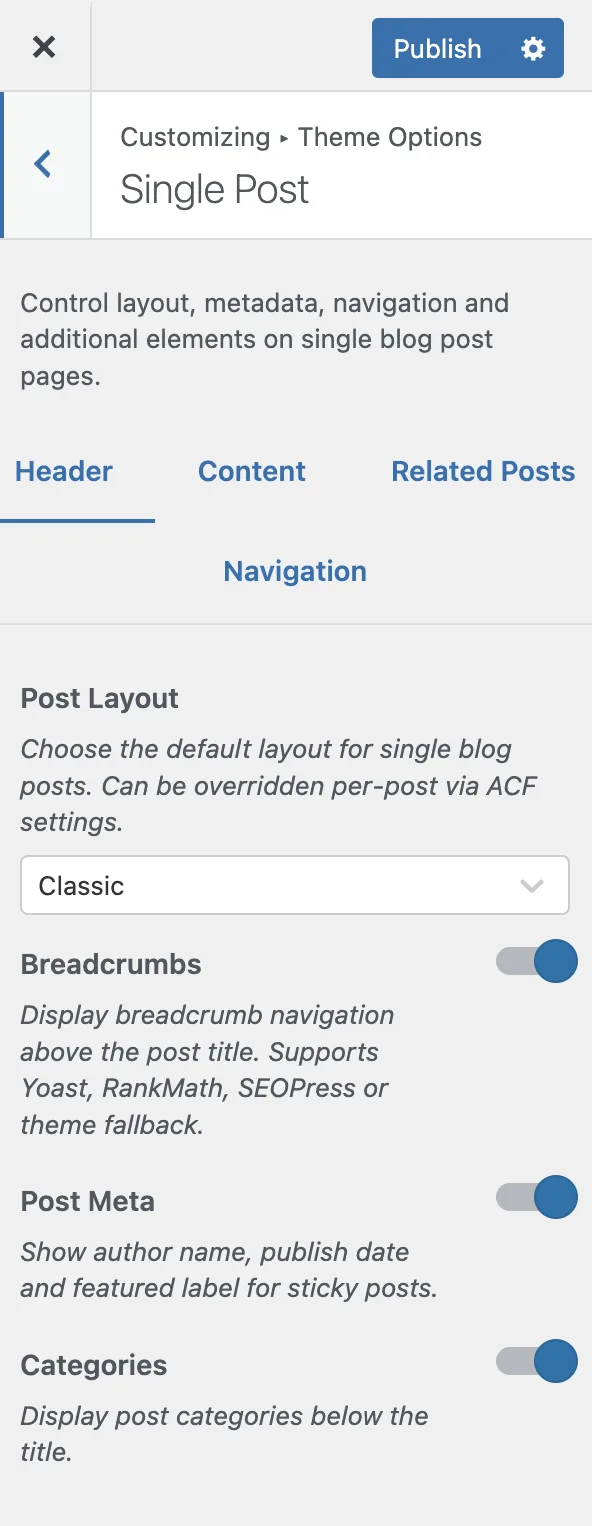
Every single blog post page can display the following elements, each controlled via **Appearance &gt; Customize &gt; Single Post**:

<figure class="doc-figure" data-width="50%" data-align="left"><img src="https://hub.jkdevstudio.com/storage/docs/2026/04/9ad97e2e-5707-4607-8301-c6c855e705ca.webp" alt="" class="doc-image rounded-xl max-w-full"></figure>

### Header Section

- **Breadcrumbs** - navigation trail above the title. Auto-detects your SEO plugin (Yoast SEO, RankMath, SEOPress) or falls back to the theme built-in breadcrumbs
- **Post meta** - author name with avatar, publication date, and a "Featured" label for sticky posts
- **Categories** - clickable category links below the title

### Content Section

- **Featured image** - displayed below the header with a subtle parallax animation
- **Full post content** - your editor content rendered with theme typography
- **Tags** - post tags displayed below the content
- **Share buttons** - social sharing via AddToAny (configurable shortcode in Customizer)
- **Comments** - standard WordPress comments with a comment form

### Navigation Section

- **Post navigation** - previous and next post links with optional thumbnail previews
- **Auto-load next post** - when enabled, the next post loads automatically as the reader reaches the end (disabled by default)

<figure class="doc-figure" data-width="50%" data-align="left"><img src="https://hub.jkdevstudio.com/storage/docs/2026/04/4ea44129-f1bc-45f6-9d8b-aaf996072df1.webp" alt="" class="doc-image rounded-xl max-w-full"></figure>

## Customizer Settings Reference

All single post settings live under **Appearance &gt; Customize &gt; Single Post**, organized in three tabs:

### Header Tab

<table style="min-width:75px;"><colgroup><col style="min-width:25px;"><col style="min-width:25px;"><col style="min-width:25px;"></colgroup><tbody><tr><th colspan="1" rowspan="1"><p>Setting</p></th><th colspan="1" rowspan="1"><p>Type</p></th><th colspan="1" rowspan="1"><p>Default</p></th></tr><tr><td colspan="1" rowspan="1"><p><strong>Post Layout</strong></p></td><td colspan="1" rowspan="1"><p>Select (Classic, Split)</p></td><td colspan="1" rowspan="1"><p>Classic</p></td></tr><tr><td colspan="1" rowspan="1"><p><strong>Breadcrumbs</strong></p></td><td colspan="1" rowspan="1"><p>Toggle</p></td><td colspan="1" rowspan="1"><p>On</p></td></tr><tr><td colspan="1" rowspan="1"><p><strong>Post Meta</strong></p></td><td colspan="1" rowspan="1"><p>Toggle</p></td><td colspan="1" rowspan="1"><p>On</p></td></tr><tr><td colspan="1" rowspan="1"><p><strong>Categories</strong></p></td><td colspan="1" rowspan="1"><p>Toggle</p></td><td colspan="1" rowspan="1"><p>On</p></td></tr></tbody></table>

### Content Tab

<table style="min-width:75px;"><colgroup><col style="min-width:25px;"><col style="min-width:25px;"><col style="min-width:25px;"></colgroup><tbody><tr><th colspan="1" rowspan="1"><p>Setting</p></th><th colspan="1" rowspan="1"><p>Type</p></th><th colspan="1" rowspan="1"><p>Default</p></th></tr><tr><td colspan="1" rowspan="1"><p><strong>Featured Image</strong></p></td><td colspan="1" rowspan="1"><p>Toggle</p></td><td colspan="1" rowspan="1"><p>On</p></td></tr><tr><td colspan="1" rowspan="1"><p><strong>Tags</strong></p></td><td colspan="1" rowspan="1"><p>Toggle</p></td><td colspan="1" rowspan="1"><p>On</p></td></tr><tr><td colspan="1" rowspan="1"><p><strong>Share Section</strong></p></td><td colspan="1" rowspan="1"><p>Toggle</p></td><td colspan="1" rowspan="1"><p>On</p></td></tr><tr><td colspan="1" rowspan="1"><p><strong>Share Shortcode</strong></p></td><td colspan="1" rowspan="1"><p>Text</p></td><td colspan="1" rowspan="1"><p>-</p></td></tr><tr><td colspan="1" rowspan="1"><p><strong>Comments</strong></p></td><td colspan="1" rowspan="1"><p>Toggle</p></td><td colspan="1" rowspan="1"><p>On</p></td></tr></tbody></table>

### Navigation Tab

<table style="min-width:75px;"><colgroup><col style="min-width:25px;"><col style="min-width:25px;"><col style="min-width:25px;"></colgroup><tbody><tr><th colspan="1" rowspan="1"><p>Setting</p></th><th colspan="1" rowspan="1"><p>Type</p></th><th colspan="1" rowspan="1"><p>Default</p></th></tr><tr><td colspan="1" rowspan="1"><p><strong>Post Navigation</strong></p></td><td colspan="1" rowspan="1"><p>Toggle</p></td><td colspan="1" rowspan="1"><p>On</p></td></tr><tr><td colspan="1" rowspan="1"><p><strong>Navigation Thumbnails</strong></p></td><td colspan="1" rowspan="1"><p>Toggle</p></td><td colspan="1" rowspan="1"><p>On</p></td></tr><tr><td colspan="1" rowspan="1"><p><strong>Auto Load Next Post</strong></p></td><td colspan="1" rowspan="1"><p>Toggle</p></td><td colspan="1" rowspan="1"><p>Off</p></td></tr></tbody></table>

## Blog Archive Settings

The blog archive page (**Dashboard &gt; Settings &gt; Reading &gt; Posts page**) is configured under **Appearance &gt; Customize &gt; Blog Archive**:

<table style="min-width:75px;"><colgroup><col style="min-width:25px;"><col style="min-width:25px;"><col style="min-width:25px;"></colgroup><tbody><tr><th colspan="1" rowspan="1"><p>Setting</p></th><th colspan="1" rowspan="1"><p>Options/Range</p></th><th colspan="1" rowspan="1"><p>Default</p></th></tr><tr><td colspan="1" rowspan="1"><p><strong>Post Layout Style</strong></p></td><td colspan="1" rowspan="1"><p>Default (image + content), Overlay (content over image), Simple (compact list)</p></td><td colspan="1" rowspan="1"><p>Default</p></td></tr><tr><td colspan="1" rowspan="1"><p><strong>Enable Sidebar</strong></p></td><td colspan="1" rowspan="1"><p>Toggle</p></td><td colspan="1" rowspan="1"><p>On</p></td></tr><tr><td colspan="1" rowspan="1"><p><strong>Sidebar Position</strong></p></td><td colspan="1" rowspan="1"><p>Left, Right</p></td><td colspan="1" rowspan="1"><p>Right</p></td></tr><tr><td colspan="1" rowspan="1"><p><strong>Column Count</strong></p></td><td colspan="1" rowspan="1"><p>1-4</p></td><td colspan="1" rowspan="1"><p>3</p></td></tr><tr><td colspan="1" rowspan="1"><p><strong>Category Filter</strong></p></td><td colspan="1" rowspan="1"><p>Toggle</p></td><td colspan="1" rowspan="1"><p>On</p></td></tr><tr><td colspan="1" rowspan="1"><p><strong>Featured Image</strong></p></td><td colspan="1" rowspan="1"><p>Toggle</p></td><td colspan="1" rowspan="1"><p>On</p></td></tr><tr><td colspan="1" rowspan="1"><p><strong>Featured Label</strong> (sticky posts)</p></td><td colspan="1" rowspan="1"><p>Toggle</p></td><td colspan="1" rowspan="1"><p>On</p></td></tr><tr><td colspan="1" rowspan="1"><p><strong>Excerpt Length</strong></p></td><td colspan="1" rowspan="1"><p>5-60 words</p></td><td colspan="1" rowspan="1"><p>20</p></td></tr></tbody></table>

<div data-callout="tip">

The **Category Filter** adds a row of clickable category links above the post grid, letting visitors filter posts without navigating to a separate category archive page.
</div>