## Breadcrumbs
Product: Monogram - Personal Portfolio WordPress Theme
URL: https://hub.jkdevstudio.com/docs/monogram/customization/breadcrumbs
Updated: 2026-09-06
Summary: Choose which plugin or system draws breadcrumbs in Monogram, and change the wording, including the Home label, in the place that source actually keeps it.
Breadcrumbs show a visitor where they are in the site, as a trail like Home > Blog > Post title. Monogram can draw that trail itself, or hand the job to your SEO plugin.
## Choose where breadcrumbs come from
Open [[Appearance > Customize > Breadcrumbs]].
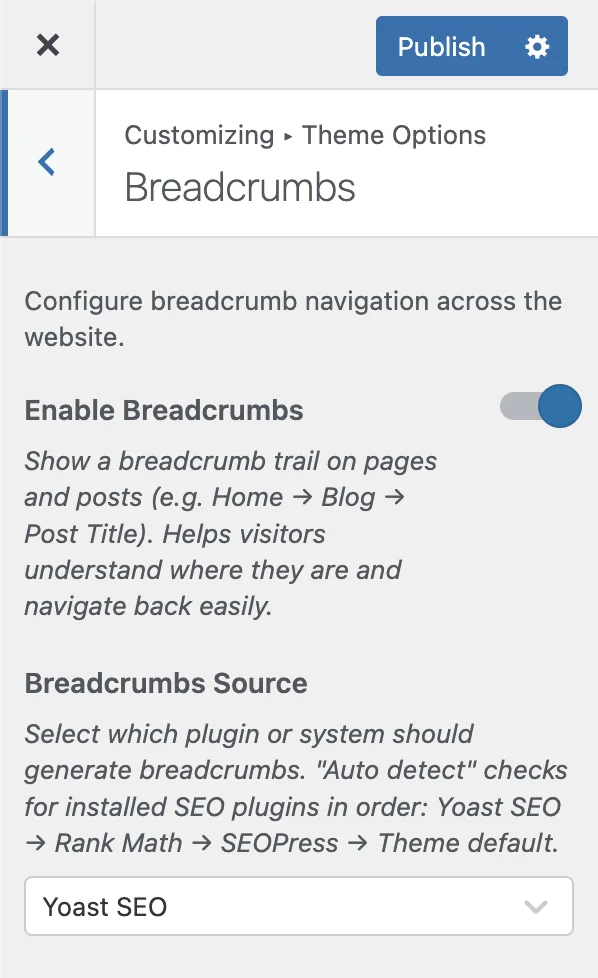
:::options
- **Enable breadcrumbs** (toggle, default: on): Shows a breadcrumb trail on pages and posts. Switching it off here switches it off everywhere, and no per-page setting brings it back.
- **Breadcrumbs source** (select, default: Auto detect): Which plugin or system builds the trail. Only appears when breadcrumbs are enabled.
:::
`Auto detect` looks for an active SEO plugin and uses the first one it finds, in this order: Yoast SEO, Rank Math, SEOPress, then the theme generator. Pick a source from the dropdown to pin it regardless of what else is installed.
Breadcrumbs from an SEO plugin also carry structured data markup that helps search engines read your site structure, which is why Auto detect reaches for them first.
## Change the wording, including "Home"
The words in the trail belong to whichever source draws it. This is the part that catches people out on a translated site: while an SEO plugin is drawing your breadcrumbs, Monogram translation files never touch them, so a finished German translation of the theme still leaves "Home" in English.
Check the source in the Customizer first, then change the label where that source keeps it.
:::deflist
Yoast SEO
: [[Yoast SEO > Settings > Breadcrumbs]]. **Anchor text for the Homepage** is the first crumb, and **Separator between breadcrumbs** is the character between them.
Rank Math
: [[Rank Math SEO > General Settings > Breadcrumbs]]. **Homepage Label** is the first crumb and **Separator Character** the one between them, with a **404 label** field on the same screen.
SEOPress
: [[SEO > PRO > Breadcrumbs]]. The Translations block holds the "Home" label and the other default words, and the Customize block holds the separator.
Theme breadcrumbs
: The words are strings in the theme itself, under the `monogram` text domain, so a translation file changes them rather than a settings field.
:::
If "Home" refuses to translate, the source is the reason. Either rename it in the SEO plugin, or set Breadcrumbs source to Theme breadcrumbs so the theme translatable strings are the ones on the page.
## Override the source on a single page
Some parts of the theme can use a different source from the rest of the site:
- Page header: any page can override the source through its Page Header fields
- FAQ archive: the FAQ settings panel carries its own override
- Portfolio archive: the portfolio page header settings carry one too
Useful when one landing page needs different breadcrumb behavior from everything else.
## Where breadcrumbs appear
- Page headers, inside the hero section, on any page with the page header enabled
- Single posts, above the title, controlled by the Breadcrumbs toggle in Single Post
- Blog, portfolio and FAQ archives, when their page headers are enabled