## Page Header
Product: Monogram - Personal Portfolio WordPress Theme
URL: https://hub.jkdevstudio.com/docs/monogram/customization/page-header
Updated: 2026-04-14
Summary: Page Header
The page header is a full-width hero section that appears at the top of individual pages. It supports background images, video, breadcrumbs, and customizable text colors. You configure it
# Page Header
The page header is a full-width hero section that appears at the top of individual pages. It supports background images, video, breadcrumbs, and customizable text colors. You configure it per page using ACF fields in the WordPress editor.
## How It Works
Unlike most theme settings that live in the Customizer, page header settings are configured per page. When editing any page in WordPress, you will see a **Page Header** meta box with tabbed settings.
The page header is disabled by default. Enable it on any page where you want a hero section above the content.
## Settings Reference
Settings are organized into four tabs: General, Layout, Background, and Advanced.
### General Tab
Setting
Type
Default
Description
Show Page Header
Toggle
Off
Enable a full-width header section above the page content. All other settings become available once this is turned on
Show Breadcrumbs
Toggle
On
Display a breadcrumb trail inside the page header (e.g., Home > About > Team). Useful for deep pages. Disable for top-level or standalone pages
Override Breadcrumb Source
Toggle
Off
Use a different breadcrumb plugin on this specific page instead of the global setting
Breadcrumb Provider
Select
Auto detect
Choose the breadcrumb source: Auto detect (recommended), Yoast SEO, Rank Math, SEOPress, or Theme built-in. Only shown when override is enabled
Header Subtitle
Textarea
Empty
A short line of text below the page title. Use it to add context or a tagline. Keep it to 1-2 sentences for best visual balance
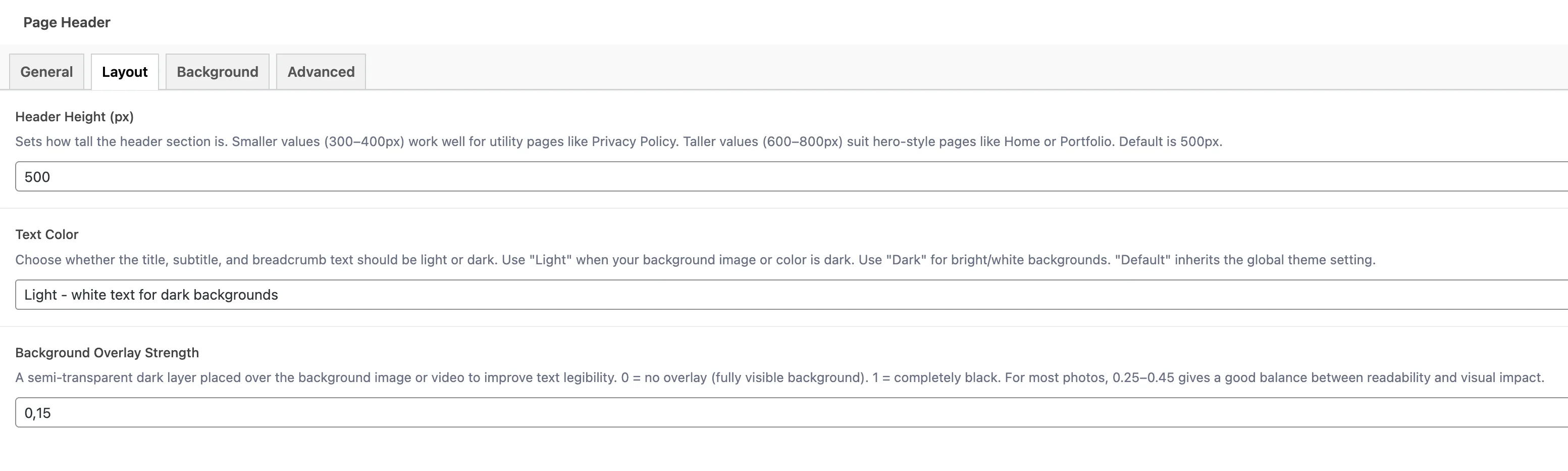
### Layout Tab
Setting
Type
Default
Range
Description
Header Height
Number
500px
300-1000px
How tall the header section is. 300-400px works well for utility pages (Privacy Policy). 600-800px suits hero-style pages (Home, Portfolio)
Text Color
Select
Default
n/a
Controls whether title, subtitle, and breadcrumb text is light or dark. Use Light for dark backgrounds, Dark for bright backgrounds, or Default to follow the theme setting
Overlay Strength
Number
0.3
0-1
A semi-transparent dark layer over the background image or video. 0 = no overlay (fully visible background). 1 = completely black. 0.25-0.45 works well for most photos
### Background Tab
Setting
Type
Default
Description
Background Type
Select
Image
Choose what fills the header background: None (plain background color), Image (static photo), or Video (looping video clip)
Background Image
Image
Empty
Upload a photo for the header background. Recommended minimum width: 1920px. WebP or AVIF formats are ideal for performance
Background Video File
File
Empty
Upload a short looping video (MP4 or WebM, under 5MB). Plays automatically, silently, and on loop. Only shown when type is Video
Background Video URL
URL
Empty
If your video is hosted on a CDN, paste the direct file URL here. Takes priority over the uploaded file. Use only direct .mp4 or .webm URLs, not YouTube or Vimeo links
### Advanced Tab
Setting
Type
Default
Description
Custom CSS Class
Text
Empty
Add one or more custom CSS class names to the header wrapper for page-specific styling. Separate multiple classes with spaces. Example: "dark-header no-parallax"
## Features
### Parallax Background
When you use a background image, the page header applies a subtle parallax scrolling effect. The image moves at a different speed than the page content as visitors scroll, creating a sense of depth.
### Video Background
Video backgrounds play automatically, silently, and on loop. They create an immersive hero experience. For best results:
- Keep videos under 10 seconds long
- Compress to under 5MB file size
- Use MP4 (H.264) for maximum browser compatibility
- Add an overlay (0.3-0.5) to ensure text remains readable
### Title Resolution
The page header automatically resolves the correct title based on the page context:
- **Regular pages** - Uses the page title
- **Search results** - Shows "Search results for: \[query\]"
- **Taxonomy archives** - Shows the term name
- **Author archives** - Shows the author display name
- **Date archives** - Shows the date range
Use the text color mode setting to ensure readability. If your background image is dark, set text color to Light. If your background is bright or white, set it to Dark.
## Archive Page Headers
In addition to individual page headers, some archive types (FAQ, Portfolio) have their own page header settings in the Customizer. These work the same way but are configured globally for all pages of that archive type rather than per page.
- **FAQ page header** - Configured in **Appearance > Customize > FAQ**
- **Portfolio page header** - Configured in **Appearance > Customize > Portfolio**
The page header is separate from Elementor page content. If you build pages with Elementor, the page header appears above your Elementor layout and is controlled entirely through these ACF fields.