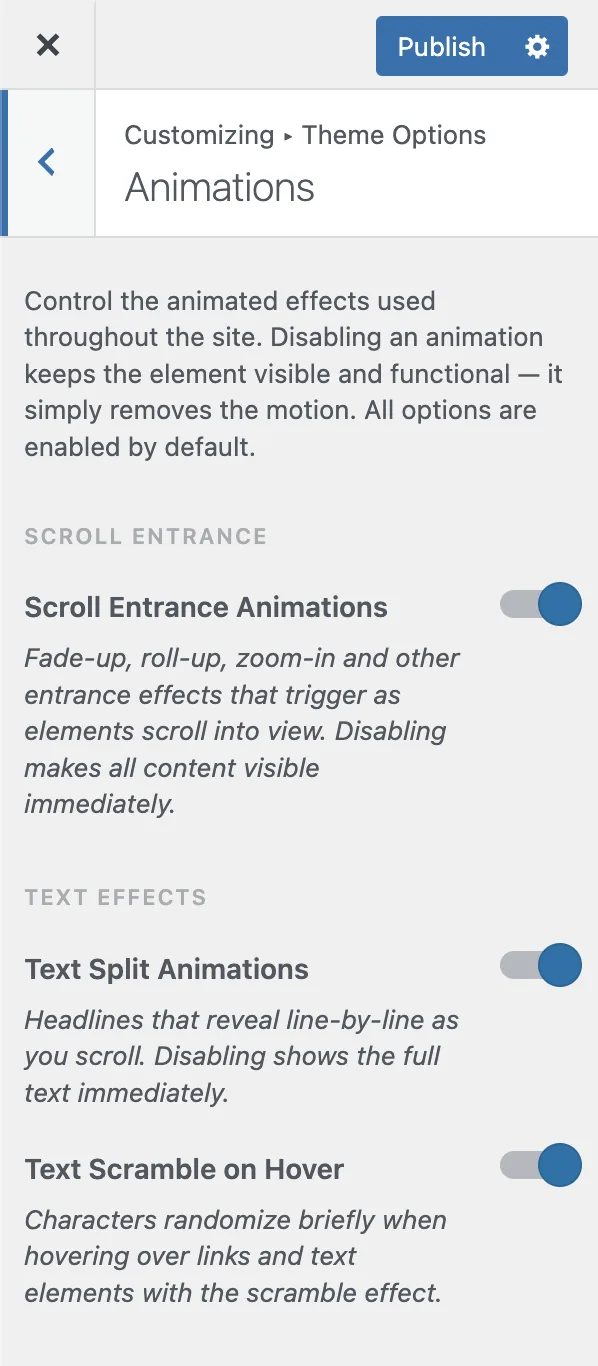
## How to Disable Animations?

Product: Monogram - Personal Portfolio WordPress Theme
URL: https://hub.jkdevstudio.com/docs/monogram/faq/how-to-disable-animations
Updated: 2026-08-19

Monogram lets you control each animation type individually through the Customizer.

## Quick Method: Disable Most Animations

To remove the most visible motion across your site, turn off **Scroll Entrance** animations:

1. Go to **Appearance &gt; Customize &gt; Animations**
2. Toggle off **Scroll Entrance**
3. Publish changes

This single toggle disables all scroll-triggered entry animations (fade, slide, scale effects) site-wide.

## Individual Animation Controls

Each animation type has its own toggle in **Appearance &gt; Customize &gt; Animations**:

<table style="min-width: 100px;"><colgroup><col style="min-width: 25px;"><col style="min-width: 25px;"><col style="min-width: 25px;"><col style="min-width: 25px;"></colgroup><tbody><tr><th colspan="1" rowspan="1"><p>Animation</p></th><th colspan="1" rowspan="1"><p>Setting</p></th><th colspan="1" rowspan="1"><p>Default</p></th><th colspan="1" rowspan="1"><p>What It Controls</p></th></tr><tr><td colspan="1" rowspan="1"><p>Scroll Entrance</p></td><td colspan="1" rowspan="1"><p><strong>Scroll Entrance</strong></p></td><td colspan="1" rowspan="1"><p>On</p></td><td colspan="1" rowspan="1"><p>Elements animate as they scroll into view</p></td></tr><tr><td colspan="1" rowspan="1"><p>Text Split</p></td><td colspan="1" rowspan="1"><p><strong>Text Split</strong></p></td><td colspan="1" rowspan="1"><p>On</p></td><td colspan="1" rowspan="1"><p>Character-by-character heading reveals</p></td></tr><tr><td colspan="1" rowspan="1"><p>Text Scramble</p></td><td colspan="1" rowspan="1"><p><strong>Text Scramble</strong></p></td><td colspan="1" rowspan="1"><p>On</p></td><td colspan="1" rowspan="1"><p>Random characters before text reveal</p></td></tr><tr><td colspan="1" rowspan="1"><p>Button Type-in</p></td><td colspan="1" rowspan="1"><p><strong>Button Type In</strong></p></td><td colspan="1" rowspan="1"><p>On</p></td><td colspan="1" rowspan="1"><p>Button text types in on load</p></td></tr><tr><td colspan="1" rowspan="1"><p>Button Scramble</p></td><td colspan="1" rowspan="1"><p><strong>Button Scramble</strong></p></td><td colspan="1" rowspan="1"><p>On</p></td><td colspan="1" rowspan="1"><p>Button text scrambles on hover</p></td></tr><tr><td colspan="1" rowspan="1"><p>Button Icon Ticker</p></td><td colspan="1" rowspan="1"><p><strong>Button Icon Ticker</strong></p></td><td colspan="1" rowspan="1"><p>On</p></td><td colspan="1" rowspan="1"><p>Button icon cycles on hover</p></td></tr><tr><td colspan="1" rowspan="1"><p>Parallax</p></td><td colspan="1" rowspan="1"><p><strong>Parallax</strong></p></td><td colspan="1" rowspan="1"><p>On</p></td><td colspan="1" rowspan="1"><p>Depth effect on scroll</p></td></tr><tr><td colspan="1" rowspan="1"><p>Tilt</p></td><td colspan="1" rowspan="1"><p><strong>Tilt</strong></p></td><td colspan="1" rowspan="1"><p>On</p></td><td colspan="1" rowspan="1"><p>3D tilt on hover</p></td></tr><tr><td colspan="1" rowspan="1"><p>Custom Cursor</p></td><td colspan="1" rowspan="1"><p><strong>Custom Cursor</strong></p></td><td colspan="1" rowspan="1"><p>On</p></td><td colspan="1" rowspan="1"><p>Custom mouse follower (desktop)</p></td></tr><tr><td colspan="1" rowspan="1"><p>Hover Underline</p></td><td colspan="1" rowspan="1"><p><strong>Hover Underline</strong></p></td><td colspan="1" rowspan="1"><p>On</p></td><td colspan="1" rowspan="1"><p>Animated link underlines</p></td></tr></tbody></table>

<figure class="doc-figure" data-width="50%" data-align="left" style="max-width: 50%; width: 100%; margin-left: 0px; margin-right: auto;"><img src="https://hub.jkdevstudio.com/storage/docs/2026/04/ab5939f9-0250-467b-9d31-aff8def50f12.webp" alt="" class="doc-image rounded-xl max-w-full"></figure>

## Other Motion Features

These are controlled in separate Customizer sections:

- **Smooth Scroll** - Appearance &gt; Customize &gt; Smooth Scroll &gt; toggle off **the Smooth Scroll toggle**
- **Page Transitions** - Appearance &gt; Customize &gt; Page Transitions &gt; toggle off **the Page Transitions toggle**
- **Preloader** - Appearance &gt; Customize &gt; Preloader &gt; toggle off **the Preloader toggle**
- **Grain Overlay** - Appearance &gt; Customize &gt; Grain Overlay &gt; toggle off **the Grain Overlay toggle**

## Accessibility Note

The grain overlay respects the `prefers-reduced-motion: reduce` operating system setting. When a user enables reduced motion in their OS preferences, the grain animation is automatically disabled.

> Tip: You can test any setting temporarily using URL parameters. Add `?anim\_scroll\_entrance=false` to any page URL to disable scroll animations without changing Customizer settings.