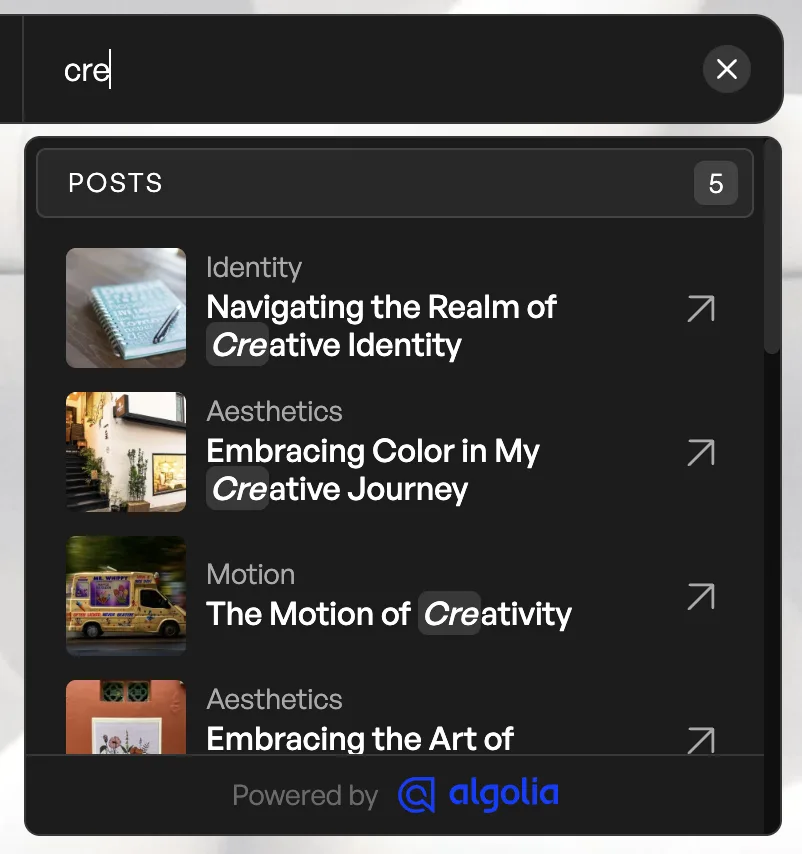
## Autocomplete Form
Product: Monogram - Personal Portfolio WordPress Theme
URL: https://hub.jkdevstudio.com/docs/monogram/integrations/autocomplete-form
Updated: 2026-09-06
The autocomplete feature provides instant search results as visitors type in the navigation search form.
## How It Works
When search is enabled in the navigation (`nav-search` setting), clicking the search icon opens a search drawer. As you type, Algolia returns matching results instantly - typically in under 50 milliseconds.
## Features
- **Instant results** - matches appear after the first few characters
- **Typo tolerance** - finds results even with spelling mistakes
- **Multi-index search** - searches across portfolio items, blog posts, and pages simultaneously
- **Highlighted matches** - search terms are highlighted in results
## Configuration
Autocomplete is configured through the WP Search with Algolia plugin settings. The theme automatically integrates with the plugin search form.
Make sure your Algolia credentials are set in both:
- **Settings > Algolia Search** (plugin settings)
- **Appearance > Customize > API Keys** (theme settings)
Index your content after major content updates. Go to Algolia Search settings and re-index to ensure new portfolio items and posts appear in search results.