## SEO

Product: Monogram - Personal Portfolio WordPress Theme
URL: https://hub.jkdevstudio.com/docs/monogram/integrations/seo
Updated: 2026-08-19

Monogram includes built-in SEO features and integrates with popular WordPress SEO plugins.

## Built-in SEO Features

### JSON-LD Structured Data

The theme automatically outputs structured data markup on key pages:

<table style="min-width: 75px;"><colgroup><col style="min-width: 25px;"><col style="min-width: 25px;"><col style="min-width: 25px;"></colgroup><tbody><tr><th colspan="1" rowspan="1"><p>Page Type</p></th><th colspan="1" rowspan="1"><p>Schema Type</p></th><th colspan="1" rowspan="1"><p>Data Included</p></th></tr><tr><td colspan="1" rowspan="1"><p>Homepage</p></td><td colspan="1" rowspan="1"><p>Organization</p></td><td colspan="1" rowspan="1"><p>Site name, URL, logo</p></td></tr><tr><td colspan="1" rowspan="1"><p>Homepage</p></td><td colspan="1" rowspan="1"><p>WebSite</p></td><td colspan="1" rowspan="1"><p>SearchAction for site search</p></td></tr><tr><td colspan="1" rowspan="1"><p>Blog posts</p></td><td colspan="1" rowspan="1"><p>Article</p></td><td colspan="1" rowspan="1"><p>Title, author, date, image</p></td></tr><tr><td colspan="1" rowspan="1"><p>Portfolio items</p></td><td colspan="1" rowspan="1"><p>CreativeWork</p></td><td colspan="1" rowspan="1"><p>Title, author, date, description</p></td></tr><tr><td colspan="1" rowspan="1"><p>FAQ archives</p></td><td colspan="1" rowspan="1"><p>FAQPage</p></td><td colspan="1" rowspan="1"><p>Questions and answers</p></td></tr></tbody></table>

### Meta Tags

The theme outputs essential meta tags:

- **Viewport** - responsive design meta tag
- **Theme color** - matches dark/light color scheme
- **Robots** - noindex on 404 and search result pages

### DNS Prefetch

Performance-optimized DNS prefetch and preconnect for:

- Google Maps API
- Algolia API
- Google Fonts

## SEO Plugin Compatibility

Monogram works with three major SEO plugins:

<table style="min-width: 100px;"><colgroup><col style="min-width: 25px;"><col style="min-width: 25px;"><col style="min-width: 25px;"><col style="min-width: 25px;"></colgroup><tbody><tr><th colspan="1" rowspan="1"><p>Plugin</p></th><th colspan="1" rowspan="1"><p>Breadcrumbs</p></th><th colspan="1" rowspan="1"><p>Structured Data</p></th><th colspan="1" rowspan="1"><p>Sitemap</p></th></tr><tr><td colspan="1" rowspan="1"><p><strong>Yoast SEO</strong></p></td><td colspan="1" rowspan="1"><p>Supported</p></td><td colspan="1" rowspan="1"><p>Plugin handles</p></td><td colspan="1" rowspan="1"><p>Plugin handles</p></td></tr><tr><td colspan="1" rowspan="1"><p><strong>Rank Math</strong></p></td><td colspan="1" rowspan="1"><p>Supported</p></td><td colspan="1" rowspan="1"><p>Plugin handles</p></td><td colspan="1" rowspan="1"><p>Plugin handles</p></td></tr><tr><td colspan="1" rowspan="1"><p><strong>SEOPress</strong></p></td><td colspan="1" rowspan="1"><p>Supported</p></td><td colspan="1" rowspan="1"><p>Plugin handles</p></td><td colspan="1" rowspan="1"><p>Plugin handles</p></td></tr></tbody></table>

### Breadcrumb Integration

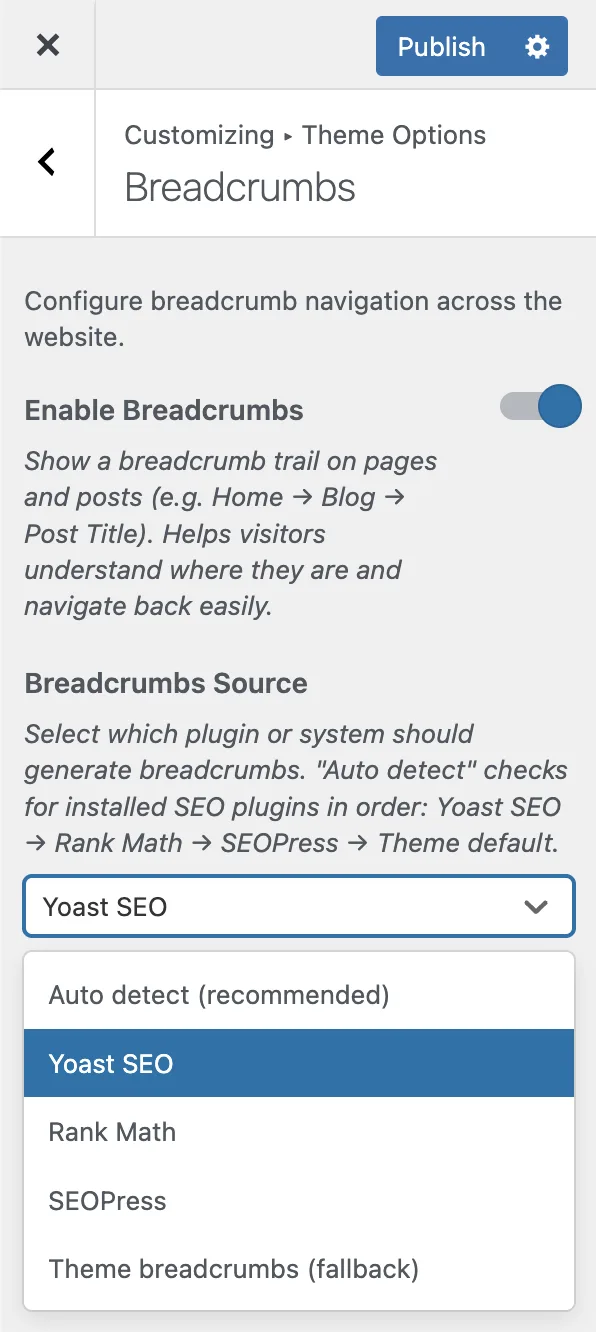
The theme auto-detects your active SEO plugin and uses its breadcrumb output. Configure the source in **Appearance &gt; Customize &gt; Breadcrumbs**:

- **the Breadcrumb Source setting**: auto (recommended), yoast, rankmath, seopress, or default (theme built-in)

<figure class="doc-figure" data-width="25%" data-align="left" style="max-width: 25%; width: 100%; margin-left: 0px; margin-right: auto;"><img src="https://hub.jkdevstudio.com/storage/docs/2026/04/6325483c-019a-41a6-a007-c6b5225b7842.webp" alt="" class="doc-image rounded-xl max-w-full"></figure>

> **Tip:** Set the breadcrumb source to "auto" and the theme will detect whichever SEO plugin is active. If none is installed, the theme uses its own breadcrumb generator.

## SEO Best Practices

- Use the `/%postname%/` permalink structure (set during demo import)
- Fill in meta titles and descriptions via your SEO plugin
- Use descriptive portfolio titles and summaries
- Add alt text to all images
- Organize portfolio items with consistent taxonomy usage