## Add a portfolio project
Product: Norto - Creative Portfolio WordPress Theme
URL: https://hub.jkdevstudio.com/docs/norto/portfolio/add-a-project
Updated: 2026-11-27
Summary: Create a Norto portfolio project, choose whether its grid card shows an image, a gallery slider, or a GIF, and file it under a category for the filters.
Availability: Pro only.
This is a Pro feature. Each project is an entry of the **Portfolio** post type, with its own page and a card in every portfolio grid.
:::steps
### Create the project
Go to [[Portfolio > Add New Item]], enter the title, and build the project page in the editor or with Elementor.
### Set the featured image
Add a **Featured image**. The grid card uses it unless you pick another thumbnail type in the next step.
### Choose what the card shows
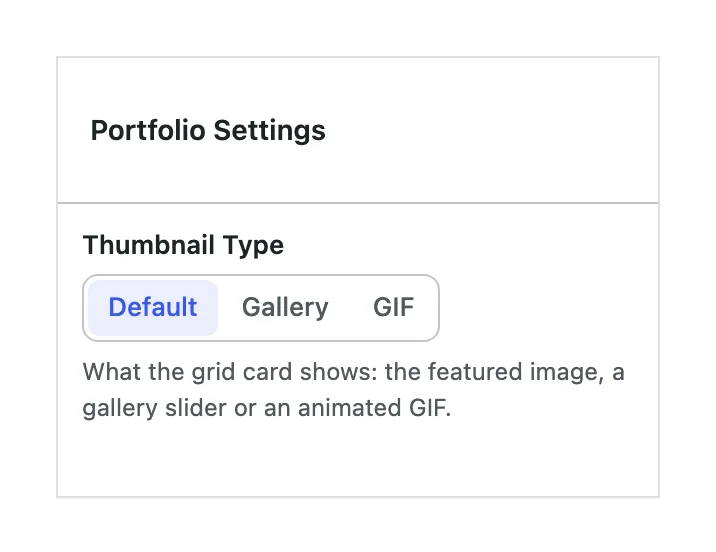
In the **Portfolio Settings** box in the editor sidebar, set **Thumbnail Type**: **Default** shows the featured image, **Gallery** shows a slider of the images you add in **Gallery**, and **GIF** shows the animated file you pick in **GIF File**.
Thumbnail Type decides what the grid card shows.
### File it under a category
Tick one or more portfolio **Categories**. The grid's filter buttons are built from these categories, so a project with no category appears only under **All Items**.
### Publish
Publish the project. It appears in the portfolio archive and in every **Portfolio** widget, newest first.
:::
Portfolio categories and tags are separate from post categories and tags. Manage them under [[Portfolio > Categories]] and [[Portfolio > Tags]].
The project page also has the **Navigation** box, described in [Navigation: style, search, and social links](https://hub.jkdevstudio.com/docs/norto/theme-settings/navigation).