
You installed a theme, maybe imported a demo, and now you want the site to look like your brand instead of like the preview. This page walks through that in order, using the theme's own settings.
#Why the logo alone is not enough
Most people replace the logo, write their own text, and stop. The result still looks like the demo, because the demo's look lives in the settings nobody touched: the colors, the fonts, the widths and the spacing. Anyone who has seen the theme's preview recognizes it straight away.
The more of the theme's own settings you change, the more the site becomes yours rather than a copy of a template. None of it needs code.
#Making the theme yours
Start from a style kit, if your theme has one
Several of our themes ship with style kits, presets in the Customizer designed for that theme. Each kit sets colors, fonts and type sizes in one click. If yours has them, pick the kit closest to your brand first and adjust from there: applying a kit later replaces the values it covers.
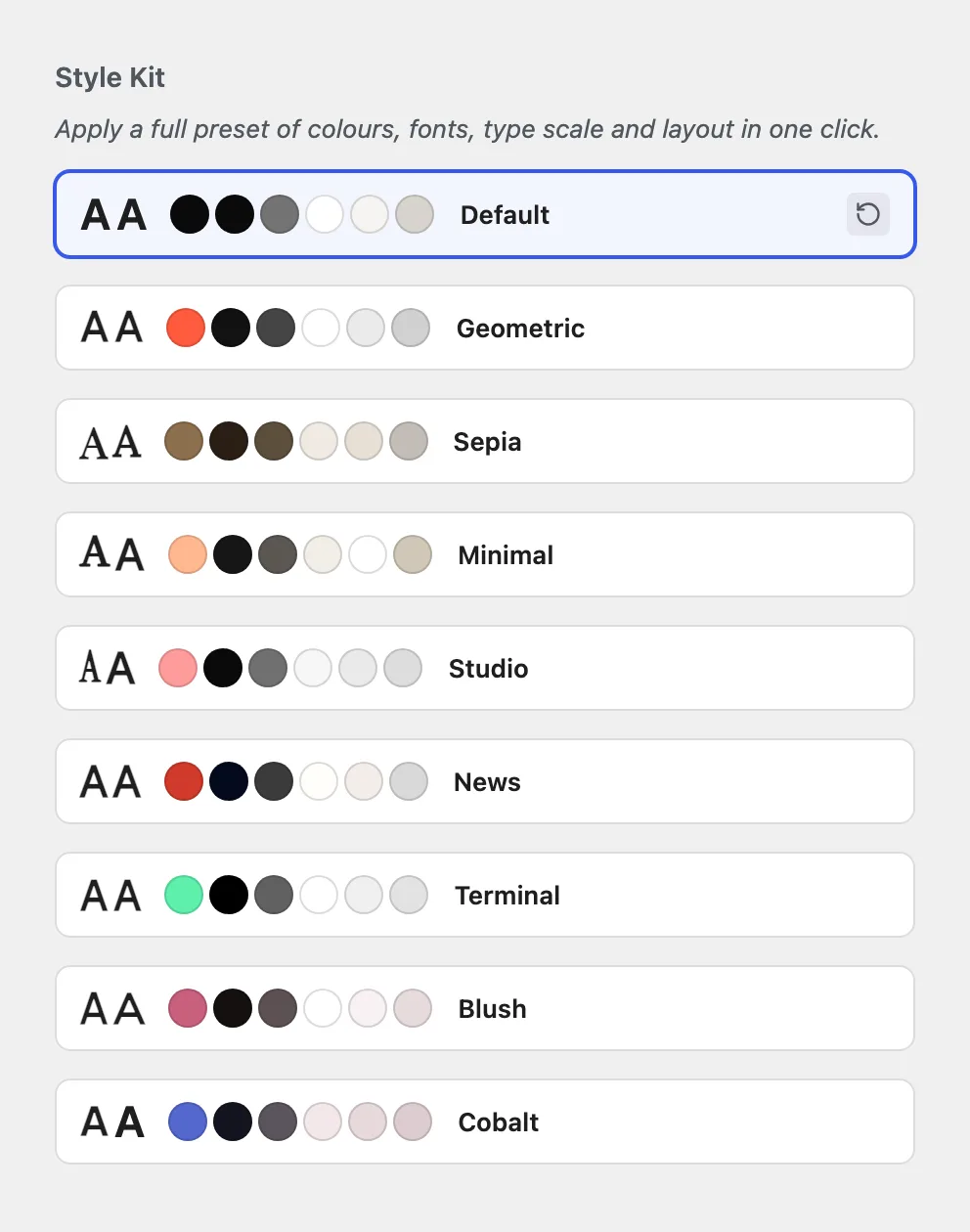
Set the logo and the site icon
Open AppearanceCustomize. The site icon, the small image in the browser tab also called a favicon, is set under Site Identity, which is part of WordPress itself and asks for a square image of at least 512 by 512 pixels. The logo is set in the Customizer too, and where the theme has a dark color scheme, upload a version of the logo that reads on a dark background as well.
Set your brand colors
Enter your brand's exact color values in the theme's color settings in the Customizer. The theme passes them on to buttons, links, active states and badges, because all of those read the same setting. If the theme has a dark scheme, set its colors too, so the dark version of the site is on brand and not just dark.
Choose your fonts
Pick a heading font and a body font that match your brand, and add them through the theme's font library so they load in the block editor and on the site alike. Google Fonts are available with the free companion plugin; uploading your own font files and connecting Adobe Fonts come with the Pro plugin.
Adjust layout widths and spacing
Content width, corner radius and the spacing between sections decide whether a site feels airy or dense, sharp or soft. These change the character of a site as much as color does, and they are the settings people forget. Change them in the theme's layout settings and compare against the demo: if you cannot tell the two apart, go further.
Put the theme under your own name
With the Pro plugin, the child theme generator creates a child theme with the name, author and screenshot you choose, built from the version of the theme you have now. It is the right place for any template edits later, and it is what a client sees in AppearanceThemes when you hand over a site.
Replace the content
Last, and only last: your own text, images, pages and menus. With the design settled, every image and paragraph you add lands in a site that already looks like yours.
Save your settings once they are right.
Exporting the theme settings gives you a file you can import on a staging copy or a second site, see Exporting and importing your theme settings.
#Use settings before custom CSS
If a setting exists for what you want to change, use the setting. Custom CSS that does the same job looks like a shortcut and turns into a maintenance job:
- It is yours to maintain. A rule you add is code you own. When the theme's markup changes in an update, the rule can stop matching or start matching the wrong thing, and nothing warns you.
- It misses places. A color set in CSS covers the elements you targeted. The same color set in the Customizer covers every element that reads it, including the ones you did not think of and the dark scheme.
- Pasted code you do not understand usually ends badly. CSS from an AI chat or a forum can look right on one page and break another, and when it does, you are debugging code you did not write and cannot read.
Custom CSS is fine for a small detail the theme has no setting for. Where it goes, and how to keep it out of the way of updates, is covered in Where to put custom CSS and JavaScript.
Custom code is not covered by support.
That includes CSS in the Customizer and code in a child theme. See the Support Policy and Customizing the code: limits and responsibility.
#Common questions
Can I use my exact brand color values?
Yes. Enter them in the theme's color settings, where the theme spreads them across the site for you.
My brand font is not in the list
With the Pro plugin, upload the font files to the font library or connect Adobe Fonts, so the font is handled like any other on the site. Adding fonts to your site walks through both.
A color did not change everywhere
Something in that spot is overriding the global setting. Check the block or element's own color settings first, then any custom CSS added earlier.
Do I need a child theme just to change colors and fonts?
No. Colors, fonts and layout are settings stored in the database, and they survive updates without a child theme. A child theme matters for your own name on the theme and for template edits.
I changed a setting and nothing happened on the site
Clear any page cache and reload in a private window. If it still does not show, Settings will not save, or changes are not visible covers the usual causes.
#Still stuck
Open a support ticket and say what you tried and where it stopped. Your product, your domain, a screenshot and the exact message you saw are usually enough to settle it in one reply.
Last updated
