
Your site confirms its license with our server on a schedule. That is why an activation can lapse without you touching anything: one of the conditions it rested on changed, or the schedule stopped running.
This page is about how that works on a live site. What you bought and how many domains it covers is a separate question:
#WP-Cron has to work on your site
The license check runs on WP-Cron, the WordPress task scheduler. If cron does not run, the check does not run, and after a few days the Pro features switch off on a site whose license is perfectly fine. This is the most common reason for "my license deactivated itself".
Cron must run on every site with an active license: either WordPress's own WP-Cron or a real server cron job.
The check cannot be turned off, so a site with no working scheduler will eventually look deactivated.
#What WP-Cron is
WordPress has no clock of its own. WP-Cron checks for due tasks when somebody loads a page, and runs them then. On a site with visitors that is enough. On a quiet site, a staging copy nobody opens, or a host that blocks the loopback request WordPress makes to itself, tasks run late or not at all. See the WordPress cron documentation for how it works.
#The two setups that work
This is the default, and nothing needs configuring. Check that wp-config.php does not contain this line:
define( 'DISABLE_WP_CRON', true );
If it is there and nothing else replaces it, cron is off.
Many hosts and performance guides disable WP-Cron and replace it with a real cron job, which is more reliable. That is fine, as long as the job actually exists. In your hosting panel, usually under Cron Jobs, add a job that calls wp-cron.php every 5 to 15 minutes:
*/5 * * * * wget -q -O - https://example.com/wp-cron.php?doing_wp_cron >/dev/null 2>&1
Replace example.com with your domain. WordPress documents this setup in hooking WP-Cron into the system task scheduler.
The theme's Diagnostics warns you when DISABLE_WP_CRON is set, because a server cron must then call wp-cron.php or license verification stops. To see the scheduled task itself, a plugin like WP Crontrol lists every cron event; ours is JkdToolkit_license_verify.
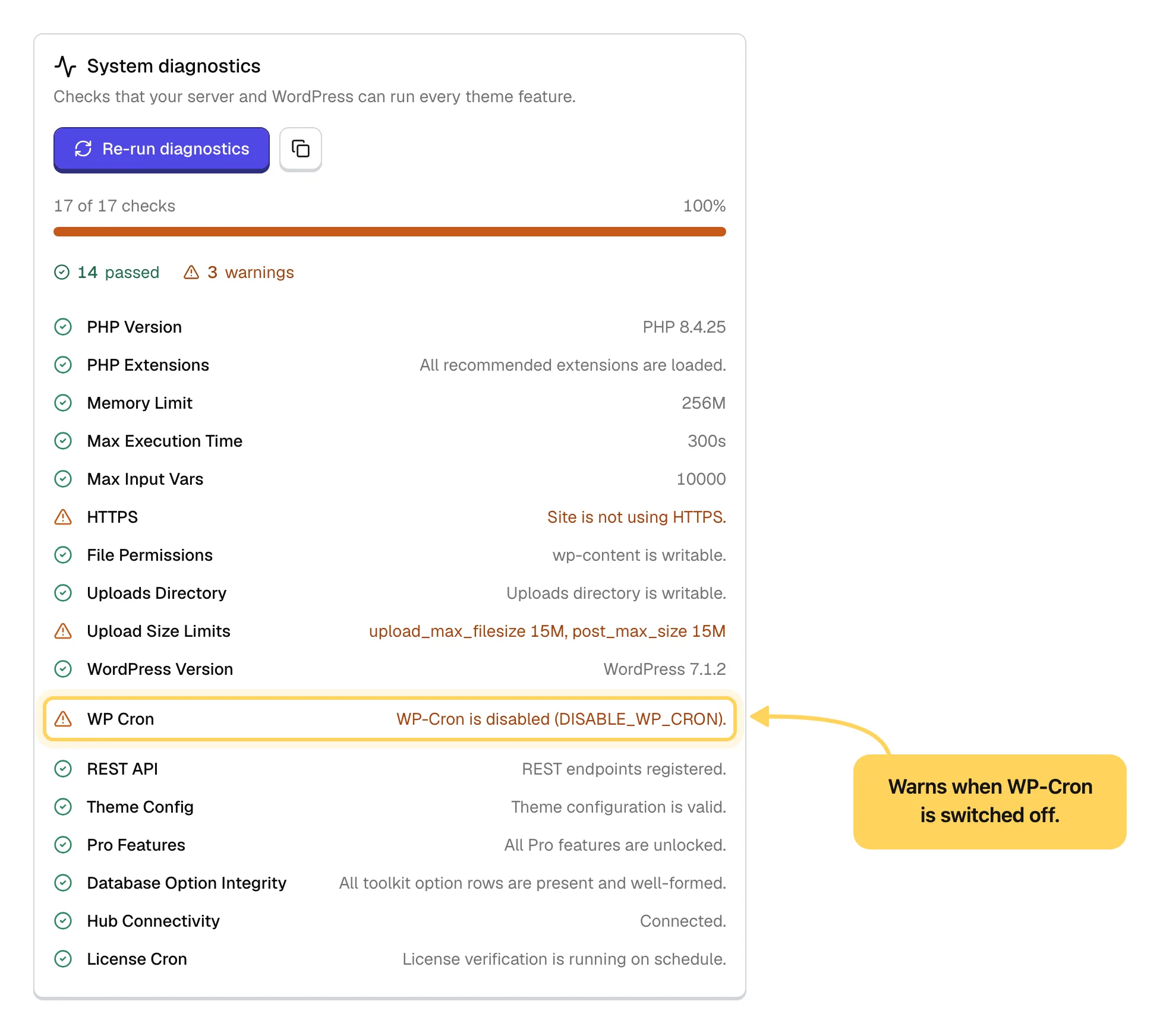
Opening the admin only helps as a fallback.
When an administrator loads an admin page and the last check is overdue, the site runs it then, at most once an hour. A site nobody logs into still depends on cron.
#How the check happens
Your site checks its license in the background once a day. The interval is 24 hours by default, and a value under an hour is treated as a mistake and reset to daily. If the scheduled task goes missing, the site puts it back the next time the admin is opened.
Our server answers with a response signed with a cryptographic key, and your site verifies the signature. In practice this means the license state cannot be changed by editing the database. You can also press Re-verify on the license page to run the check right away.
#The states you can see
- Active
Everything is in order.
- Inactive
There is no activation on this domain, or the grace period ended without contact.
- Grace period
Our server could not be reached. Your site works normally and shows a bar with the days left while it keeps retrying.
- Unverified
The license has not been confirmed yet, usually right after activation and before the first successful check. It is not an error.
- Blocked
The license is no longer valid, usually after a refund or a breach of the Terms. There is no grace period for this one.
#The grace period
If our server is temporarily unreachable, the Pro features stay on. Your site enters a grace period, keeps working exactly as before, and retries.
The length comes from the signed response: a few days, currently three, counted from the last successful check. It cannot be extended by editing the database, and repeated failures continue the same window instead of starting a new one, so a long outage does not become an endless grace period.
If contact comes back inside the window, everything returns to normal on its own. If it does not, the Pro layer closes until the next successful check, with nothing to reinstall.
A short outage on our side cannot break your site.
Maintenance, a network blip or a temporary firewall rule all land inside the grace period.
#Why an activation lapses
- The domain changed
The most common reason. The check sees a domain that is not the one the license sits on, for example after moving from staging to live or changing the site address.
- The site was cloned
A copy carries the activation record from the original site's database. Same situation, same fix.
- The license was released elsewhere
Removed in your Hub account or from another site. It takes effect on the next check.
- Cron stopped running
The check stopped, the grace period ran out, and the site closed the Pro layer. Fix cron, then press Re-verify.
- A refund was issued
The license stops being valid on the next check. See the Refund Policy.
When your support period ends, nothing on this list happens. The theme keeps working and the license stays valid. Only the support channel closes.
In every domain-related case the fix is to move the activation to the domain the site actually runs on:
#Repeated activation attempts
Activation and verification are rate limited. Pressing activate, deactivate or Re-verify many times in a row shows "Please wait a moment before trying again". That is not a block on your license, and it clears in about a minute.
Cycling activations to keep one license running on several sites, patching the check out of the code, or faking the server's answer is a breach of the Terms & Conditions whether or not it works. A license used that way can be deactivated together with every activation on it.
If you need more sites, buy more activations. It costs less than any workaround and nothing breaks.
#Common questions
What exactly does the check send to your server?
The purchase code, the product ID, your site address, and the JKD Toolkit, WordPress and PHP versions. Nothing about your content, your visitors, your users or your database. The versions tell us which releases are still in use and help us reproduce a bug if you report one.
Can I turn the check off?
No. The check is what keeps updates and the Pro features available, and without it the site cannot confirm the license is still yours. Removing it from the code breaks the Terms & Conditions.
My host disabled WP-Cron for performance. Is that a problem?
Only if nothing replaced it. Ask your host whether a server cron job calls wp-cron.php, or add one yourself as shown above.
Does the site contact your server on every page load?
No. Once a day in the background, plus the manual Re-verify button. A visitor never triggers it.
My site is behind a firewall that blocks outgoing traffic
The check fails, the grace period starts, and the Pro layer closes when it ends. Allow outgoing HTTPS to hub.jkdevstudio.com, press Re-verify, and everything comes back.
The status looks different from my Hub account
Press Re-verify on the license page and clear any object cache, since a cached value is the usual reason an old status lingers. If the two still disagree, see License problems, then open a support request with the domain and the status you see.
#Still stuck
Open a support ticket and say what you tried and where it stopped. Your product, your domain, a screenshot and the exact message you saw are usually enough to settle it in one reply.
Last updated
