
You installed the theme, there are a hundred settings in front of you, and no obvious place to start. This is the order to work in.
By the end the site looks like yours rather than like a demo, and you know where things live.
#Look around before you change anything
Spend ten minutes clicking through the site as a visitor and through the theme's own screens as its owner. Open the homepage, one archive, one single entry. Then open the Customizer and the theme dashboard and read the section names without touching a control.
Almost every setting you are about to look for lives in one of three places, and knowing which saves you the search each time:
- The WordPress Customizer
Everything the theme renders on every page: layout, colors, fonts, header, footer, global elements.
- The theme's own screens
Licensing, updates, demo import, integrations and the tools that come with the Pro plugin.
- The individual post or page
Per-entry overrides. The most specific level wins, so a page can contradict a global setting without you noticing.
#Step 0: the WordPress basics
These have nothing to do with the theme, and skipping them spoils the first impression. Do them while the site is still empty.
Permalinks, chosen now. Changing them later breaks every address already shared
Site title, tagline, time zone and language
Which page is the front page and which one lists your posts
The last one is the most common confusion at the start, and it is a WordPress setting, not a theme one. It lives in SettingsReading.
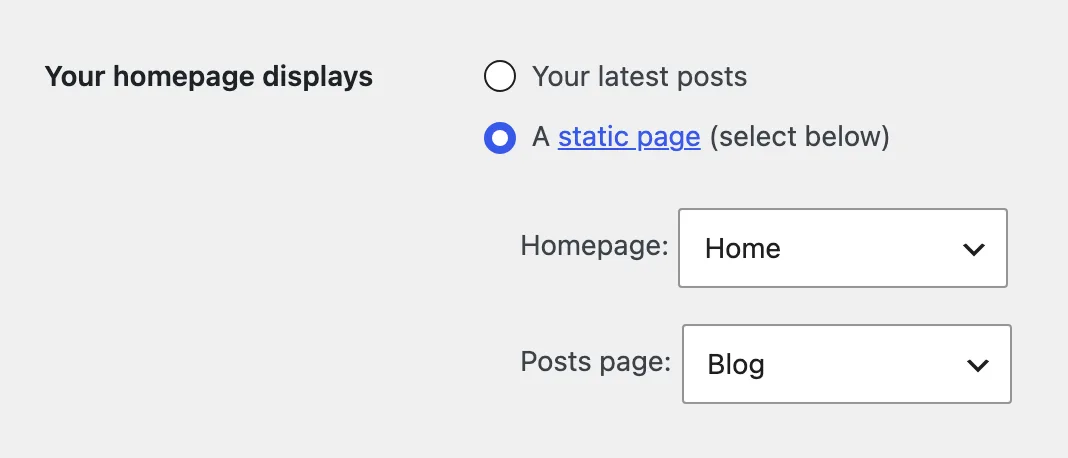
WordPress documents its own settings well. The WordPress documentation and the Theme Handbook are the reference for anything on this list that is new to you.
#Step 1: identity
Logos. There is more than one: light, dark, compact. Set them all at once, or a stray logo appears in dark mode or in the sticky header.
A style kit first, then adjustments. A kit sets colors, fonts and shape together, which is faster and more coherent than choosing each one alone. Tune afterwards rather than before.
Colors. Set both schemes, not only the one you are looking at. If dark mode is enabled, somebody will see it.
Typography. There are two decisions here: which fonts (a heading face and a text face), and how big the steps between them are. The size scale is what makes a page read as calm or as loud, and people forget it exists while they retype font names.
Layout. The global geometry: full width or a boxed frame, content width, corner radius, spacing density. Any one of these changes how the whole site feels more than a dozen small settings, so decide them before you start judging individual pages.
#Step 2: the frame
The frame is everything that stays the same on every page. Get it right before you touch individual entries, because you are about to see it a few hundred times.
Menus. Build the menu in AppearanceMenus, then assign it to a location the theme declares. A menu with no location assigned renders nowhere, which is the usual reason a freshly built menu does not appear.
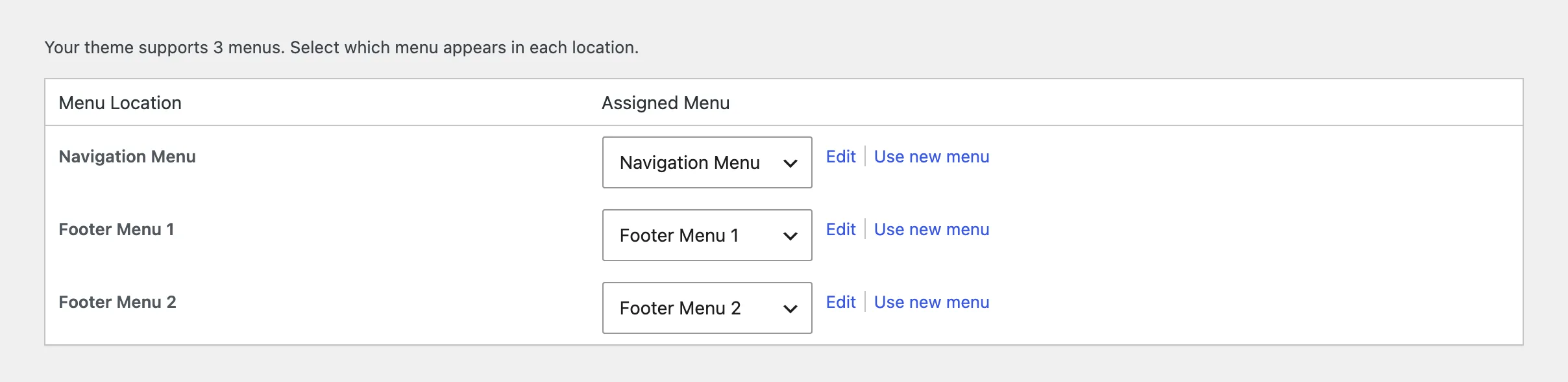
The header. Which layout, what sits in it, whether it sticks on scroll, and what it does on a phone. The mobile header is a separate decision from the desktop one, so check it on a real phone.
The footer. Columns, what goes in each, the copyright line. The copyright line is a demo trace more often than anything else on the page.
Global UI elements. The controls that belong to no single page and are set once:
- the scroll-to-top button, including which screen sizes it appears on
- the reading progress indicator, when the theme has one
- breadcrumbs, and whether they show on phones
- dark mode: whether it exists, which scheme is the default, and what the switcher looks like
- reveal animations and transitions, including whether they run on mobile at all
- social profile links, which feed every place the theme prints your icons
Decide motion on purpose.
Reveal animations look good on a portfolio and get tiring on a site somebody reads daily. Turning them off on mobile is a reasonable default: a phone user scrolls fast, and an element that fades in as it arrives just looks slow.
Sidebars are deliberately not on this list. Modern layouts put navigation and supporting content in the header, the footer and inside the page, and a theme that has no sidebar is not missing one.
#Step 3: your content
Whatever your site is, the work has the same shape: get one entry exactly right, then use it as the pattern for everything else.
The entry might be a post, a page, a portfolio project, a product or whatever else the theme registers. The set of decisions it carries barely changes between them:
The featured or cover image, at a size that survives cropping
The taxonomy, meaning the category or the type of thing this is
The excerpt or summary, which is what archives and search results print
Any per-entry layout override the theme offers, decided once rather than per entry
If you already have content, bring it in and then walk one of each type through that list. If you started from a demo, the demo entries are already filled in, so edit one into the shape you want to keep and copy it.
Duplicate a finished entry instead of configuring each new one from scratch.
Configuring everything from scratch is how an afternoon disappears, and the copy carries the decisions you already made.
#Step 4: remove the demo traces
This is where people stop, thinking they are finished. These are the things a visitor notices first:
Somebody else's social links in the footer
Demo text in the call to action and the signup form
Demo images in the header
Test categories nobody meant to keep
Demo contact details, which is the one that actually costs you something
#Check the result
Walk the homepage, an archive, a single entry and the search results, in light mode and dark mode, on a phone.
You are finished when nowhere on the site can a visitor tell it was assembled from a demo.
#Common questions
Do I have to do these in order?
Permalinks do come first. The rest is a sensible sequence, not a requirement.
Can I change the style kit later?
Yes, and it replaces your color and font choices. Do any manual tuning after the kit, not before it.
How long does this take?
About an hour for the frame, and as long as your content takes for the rest. The demo trace list takes fifteen minutes and is the part most often skipped.
Should I delete all the demo posts?
Look at them first. They are the fastest way to see what the theme's layouts can do, and deleting them takes a minute once you have.
I cannot find where a setting lives
Check the three places from the top of this page in order: the Customizer, the theme's own screens, and the individual post or page. Some settings exist at all three levels and the most specific one wins.
Can I just add CSS instead of hunting for the setting?
You can, but spend two more minutes looking for the setting first. A setting survives updates and describes what you meant, while a CSS override only records what you patched. Where custom CSS does belong, there is a right place to put it.
#Still stuck
Open a support ticket and say what you tried and where it stopped. Your product, your domain, a screenshot and the exact message you saw are usually enough to settle it in one reply.
Last updated
