
Every jkdevstudio theme adds one page to the WordPress admin, carrying the theme's tools. It sits in the sidebar under the theme name, and everything the theme manages lives there instead of being scattered across WordPress.
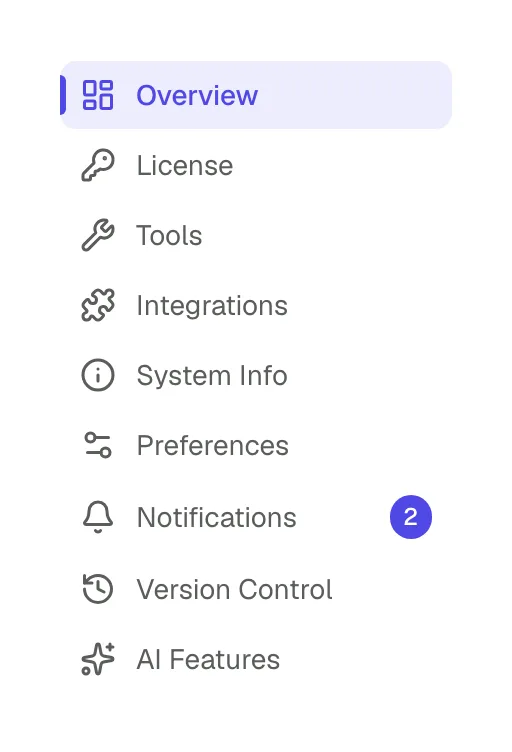
#What is on it
The set of sub-pages depends on the theme, the extensions installed and how the site is configured, so your list may be shorter or longer than somebody else's. Common ones:
- Overview
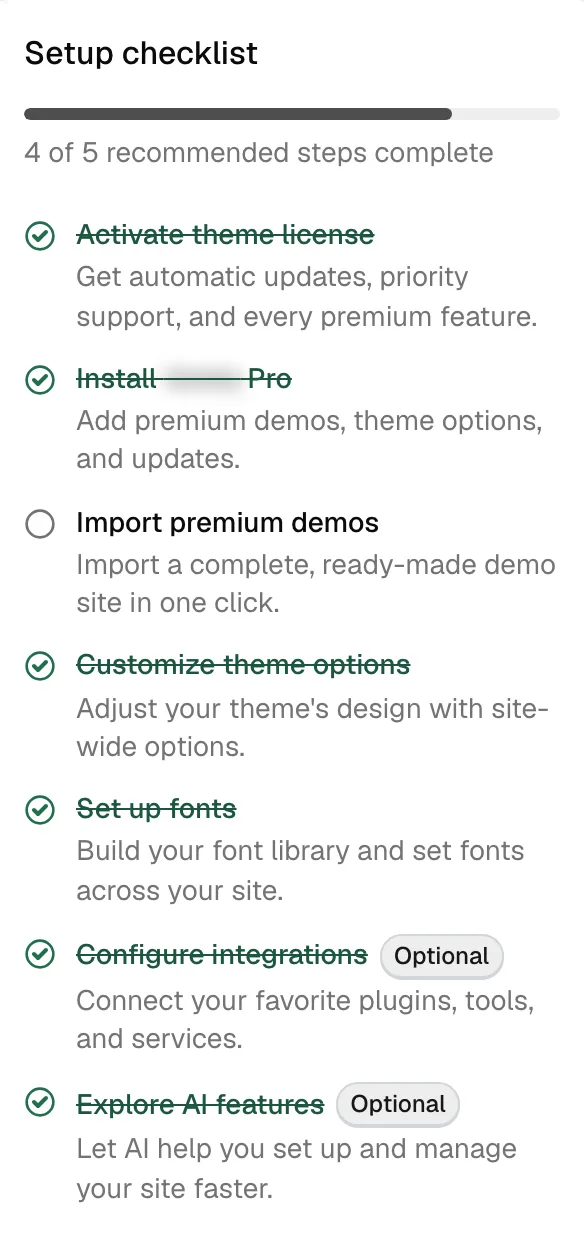
The landing screen. Status, notices, the setup checklist and quick links to whatever needs attention.
- License
Activation status, the domain in use, and the activate and deactivate actions.
- Tools
Settings export and import, diagnostics, and the child theme generator.
- Integrations
Which integrations are installed, active or have updates waiting.
- System Info
A snapshot of the environment, with a copy button.
- Preferences
Housekeeping options, the rebuild actions, and the irreversible Reset Data button.
- Notifications
One inbox for everything the theme needs to tell you: health alerts, import results and license notices.
- Version Control
Updates and rollbacks for the theme and the Pro plugin. It belongs to a direct license: a marketplace purchase carries the Regular tier and does not have this screen.
- AI Features
The AI provider and model your site uses, with privacy filters and usage limits. See setting up AI features.
Two more tools sit beside the panel as their own items in the same sidebar menu: Demo Import, with the available demos and the mode for importing single pages, and the Fonts Library, where the theme's fonts are managed.
#The panel belongs to the framework
The panel is the visible surface of JKD Toolkit, the framework all of our products are built on. The theme supplies its own settings and its own screens, and the framework supplies everything around them. That is why the panel looks and behaves the same whichever of our themes you own.
A few things follow from that:
- It is modular. Licensing, demo import, the fonts library, integrations and diagnostics are separate modules, so a site only runs the ones its edition includes.
- It grows from two directions. The free companion plugin adds the modules a free theme needs, and the Pro plugin adds the paid ones. That is why installing a plugin can make a new tab appear.
- It updates on its own schedule. The framework ships inside the theme and the Pro plugin, so a theme update can bring panel changes even when nothing in the theme's own design moved.
- Every release goes through the same pipeline. Builds are produced and checked automatically before they are published.
#It runs on WordPress, so WordPress has to be healthy
The panel is built on the platform. It reads and writes through the WordPress REST API, uses the core APIs for settings, media and fonts, and expects the admin to work normally.
So the failures people report as "the panel is broken" are usually WordPress problems:
- a security plugin closing the REST API takes the panel with it
- an aggressive object cache serves stale settings back to it
- a PHP error from an unrelated plugin can stop the admin scripts before it loads
If a page you expected is missing, System Info is the quickest way to find out why.
It shows whether the theme, the companion plugin and the Pro plugin are each installed and active, which answers most versions of that question.
#Why some of it is locked
A tab is locked when its feature needs the Pro plugin or an active license. The rest of the panel keeps working.
The free edition has the panel as soon as the theme is active, and the free companion plugin adds more pages to it, such as demo import, the fonts library, tools and integrations.
#Why it is a single page
Moving between its tabs does not reload the browser page, which is why it feels faster than the rest of the admin. It also follows the WordPress visual language, so it stays legible next to the screens around it.
The practical consequence is the one above: if the panel does not load at all, look at the REST API first.
#Common questions
The theme menu is missing from the sidebar
Check that the theme itself is activated under AppearanceThemes and not only installed. If the menu is there but specific pages are missing on the free edition, install and activate the companion plugin.
Why do I have fewer pages than the documentation shows?
The page list depends on your edition, your license and which modules the theme includes. The documentation describes the widest case.
I have no Version Control page
That screen belongs to a direct license, so a theme bought on a marketplace does not get it. Versions are downloaded from your account and installed as a zip instead.
The panel loads blank or spins forever
Almost always the REST API. Deactivate security plugins one at a time and reload. A browser console error mentioning rest_forbidden confirms it.
Can I hide the panel from clients?
The white label tool renames what the client sees, and WordPress roles control who can reach the panel at all: an editor never sees it.
One page will not open while the rest do
Reload once and clear any object cache. Then open System Info, which works independently of most of the panel and reports what state each component is in.
#Still stuck
Open a support ticket and say what you tried and where it stopped. Your product, your domain, a screenshot and the exact message you saw are usually enough to settle it in one reply.
Last updated
