
An integration is a small plugin we write that connects the theme to one service or one third-party plugin, and works only inside our themes.
The word "we" carries the weight here. Most themes on the market take a third-party plugin and adapt the theme to it afterwards. An integration is a module written for a specific set of our products.
That also decides who owns a problem: an integration is ours, so a bug in one is our bug. A plugin you chose yourself is yours.
Integrations are part of the Pro theme you bought.
They are delivered through the theme panel, and the catalog behind that panel is served by Hub, with access tied to your license. Installing one into somebody else's theme is outside what your license permits, and it is also the case we cannot help with: an integration is written against our themes, expects their markup and their settings, and we take no responsibility for what it does to a site it was never built for. The terms and conditions are where that is written down.
#Which licenses reach them
A license bought directly from us opens every integration. A Regular license, which is what a marketplace purchase carries, opens the theme, the Pro plugin and only the integrations marked available to Envato.
#What follows from that
Integrations install, update and configure through the same framework the rest of the theme uses. Their settings sit where you already look for settings, and not on somebody else's admin page with different conventions.
Every integration installs in the same place, has settings that look the same, and updates through the same channel. Learn one and the rest are familiar.
In practice that means:
The link between the theme and the outside service is ours, and keeping it working when a third-party plugin updates or a service changes something is our job.
There is one support channel. If an integration does not work, the question comes to us instead of bouncing between a plugin author and a theme author.
Integration updates ship on the theme's rhythm and are tested against it.
#A worked example
Take a newsletter signup form.
The usual arrangement. The theme relies on the service's free plugin from the WordPress plugin directory. The theme developer controls neither its interface nor its release schedule.
Most of the form settings are unavailable in the free version and open up on payment. Nobody calls that a paywall, and it behaves like one. The integration ends up half-finished, because the theme hands the form's appearance to somebody else's plugin and cannot bring it up to its own standard. You pay separately for something you assumed was part of the theme. And if that plugin's author moves on, you are alone with the problem.
How it works here. Newsletter signup is built into the theme through our own integration. The form settings sit inside Theme Options, next to the rest of your site settings.
There is no third-party plugin to install, no second interface to learn, and no keys spread across two places. You connect once, in our settings. Every part of the form is available immediately, with nothing behind an extra payment on top of the theme.
The integration lives as long as the theme does and updates alongside it.
#Two kinds of integration
Each integration is one of two kinds.
- Self-contained
Works on its own with nothing else to install. Mailchimp and Algolia are both like this: they hold their own credentials and talk to the service directly, which is why neither needs the well-known third-party plugin for that service.
- An overlay
Adds the theme's handling of a specific third-party plugin, so that plugin has to be installed and active. Contact Form 7, WPML, Weglot and TranslatePress are overlays.
The integration list tells you what each one requires. The order is always the same: third-party plugin first, our integration second.
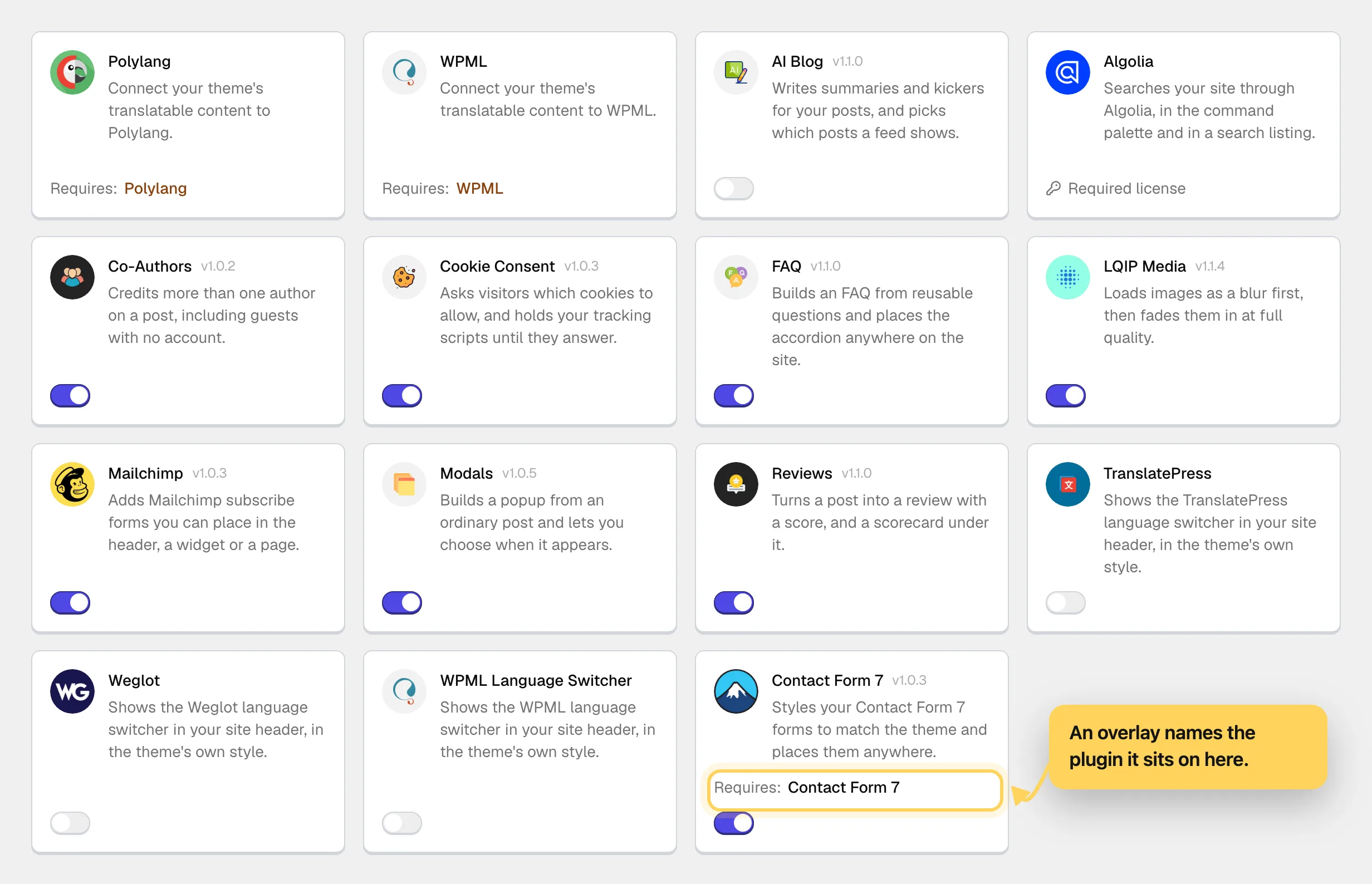
An overlay is a deliberate choice. Those services arrive with their own plugin that does the substantial work: holding the connection to the service, performing the translation, receiving and processing the messages. Writing that a second time would produce a worse copy of something that already exists and is already maintained.
What our integration does instead is a thin layer on top that stitches that plugin into the theme. It takes over the appearance, the placement and the behavior inside the theme, and leaves the service to the people who built it.
You use the familiar, actively maintained plugin for the service, and what shows on your site looks like part of the theme.
On an overlay, the underlying plugin is still a third-party plugin. What it does to your site is yours, and what our layer does with it is ours.
#Where the settings are
This applies to every integration, so the individual integration pages do not repeat it.
An integration's settings live in one place: Theme Options, in the Integrations block. Each installed integration has its page there for the connection, the text and the default appearance.
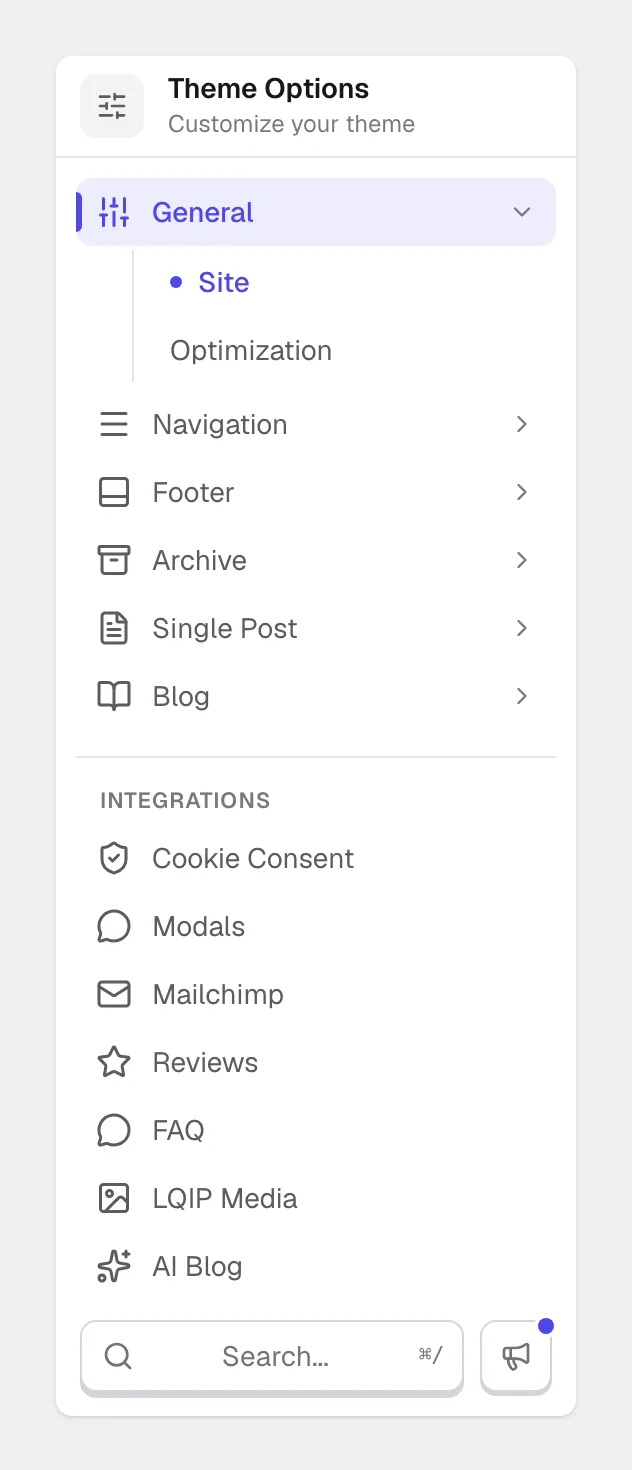
The second layer is what confuses people most. When a theme element relies on an integration, that element's setting stays where the element lives and does not move to the Integrations block.
The language switcher shows this best. The integration gives the theme the languages. Whether to show a switcher, and where it sits, is configured in the part of the theme it belongs to. The placement differs between our themes, in the navigation in one and in the footer in another, while the connection to the service is identical everywhere.
The rule that comes out of it: the Integrations block configures the integration; the rest of Theme Options configures how the theme uses it.
Some integrations have no settings page, on purpose.
Not every integration appears in the Integrations block. Some do exactly one small thing with nothing global to configure, and an empty page with a single checkbox would be worse than no page. Those integrations still appear in the list and switch on and off like the rest.
#Settings that depend on an integration
Some theme settings are designed around a specific integration: the element was conceived together with it.
Until that integration is present, those settings are visible but inactive, with a note saying what is missing. Nothing disappears and nothing breaks.
Most of the theme works with no integrations at all. They add to it; they are not what switches it on.
#Common questions
Are integrations included with the theme?
They are delivered through the theme panel, and the catalog behind that panel is served by Hub with access tied to your license, so an active Pro license opens the list without a separate purchase. A direct license opens every integration, while a Regular license bought on a marketplace opens only the ones marked available to Envato.
Can I use a general-purpose plugin instead?
You can install whatever you like. The theme is built around its own integrations and makes no promise that an equivalent from elsewhere will look or behave the same way, and what that plugin does on your site is yours to own.
Why does an integration appear in my plugins list?
Because it is a real plugin, delivered through the theme panel. The panel is what knows about versions and compatibility, so manage it from there and not from the Plugins screen.
Do I have to install all of them?
No. Install the ones whose features you want and leave the rest alone.
An integration does not appear in the list for my theme
Not every integration is compatible with every one of our themes, and the panel only lists the ones that work with yours, so a missing row is deliberate. If the whole list is empty, check the license first, since the catalog is served against it.
Can I use an integration with a theme that is not yours?
No. Integrations are premium functionality tied to a Pro license of one of our themes, and they expect that theme's markup and settings. Running one anywhere else is outside the license terms and outside anything we can support or take responsibility for.
#Still stuck
Open a support ticket and say what you tried and where it stopped. Your product, your domain, a screenshot and the exact message you saw are usually enough to settle it in one reply.
Last updated
