
A demo import turns an empty install into the site you saw on the demo page, so you edit something finished instead of building from nothing. This page explains how the importer behaves. The step-by-step guide is separate:
#What a demo import is
A demo is a packaged copy of a finished site: pages, posts, images, menus, widgets and the settings that make it look the way it does on the preview. Importing it writes all of that into your WordPress database and media library. It is a starting point, and everything it brings in is ordinary WordPress content you can edit or delete afterwards.
#It is our own importer, with its own screen
The themes do not use a third-party import plugin. The importer is part of JKD Toolkit, the framework our themes are built on, and it arrives with the Pro plugin in a purchased package or with the free companion plugin from WordPress.org. The process is the same in both. What differs is which demos you can install.
It lives on its own Demo Import screen, in the admin menu that carries your theme's name. The screen has four sections:
- Demos
The catalog of complete demo sites, each with a preview. What a demo needs is listed in the import window once you press Install.
- Pages
Single pages from the demos, for when you want one layout and not a whole site.
- Tools
Importing or exporting a demo package as a file.
- Settings
How the import runs on your server: the PHP time limit, the batch size, and a button to refresh the demo list.
A generic demo importer will not unpack our demos correctly.
The packages are built for this importer. Another one produces a half-assembled site: menus unassigned, settings missing and images that never arrive.
#You choose what comes in
A demo import is modular. Before it starts, the import window lists the parts of the demo, and you keep the ones you want or turn on Import everything:
| Part | What it brings |
|---|---|
| Content, one group per type | Pages, posts and other content the demo has, including menus and templates |
| Media | The demo images, downloaded into your media library |
| Site settings | The WordPress settings the demo relies on, such as the front page |
| Widget Areas | Widgets, placed in the theme's widget areas |
| Theme Options | The theme's own design and layout settings (Pro) |
| Customizer Settings | Settings stored in the Customizer |
| Fonts | The fonts the demo uses |
Categories and tags always come in, because the content points at them. The same window lists the Required Plugins and Required Integrations the demo depends on, so you know before you press Start Import.
If you need one layout rather than a whole site, import a single page instead:
#Built to survive interruptions
A demo import is a long job, and long jobs on shared hosting get interrupted: a timeout, a dropped connection, a closed laptop. The importer is designed around that.
- It works in small batches. Content and media come in a few items at a time, and the server records progress after every batch. A timeout loses one batch at most, never the whole run.
- The job belongs to the site, not to your browser tab. Reload the page, or open the Demos section in another tab, and you see an Import in progress notice. Show progress opens the current status, so you can watch the run rather than start a second one.
- Only one import runs at a time. Starting another while one is running is refused with "Another import is already in progress", so two runs cannot write over each other.
- Running it again continues where it stopped. If a run did stop, start the same demo again. The importer remembers what it already created and skips it, and reuses images it already downloaded. For each widget area the demo uses, the import replaces that area's widgets with the demo's; areas the demo does not use are left as they are.

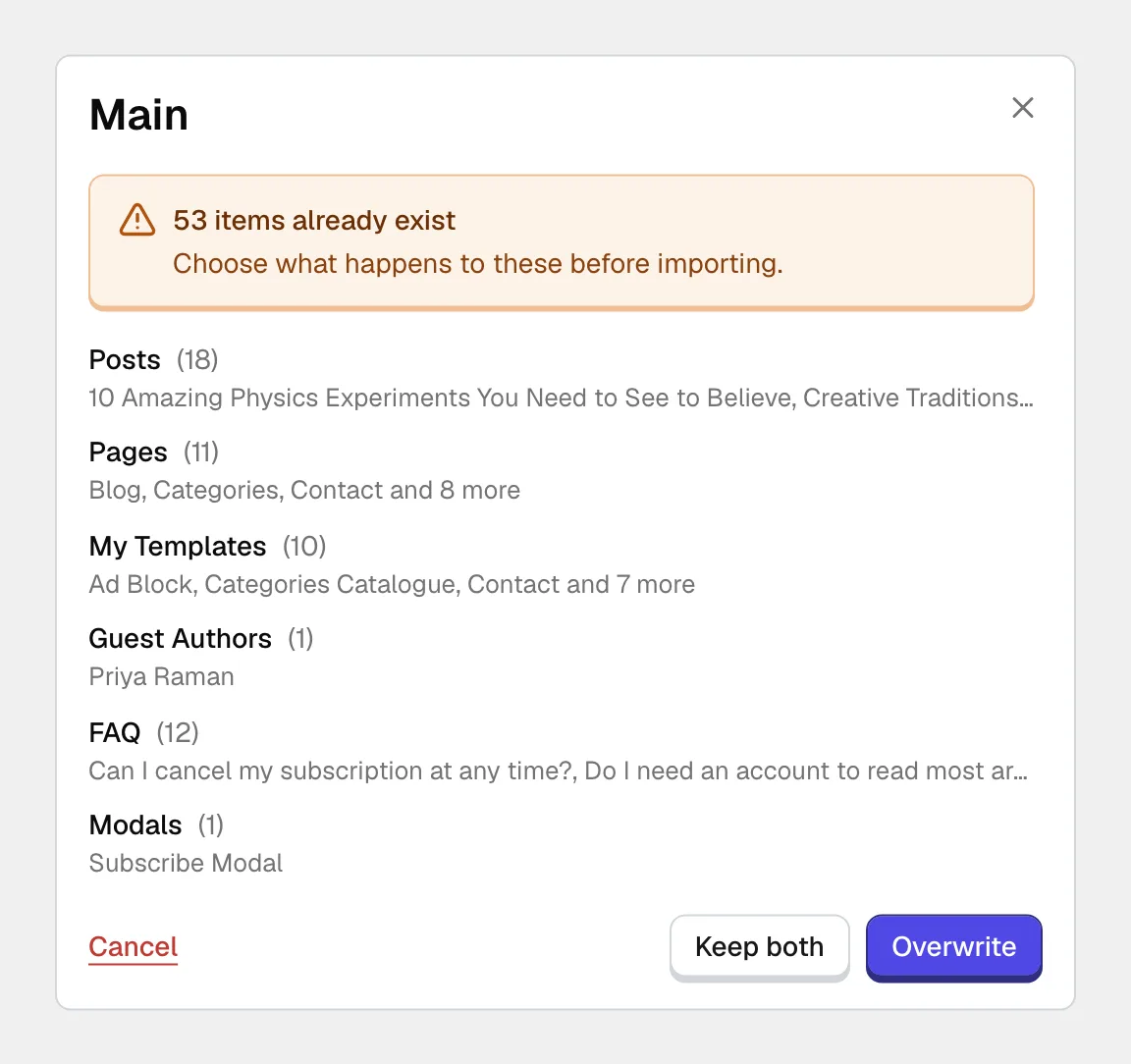
When an item with the same address already exists, the window asks before touching it: Overwrite, Keep both or Cancel. Nothing is preselected. Overwrite is the main button and Keep both sits beside it, so read the list before you choose; nothing of yours is replaced until you press Overwrite.
#Free and Pro demos
Free demos install with the free companion plugin and no license. Demos built on Pro features can be previewed by anyone, and they install with the Pro plugin and an active license. The catalog marks which is which before you commit to anything.
It is the same importer reading a different set of packages. A license bought directly from us includes every demo, while an Envato license includes only the demos marked available to Envato. See What an Envato license covers.
#Tools that are easy to confuse with a demo import
Three other operations also write settings in one go. None of them lives on the Demo Import screen, and none of them imports a demo:
- Import and export of settings
Moves your theme configuration from one site to another. It lives in the theme dashboard under Tools, on the Import / Export tab, and brings no content.
- Reset Theme Options and Reset Customizer
Put the theme settings back to their defaults. They are under Theme Options, in the Advanced section. They do not touch content and do not undo an import.
- Reset Data
Erases everything the framework has saved, including the license activation. It is in the theme dashboard under Preferences, and it is covered in Removing the theme cleanly.
A demo import, a settings import and every reset write directly to your database, and none of them has an undo button in the admin.
Take a database backup before running any of them.
#Common questions
Will an import delete my existing posts?
No. It adds its content beside yours, and when an address clashes it asks first. That is also why a demo import is a poor fit for a site that already has real content.
Can I import two different demos?
Technically yes, and the result is usually a mess, because each brings its own front page, menus and settings. Pick one demo and adapt it, and take single pages from others.
How long does it take?
Usually a few minutes. Downloading the images is the slow part, so it depends on your server and the size of the demo more than anything else. On a slow host, lower the batch size under Settings on the Demo Import screen.
I closed the tab in the middle of an import
Open the Demo Import screen again. If an import is still recorded as running, the notice shows it. If the run stopped, wait for the notice to clear, then start the same demo again and it continues from what already arrived.
It keeps stopping in the same place
A repeated stop at the same point usually means the server is running out of time or memory on one item. Check the pre-import checklist, then Demo import problems explains what each stopping point tells you.
Can I undo an import?
Not from the admin. Restoring the backup you took beforehand is the way back, which is the reason to take one. After a finished import, go through what to check after a demo import.
#Still stuck
Open a support ticket and say what you tried and where it stopped. Your product, your domain, a screenshot and the exact message you saw are usually enough to settle it in one reply.
Last updated
