
You have a site that already looks the way you want, and you need one more layout from a demo: an about page, a contact page, a landing page. The Pages section of the demo importer is built for that. It brings in one page and leaves the rest of your site alone.
#A page is not a small demo
The difference is what each one carries.
A full demo import is modular, but it is built to reproduce a whole site. Among its parts are the global ones: Theme Options, Customizer Settings, Fonts, Widget Areas and the Site settings that decide the front page. Importing those changes how every page on the site looks, which is what you want on an empty install and what you do not want on a finished one.
A page brings content scoped to that page:
- The page itself
One page, with its layout and its text. A page package is built from a single page, never several.
- The page's own settings
Whatever is saved on that page, such as its template and per-page options, travels with it.
- Media
The images the page uses, downloaded into your media library.
- Categories and tags
Only if the page is filed under any, because the content points at them.
So a site with its own colors and typography can take one layout from a demo and keep everything else. Colors and fonts that come from the theme's settings follow your site, because the page did not bring those settings with it.
A one-file importer cannot do this.
A common approach in premium themes is a generic importer that reads a single export file for the whole demo site, so the choice is the whole demo or nothing. Taking one page from it means importing everything and deleting what you did not want, after your settings have already been replaced.
#Importing a page
Take a backup
An import writes to the database, and there is no undo button in the admin. A backup is the way back.
Open the Pages section
Open the admin menu that carries your theme's name and choose Demo Import, then Pages in the section list. It lists the individual pre-built pages available for your theme, each with a preview.
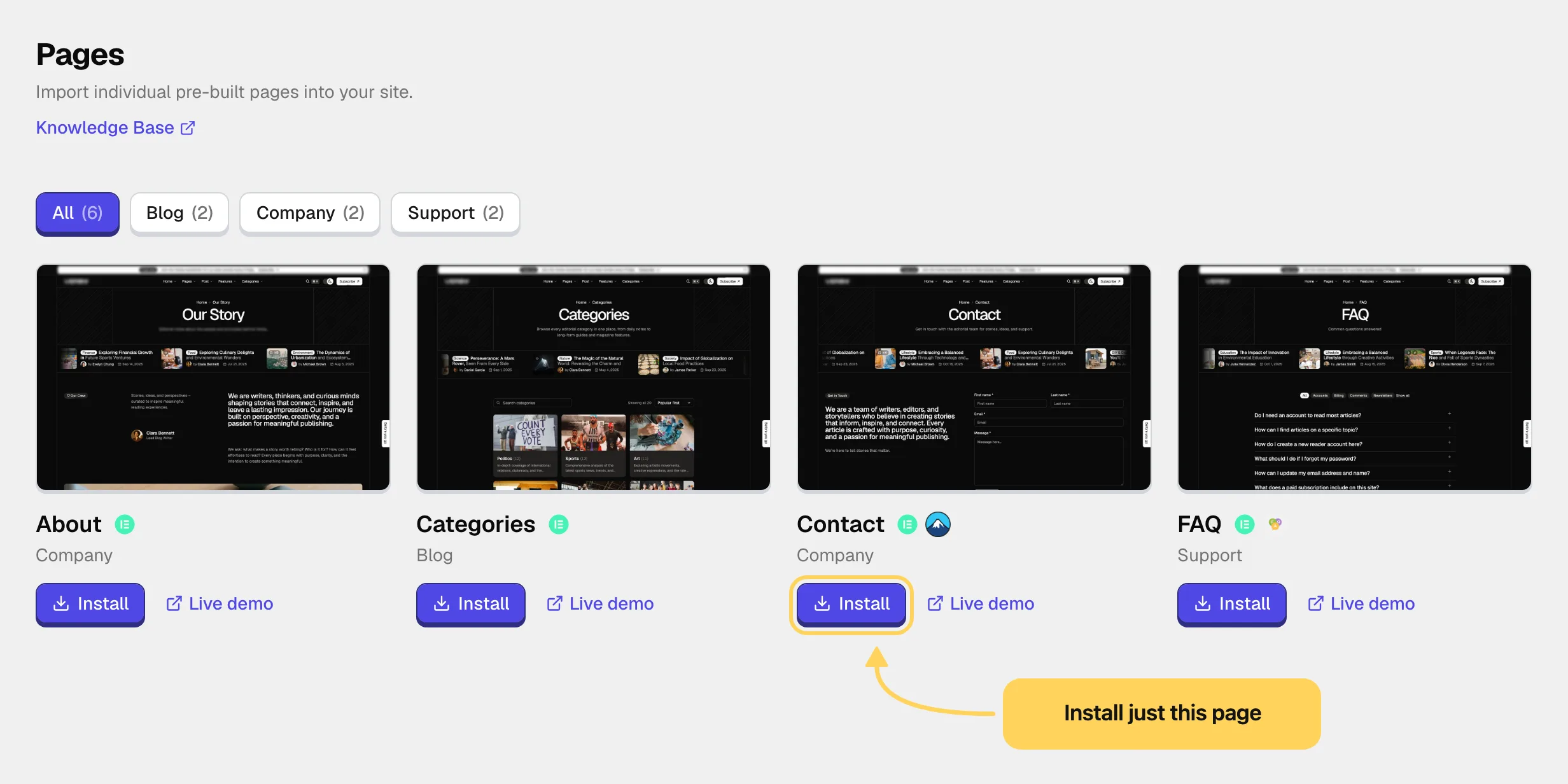
Choose a page and press Install
The import window opens with the page's preview on one side and its details on the other. A premium page downloads first.
Check what the page needs
If the page depends on plugins or integrations that are not set up yet, the window lists them before anything else. The import installs most of them itself, and anything it cannot install is marked for you to set up. Press Continue.
Check the parts, then start
Expand Import everything to see every part the package carries, each with a checkbox. For a page, the parts are the page and its media. If a package ever lists a global part such as Theme Options, Customizer Settings or Site settings, untick it and the page still comes in on its own. Press Start Import.
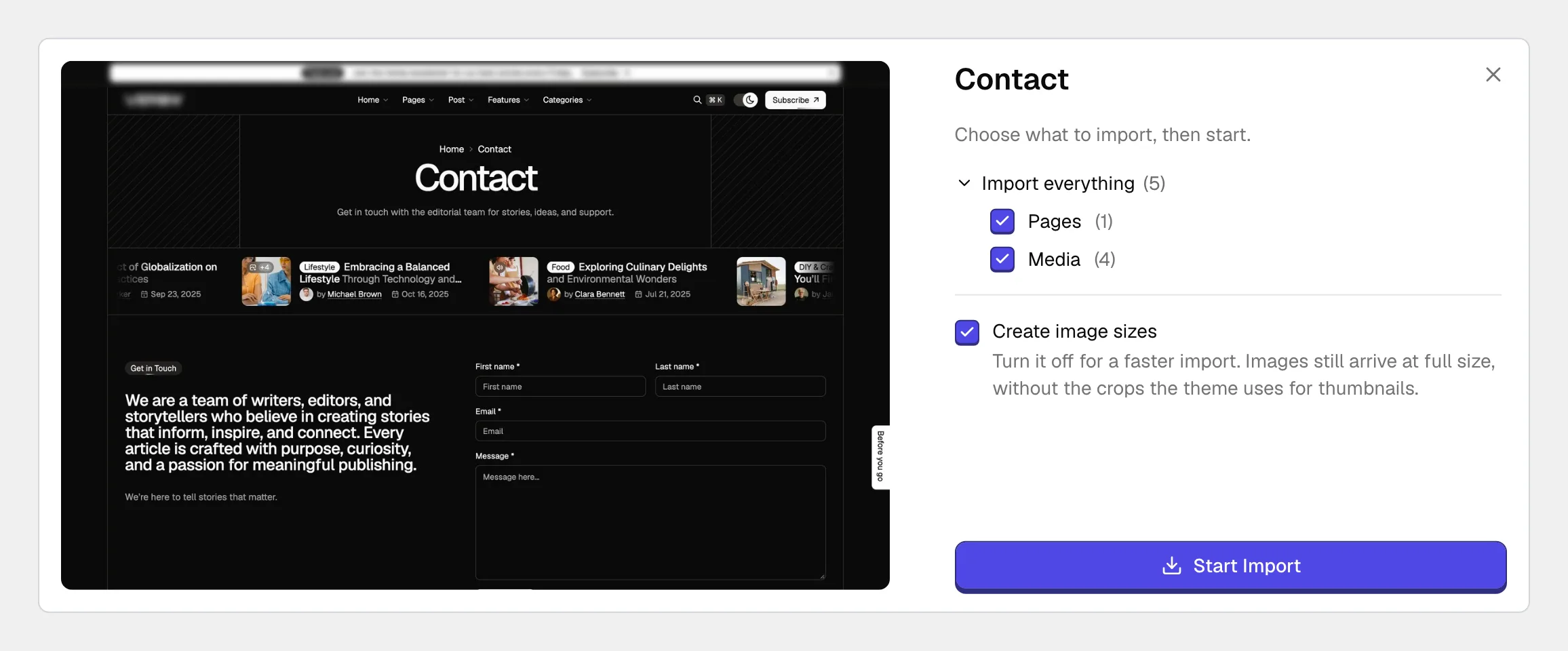
Decide what happens to a page with the same address
If your site already has a page at the same address, the window stops and asks: Overwrite replaces your page, Keep both adds the imported one beside it under a new address, and Cancel stops. Choose Keep both unless you mean to replace your page.
Open the result
When the import finishes, View website opens the site and Back to admin closes the window. The page is in PagesAll Pages, and the card in the gallery is marked Imported.
#What stays as it was
With no global part ticked, none of these change:
- your Theme Options and Customizer settings, which hold colors, typography and layout
- your fonts
- your menus, since the page is not added to any of them
- your widget areas
- your front page and blog page, set in SettingsReading
To show the new page in the navigation, add it to a menu yourself.
#Free and premium pages
Pages come with the same split as demos. The Pages section is part of the free companion plugin as well as the Pro plugin, and pages from free demos install with no license. Pages built on Pro features install with the Pro plugin and an active license, and the gallery marks which is which before you choose. The importer is covered in more depth in How demo import works.
#Afterwards
Replace the demo text, images, contact details and links. They are placeholders, and visitors read them as placeholders. If a section of the page looks empty, check that every plugin and integration the window listed is active.
#Common questions
Can I import the same page twice?
Yes. The second time, the window tells you the page already exists. Keep both gives you a second copy at a new address, and Overwrite replaces the first one with a fresh import.
Will it change my homepage?
Not unless Site settings is among the ticked parts. The front page is a site setting, and a page on its own does not change it. Setting the new page as your homepage is a separate choice in SettingsReading.
Can I take pages from a demo I did not install?
Yes. The Pages section lists pages on their own, with no link to which demo you imported, if any.
The Pages section says no pages are available
The section lists what the demo catalog offers for your theme. With the Pro plugin, the Refresh button at the top of the section reloads that list. If it is still empty, run a full demo import with only the parts you need. See Importing a demo site.
The page came in looking wrong
Check that every required plugin and integration is active, then clear any page cache and look again in a private window. If it still looks broken, Demo import problems covers what each symptom points to.
#Still stuck
Open a support ticket and say what you tried and where it stopped. Your product, your domain, a screenshot and the exact message you saw are usually enough to settle it in one reply.
Last updated
