
Deleting a theme takes a minute. Deciding what happens to its settings and its license takes a little longer, and one of the options cannot be undone, so read this before clicking.
#What deleting a theme actually removes
Only the files. Deleting the theme or the Pro plugin in the usual way leaves everything else where it was:
| Stays after deleting | Why |
|---|---|
| Posts, pages, media, menus, categories, users | They belong to WordPress, not to the theme |
| Content brought in by a demo import | Once imported, it is ordinary WordPress content |
| Theme settings, integration and font settings | Kept on purpose, so a reinstall picks up where you left off |
| The license activation | It is recorded on our server and freed separately |
So if you delete the theme and install it again later, every setting comes back exactly as it was, unless you chose to erase them with one of the two tools described below.
Deleting the theme does not free the license slot.
The activation lives on our server, not in the files. Deactivate the license first, or release it from your Hub account afterwards.
#The order to do it in
Take a backup
A full backup of the files and the database. It costs a minute and it is the only way back from any of the steps below.
Deactivate the license
On the theme's license page, while the theme dashboard still exists. The slot becomes free in your Hub account, ready for another site.
Decide what happens to the settings
Leave them, if you might come back. Turn on Remove everything when uninstalling, or press Reset Data, if you want nothing left behind. Both are explained below.
Switch to another theme
In AppearanceThemes. WordPress will not delete the theme that is currently active.
Delete the Pro plugin
In Plugins, deactivate it, then click Delete. On the free edition, do the same with the companion plugin.
Delete the theme
In AppearanceThemes, open the theme's details and click Delete.
The order matters because the theme dashboard disappears with the theme, and the deactivate button, the uninstall switch and Reset Data all live there. If the theme is already gone, release the license from your Hub account instead.
#Remove everything when uninstalling
In the theme dashboard, open Preferences. The Advanced section has a switch called Remove everything when uninstalling. It is off by default.
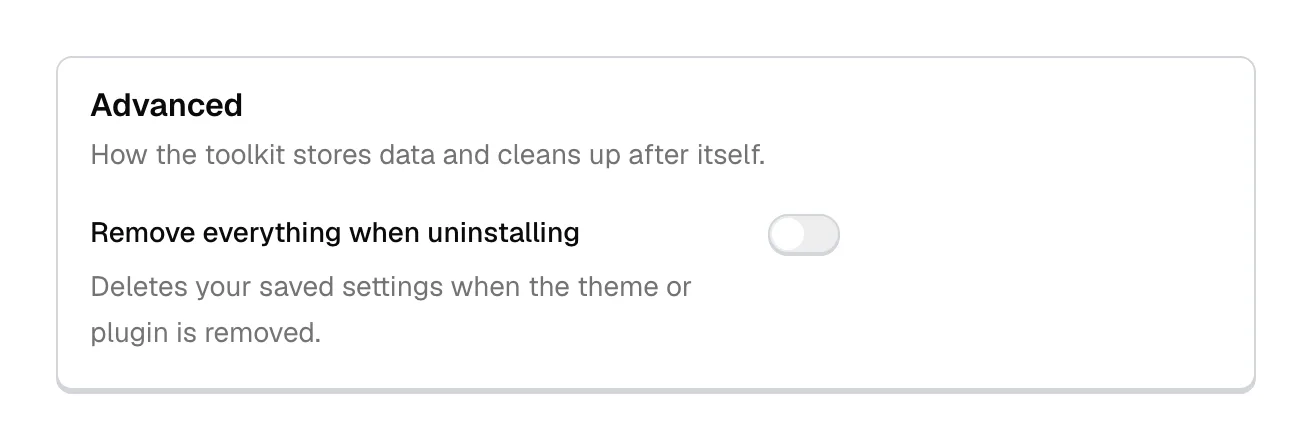
When it is on, deleting the Pro plugin or the companion plugin from the Plugins screen also deletes the settings the framework saved:
- theme options, Customizer settings and font settings
- integration settings
- the license record on this site
- demo import history, notifications, diagnostics history and cached data
Your posts, pages, media and imported demo content stay.
Three details decide whether it does what you expect:
- It runs when the plugin is deleted from the Plugins screen. Deleting the plugin folder over FTP or the hosting File Manager skips it, because WordPress only runs a plugin's cleanup when it deletes the plugin itself.
- Deleting only the theme does not trigger it, even though the note under the switch mentions the theme. WordPress runs no cleanup code when a theme is deleted, so the settings stay until the Pro or companion plugin is deleted.
- It does not deactivate the license on our server. Deactivate first, or the slot stays in use until you release it in Hub.
If the switch stays off, which is the default, deleting and reinstalling the theme and plugin changes nothing about your data.
#Reset Data
At the bottom of the same Preferences card, under a divider below the Advanced settings, is the Reset Data block with its button.
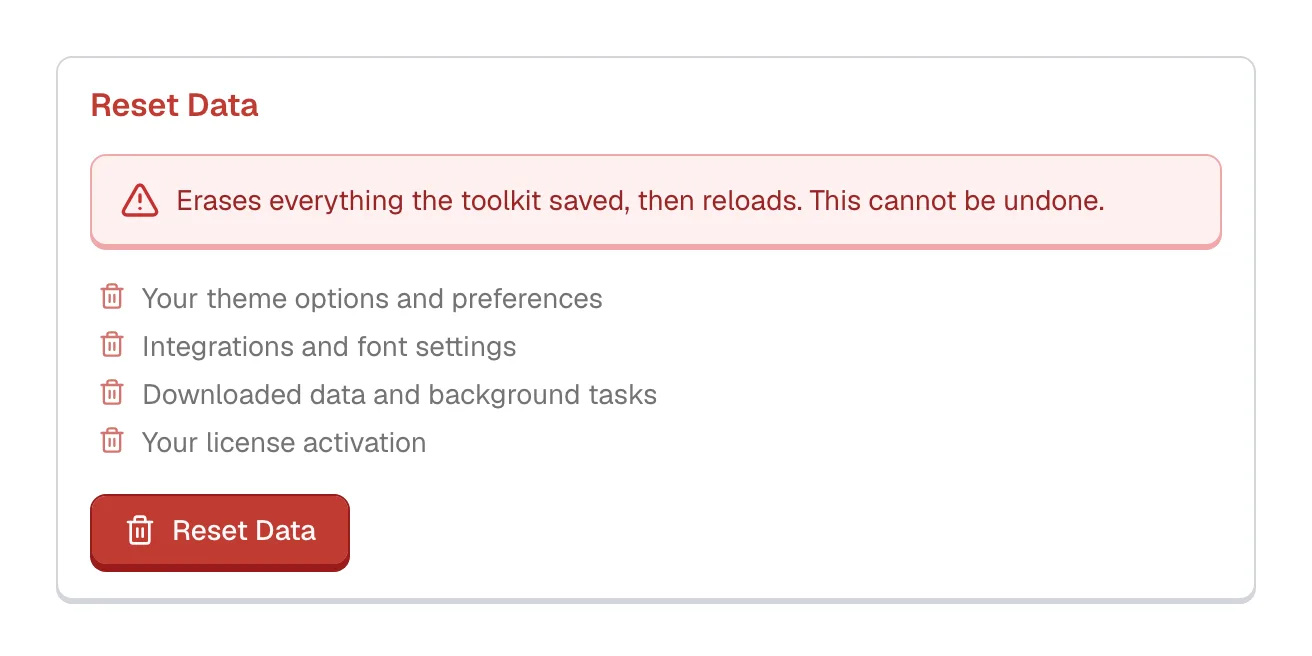
The switch above waits for the plugin to be deleted. Reset Data does not wait: it erases the settings the moment you confirm, then reloads the page. It removes your theme settings, integration and font settings, downloaded data and background tasks, and the license activation record on this site. It does not touch posts, pages, media or menus.
Reset Data cannot be undone.
There is no trash and no automatic backup. The browser asks once, "This erases everything the toolkit has saved, then reloads the page. You cannot undo it. Continue?", and that dialog is the only safeguard.
Use it before deleting the theme for good, before handing the site to a new owner, or to start over after an experiment. Do not use it to fix a problem: it erases the configuration that would have shown what went wrong.
#What to do in your situation
A refund ends your right to use the item. Under the Refund Policy, the license for that purchase is revoked, the product comes off every site it was installed on, and updates and support end with it. Removing it yourself is part of the refund.
- Take a backup of the site.
- Switch the site to another theme and check it works.
- Delete the Pro plugin and the theme from every site that uses them.
- Request the refund as the policy describes.
After the refund, the license stops working at the site's next license check, and the Pro features switch off wherever the item is still installed. See Policies, support terms and refunds.
Your content survives a theme switch, while the layout, widgets and theme settings do not carry over to the new theme. Read what to expect first:
- Take a backup.
- Deactivate the license, so the slot is free for your next site.
- If you might come back, export your theme settings to a file from the theme dashboard (Tools, Import / Export).
- Activate the new theme and check the site.
- Delete the Pro plugin and our theme when you are sure.
Do not delete the theme and do not press Reset Data. Deleting and reinstalling does not reset anything, because the settings survive, and Reset Data destroys the evidence of what went wrong.
- Work through How to diagnose a problem and report a bug.
- For a white screen or critical error, see PHP errors and the white screen.
- If an update caused it, roll back to the previous version.
- If it is still broken, open a support request.
- Take a backup.
- Deactivate your license, so its slot stays with you.
- Press Reset Data if the site should start again from default settings.
- Activate the license the site will run on from now.
#Common questions
Will my posts disappear?
No. Deleting the theme, the uninstall switch and Reset Data all leave posts, pages, media and menus alone.
I deleted the theme and want it back. Are my settings gone?
Not unless you pressed Reset Data, or turned on Remove everything when uninstalling and then deleted the Pro or companion plugin. Otherwise, install the theme and plugin again and the settings are there.
Do I have to delete the Pro plugin too?
Not strictly, but a Pro plugin with no theme to extend does nothing, so remove both. After a refund, both have to go.
How do I release the license after deleting the theme?
In your Hub account, on the license itself. The button inside the theme went with the theme.
Can I keep using the theme after a refund if I do not update it?
No. The Refund Policy revokes the license with the refund, the product has to come off your sites, and the Pro features stop at the next license check.
The delete button is missing
WordPress hides it for the active theme, so switch to another theme first. If it is still missing, your host has disabled file changes from the admin, and the folder comes off over SFTP instead. Deleting that way does not run the uninstall cleanup.
#Still stuck
Open a support ticket and say what you tried and where it stopped. Your product, your domain, a screenshot and the exact message you saw are usually enough to settle it in one reply.
Last updated
