
Elementor widgets - Exquil
Exquil Pro adds its own Elementor widgets for salon and shop pages. In the Elementor editor they are grouped under JK Widgets in the widgets panel, and they appear while Exquil Pro is active and licensed. Before you build pages, check Elementor settings to configure once.
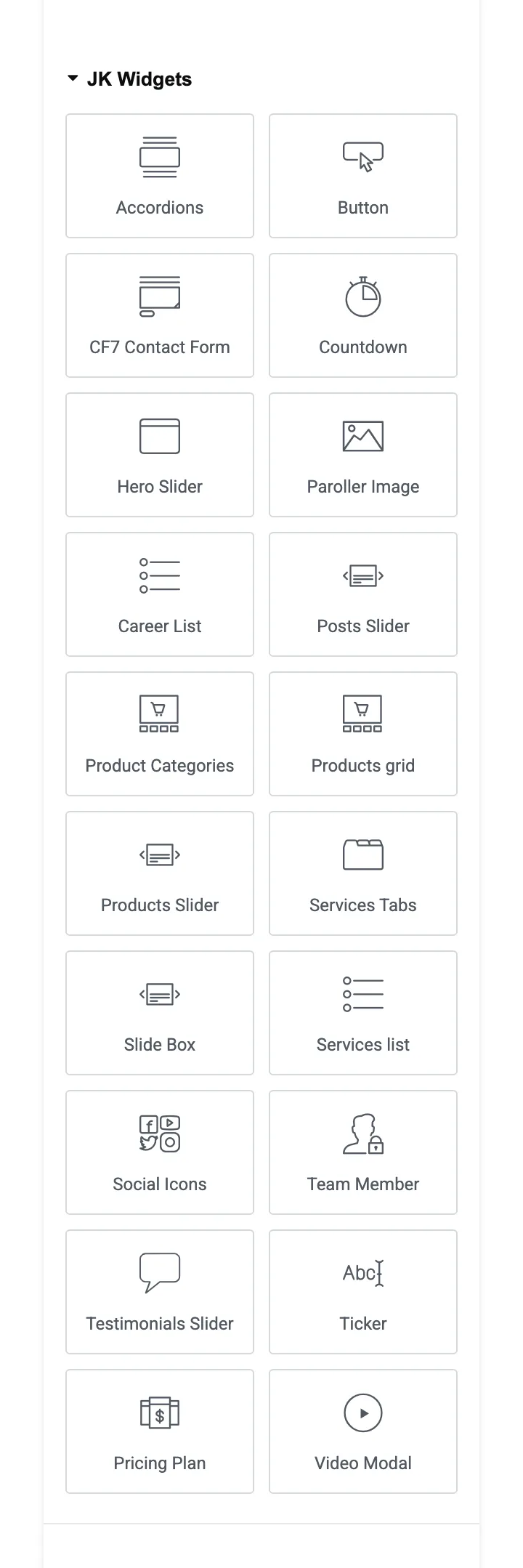
#Salon
- Services list
Services from one service category, as a list.
- Services Tabs
Services grouped by service category, one tab per category.
- Pricing Plan
A price card with features, a button, and an optional best offer label.
- Team Member
A photo, name, position, and social links.
- Testimonials Slider
Client quotes in a slider.
- Career List
Your open positions, see Services, career positions, and brands.
#Shop
- Products grid
Products in a grid with a choice of style, columns, and sorting.
- Products Slider
Products in a slider.
- Product Categories
Product categories with their images.
- Brands List
Brand logos from ProductsBrands.
#Content and layout
- Hero Slider
A full-width slider with a title, a subtitle, and two buttons per slide.
- Slide Box
A box with a logo, a background image, a title, and text.
- Posts Slider
Blog posts in a slider.
- Paroller Image
An image that moves at its own speed while the page scrolls.
- Video Modal
A play button that opens a video in a popup.
- Ticker
A line of text or images that scrolls across the page.
- Logo Slider
Partner or press logos in a slider.
- Accordions
Collapsible questions and answers.
- Countdown
A timer counting down to a date, for a sale or an opening.
- Button
A button in the theme's style.
- Social Icons
The social profiles set in Theme Options: branding, header, and footer.
- CF7 Contact Form
A Contact Form 7 form in the theme's style. It needs the Contact Form 7 plugin; pick the form in the widget.
Last updated
Was this article helpful?

On this page
