
This page covers the LQIP Media integration: the settings behind blurred image placeholders and lazy loading in our themes. For what lazy loading and image placeholders are in general, and why they help, read blurred image placeholders and lazy loading, explained first.
#What it does
The integration takes over how the theme outputs its images. Every image a theme template renders through it gets:
- a tiny blurred preview in the image slot, shown until the full picture has loaded
- width and height attributes, so the slot keeps its size and the text around it does not jump
- browser lazy loading, so images further down the page wait until the visitor gets near them
- an AVIF source in front of the original, when an AVIF version of that image size already exists on the server
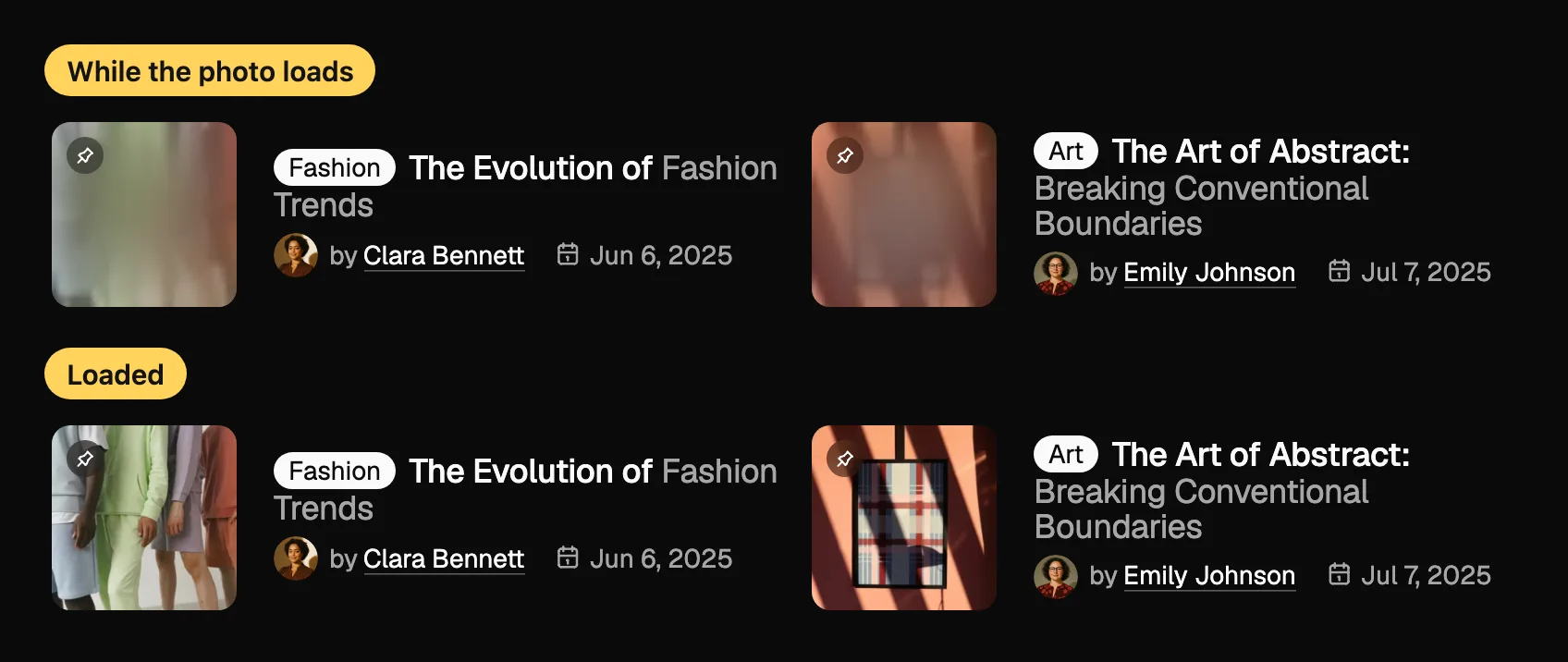
The preview costs almost nothing next to the photo it stands in for.
It is self contained: no third party plugin and no external service. The integration does not create AVIF files and does not compress anything; it only decides how and when the existing files load.
It handles the images the theme draws, not the images inside your post text.
Which images go through it is decided by the theme's templates. An image block you placed inside the content of a post is left to WordPress, which has added its own lazy loading to content images since version 5.5. The block editor always shows plain images, because the script that reveals a preview does not run there.
#Where the settings are
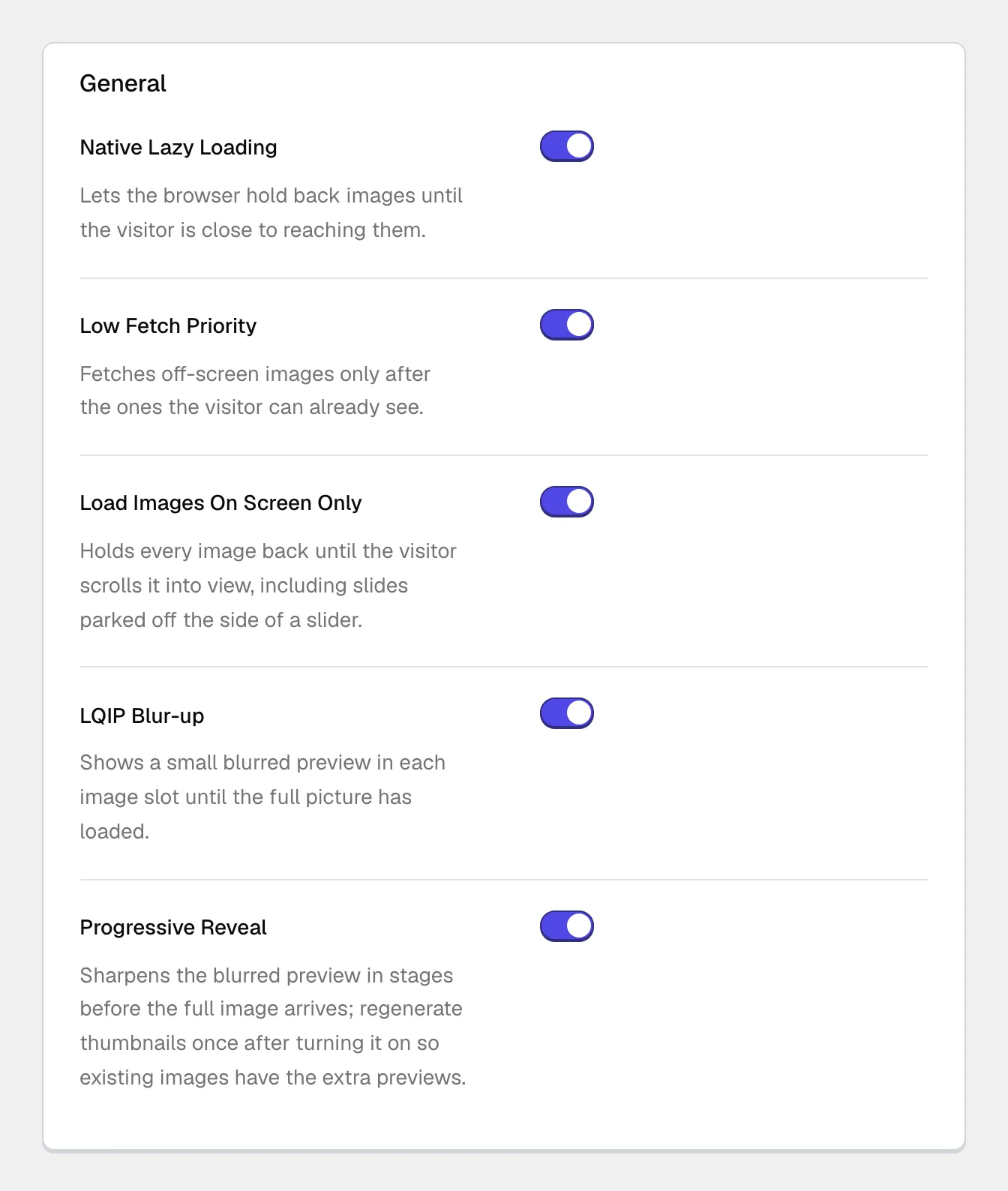
Open Theme Options and find the LQIP Media page in the Integrations group at the bottom of the sidebar: Theme OptionsIntegrationsLQIP Media. It holds one group, General, with five switches. All five are on by default. Save with Save Changes.
Installing the integration and turning it on or off happens on the Integrations page of the theme dashboard, covered in installing and managing plugin integrations.
#The settings
Lets the browser hold back images until the visitor is close to reaching them. The next two settings only appear while this one is on.
Marks lazy images as low priority, so the browser fetches the images already on screen first. A template that needs a particular image straight away can still ask for it.
Holds every image back until it is actually in view, including slides parked off the side of a slider. Browser lazy loading only measures distance, so without this a whole slider row downloads as soon as the section comes near. This setting depends on JavaScript, see below.
Shows a small blurred preview in each image slot until the full picture has loaded. The preview is a 32 by 32 pixel copy of the image, stored as its own image size.
Sharpens the preview in stages, through 96 and 240 pixel copies, before the full image arrives. It only appears while LQIP Blur-up is on.
#Regenerate thumbnails once after turning previews on
The preview copies are WordPress image sizes, and WordPress creates image sizes when a file is uploaded, not later. An image uploaded before LQIP Blur-up or Progressive Reveal was switched on has no preview copy, so it loads normally with no blur in front of it.
Regenerate thumbnails once after switching either of those settings on, and older images get their previews. Why your images look blurry, cropped, or wrong explains image sizes and regeneration.
#When to switch parts of it off
- You want to stop the integration completely
Switch LQIP Media off on the Integrations page of the theme dashboard. While it is off, the theme outputs its plain images: no blurred previews, no reveal script, no on-screen-only loading and no extra preview sizes for new uploads. Your five settings are kept, so switching it back on restores them.
- Another plugin already lazy loads your images
An image optimization or caching plugin with its own lazy loading acts on the same images, and two mechanisms on one image get in each other's way. The usual symptoms are images that stay blurred, never appear, or flash. Keep exactly one: turn off lazy loading in that plugin, or switch off Native Lazy Loading here.
- A plugin delays JavaScript until the visitor interacts
Some optimization plugins hold every script back until the first scroll or tap. The script that reveals images waits too, so images stay blank or blurred until then. Exclude
lqip-reveal.jsfrom that delay, or switch off Load Images On Screen Only.- The site has to show images without JavaScript
With Load Images On Screen Only on, an image is sent without its address and the integration's script fills the address in when the image comes into view. A browser or tool that does not run JavaScript never gets the image. Switch the setting off and images fall back to ordinary browser lazy loading, which works without scripts.
#What it needs
- The Pro plugin and a license that includes integrations, like every integration (see the note below).
- WordPress 6.0 and PHP 8.1 or newer, which is the integration's own minimum. Your theme's server requirements apply on top of that.
- A theme that renders its images through the integration. The blur and the fade are drawn by the theme's own styles.
- JavaScript in the visitor's browser for the blur-to-sharp reveal and for on-screen-only loading.
This integration is licensed with the theme, not on its own.
Integrations are premium functionality for customers running a Pro license of one of our themes. They are written against our themes and expect them, and we cannot support or take responsibility for what one does inside somebody else's theme. See how theme integrations work.
#Common questions
Some images have no blurred preview
They were uploaded before the preview sizes existed. Regenerate thumbnails once and they get one. Until then they load normally, just without the blur.
Images stay blurred or never appear
Look for a second lazy loading mechanism first: turn off the other plugin's lazy loading, clear the page cache and reload. If that changes nothing, check for a plugin that delays JavaScript. To confirm the integration is involved at all, switch it off on the Integrations page and reload: the theme then shows plain images. If images still do not appear with it on, open a support request with the page address and the list of optimization and caching plugins on the site.
Does it make my image files smaller?
No. It changes when and in which format images load. It uses an AVIF file if one already exists but creates none, and compressing files is a job for an image optimization plugin.
Will search engines still see my images?
With Load Images On Screen Only on, the image address is filled in by a script. Google renders JavaScript and documents how it handles lazy loaded content, but a tool that reads raw HTML without running scripts sees no image address. If that matters for your site, switch the setting off.
Does it work on background images?
No. It handles images the theme renders as images, and a CSS background is not one of them.
Why are images not lazy loaded in the block editor?
That is deliberate. The script that reveals a preview does not run inside the editor, so a placeholder there would never clear, and the editor gets the plain image instead.
#Still stuck
Open a support ticket and say what you tried and where it stopped. Your product, your domain, a screenshot and the exact message you saw are usually enough to settle it in one reply.
Last updated
