
Block styles - Auno
A block style is a ready look for a core block, picked in the Styles panel of the block's settings instead of typed as a CSS class. Select a block, open the Styles tab in the sidebar and click the style. Auno adds 45 of them; the patterns already use them, so you meet most of these by editing a pattern. Each style is also editable for the whole site at AppearanceEditorStylesBlocks.
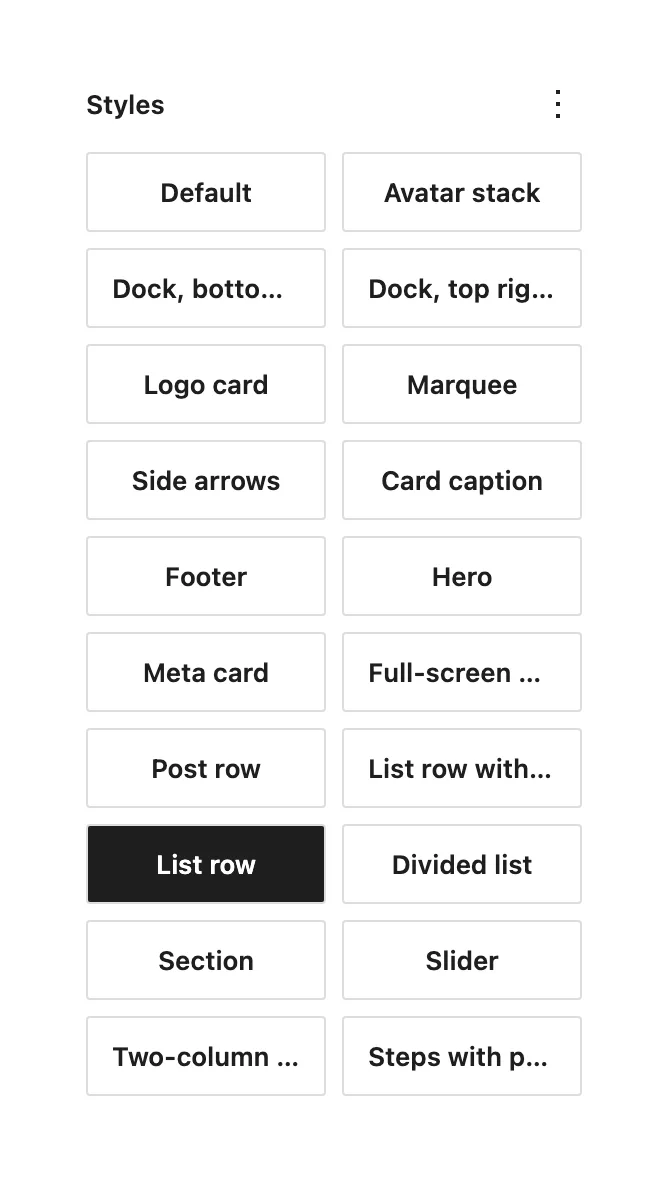
#Sections and layout
- Section (Group)
The vertical spacing of a page section. Reveal animations start one section at a time.
- Hero (Group)
The first screen of a page, with the glow behind it.
- Footer (Group)
Spacing and type of the footer.
- Full-screen message (Group)
Centers its content between the header and the footer, as on the 404 page.
- Dock, top right / Dock, bottom left (Group)
Fixes the group to a corner of the window. The top right dock holds the color scheme switch; the bottom left one holds the contact line and the local time, and hides below 1200px.
#Lists and rows
- List row (Group)
A row with a divider, used in Stack, Services and Process.
- List row with action (Group)
A row that is a link as a whole, with an arrow on hover, used in Highlights.
- Divided list (Group, Post Template)
Lines between the rows of a list.
- Two-column list (Group)
A two-column grid of links, used in Stack.
- Post row (Group)
A post in a list: thumbnail, title and meta.
- Steps with photo (Group) and Step photo (Image)
The Process section: steps on the left, the active step's photo beside them. Each step is a list row with its own image set to Step photo; duplicate a row to add a step.
#Cards and people
- Card caption (Group)
The line under a cover: title and year, with an arrow on hover.
- Meta card (Group)
An outlined card with a label over a value, as in Client, Year and Timeline on a project.
- Logo card, Marquee and Avatar stack (Group)
The Clients section: logos moving in an endless strip, and avatars that overlap.
- Slider (Group)
The client feedback slider, which moves on by itself every three seconds.
- Side arrows (Group)
The fixed previous and next arrows at the sides of a post or a project.
#Images
- Cover and Large cover (Image, Featured Image)
A cover with a small or a large corner radius.
- Thumbnail (Featured Image, Image)
A 72px square, used in post rows.
- Avatar (Image)
A round photo.
- Glyph (Image)
An icon at its own size, drawn light on the dark scheme and turned dark on the light one.
- Logo (Image)
A client or service logo in one color: white on the dark scheme, black on the light one, whatever colors the file has.
- One-colour mark (Image)
For a mark already drawn in white: it stays white on the dark scheme and turns dark on the light one.
#Text, buttons and links
- Item title (Paragraph, Heading, Post Title)
The title of a list item, in a heavier weight.
- Label (Paragraph, Heading)
A small uppercase label, as above the meta of a post.
- Muted link (Paragraph, Read More, Post Terms)
A quiet link with an arrow that turns on hover, as in View all.
- Quote (Paragraph)
The text of a testimonial.
- With post count (Heading, Query Title)
Adds the number of posts after a heading, as in Blog (12) and Works (12).
- Secondary, Outline and Small (Button)
Button variants with the arrow tile; Small is the compact one.
- Icons only (Social Icons)
Social links as matching outline icons.
- Topics (Categories)
Categories as a list marked with an arrow.
- FAQ box (Details)
A box that opens smoothly, its plus turning into a minus.
#Listings and pagination
- Works grid (Post Template)
Two columns of project cards, one on phones, with a zoom on hover.
- Switchable views (Query)
Adds the list, grid and one-column view buttons beside the listing's title. See the blog: listings, views and pagination.
- Numbers, no reload / Load more / Infinite scroll (Pagination)
How the next page of posts arrives: numbers that swap the posts in place, a button, or more posts as the reader scrolls. Without a style, the numbers open ordinary pages.
- Boxed and Plain (Page Numbers)
Page numbers in square boxes, or as plain text with the current one underlined.
#Questions
Can I add a CSS class instead?
You can, under Advanced in the block settings, but a style is the supported route: it shows in the editor, survives updates and is editable in Styles.
A style is missing from a block's panel
Each style belongs to the blocks named next to it above. List row shows on a Group, not on a Paragraph, for example.
Last updated
Was this article helpful?

On this page
