
Events Manager
The Events Manager is the heart of Cronix PRO - your central interface for viewing and controlling every WP-Cron event registered on your site.
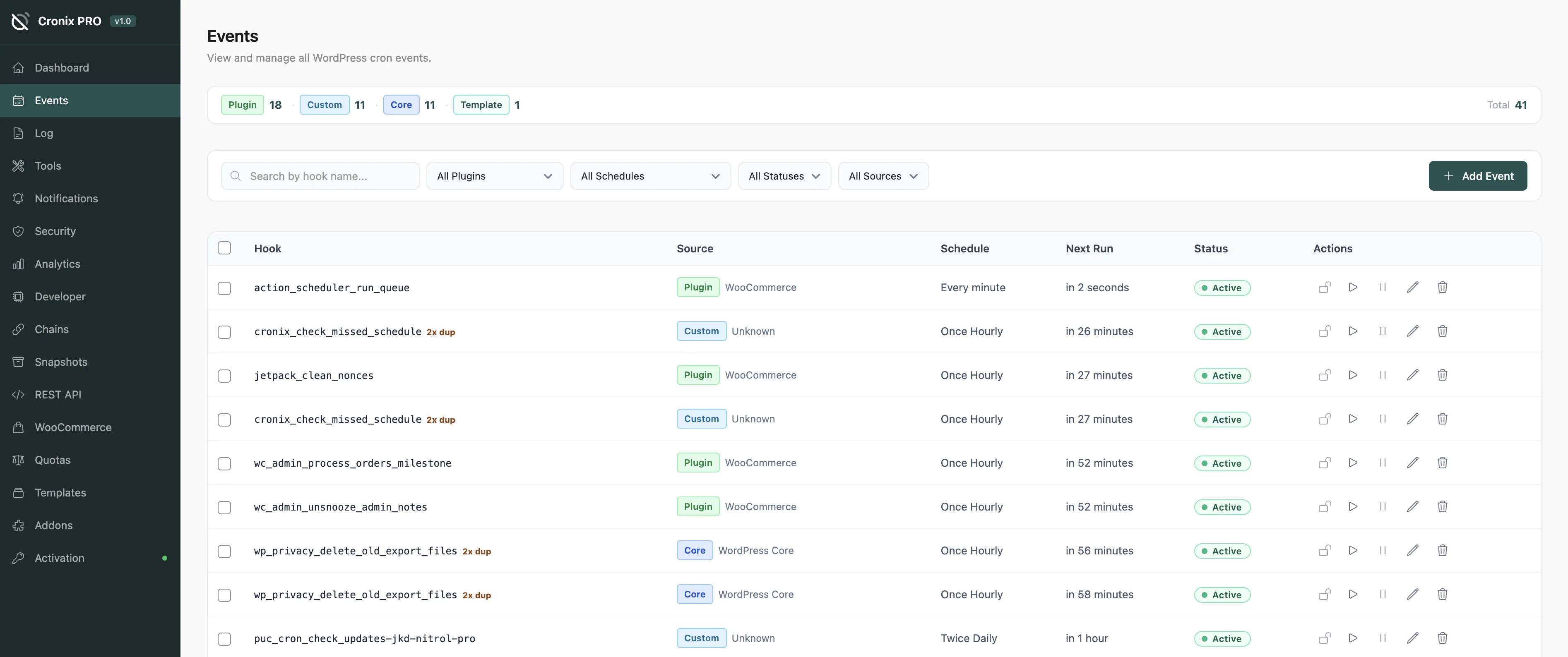
#Event List
Each row represents one registered cron hook. The columns give you everything at a glance:
Column | Description |
|---|---|
Hook | The cron hook name |
Schedule | Recurrence interval (hourly, daily, custom, or one-time) |
Next Run | When the event is next due to fire |
Last Run | When it last executed (requires Execution Tracking) |
Status | Active, Paused, Overdue, or Locked |
Source | Which plugin registered the hook |
Arguments | The arguments passed when the event fires |
#Event Actions
Hover over any row to reveal the action buttons:
Run Now - fire the event immediately regardless of schedule
Pause - suspend the event without deleting it; it will not run until resumed
Resume - re-enable a paused event
Lock - prevent the event from being modified or deleted until unlocked
Edit - change the schedule, next run time, or arguments
Delete - remove the event from the cron schedule
Use Pause instead of Delete when debugging. Paused events are preserved and easy to resume. Deleted events must be re-registered by the originating plugin.
#Bulk Actions
Check the boxes on the left to select multiple events, then use the Bulk Actions dropdown:
Pause selected
Resume selected
Run selected now
Delete selected
Bulk delete is irreversible. Events registered by plugins will return on the next page load or activation, but custom events are gone permanently.
#Filtering & Search
Search - filter by partial hook name
Status - All, Active, Paused, Overdue, Locked
Source - filter by the plugin that registered the event
Schedule - filter by recurrence type
#Overdue Indicator
Events that have missed their scheduled time are highlighted with an overdue badge. The threshold (default: 5 minutes) is configurable in Settings > General.
Last updated
Was this article helpful?

On this page
