
Plugins Fabula works with - Fabula
This page lists the third-party plugins that Fabula's own code recognizes, and what it does with each one. A plugin that is not listed here can still run next to Fabula, but the theme does nothing special for it. Who is responsible for a plugin you install is covered in Third party plugins and where responsibility sits.
Each entry says whether the behavior belongs to the free theme or needs the Pro plugin. Theme Options settings exist only with Pro.
#Shop
#WooCommerce
- Free theme
Declares WooCommerce support, including the product gallery zoom, lightbox, and slider, and loads a WooCommerce stylesheet.
- Pro plugin
Adds Fabula's markup to the shop: a cart remove icon with an accessible label, cart thumbnails at the image's own size, placeholders in the billing fields of the checkout, the product tabs inside the product summary, arrow icons in the shop pagination, and 768 by 768 cropped shop thumbnails. It removes the WooCommerce breadcrumb from the shop pages.
- Cart in the header
With Pro, the Enable Cart setting on the Fabula ProTheme OptionsNavigation page adds the cart to the header and a cart panel.
- Page weight
With Pro, WooCommerce styles and scripts do not load on pages that are not shop pages. A page counts as a shop page when it is the shop, a product, the cart, the checkout, the account page, or when it contains a WooCommerce shortcode such as
[products].
#TI WooCommerce Wishlist
Pro treats the wishlist page of this plugin as a WooCommerce page, so the shop layout applies there too.
#Page building
#Elementor
The free version of Elementor is enough. Pro adds these in Elementor, and none of it exists without Pro:
- Widgets
The 28 widgets described in Elementor widgets, under the JKD Widgets category.
- Section settings
A JKD Settings group on the Style tab of a section, with the switches Default Background and Primary Background.
- Animations
Extra entrance animations in the animation list, such as
Fade In,Fade Up, andZoom In.- Template shortcode
Without Elementor Pro, the shortcode
[elementor-template id="123"]prints the Elementor template with that ID, and the template list gets an ID column. When Elementor Pro is active, Pro leaves this to Elementor Pro.
The free theme's stylesheets include styles for Elementor's own elements.
#SEO and content
#Yoast SEO
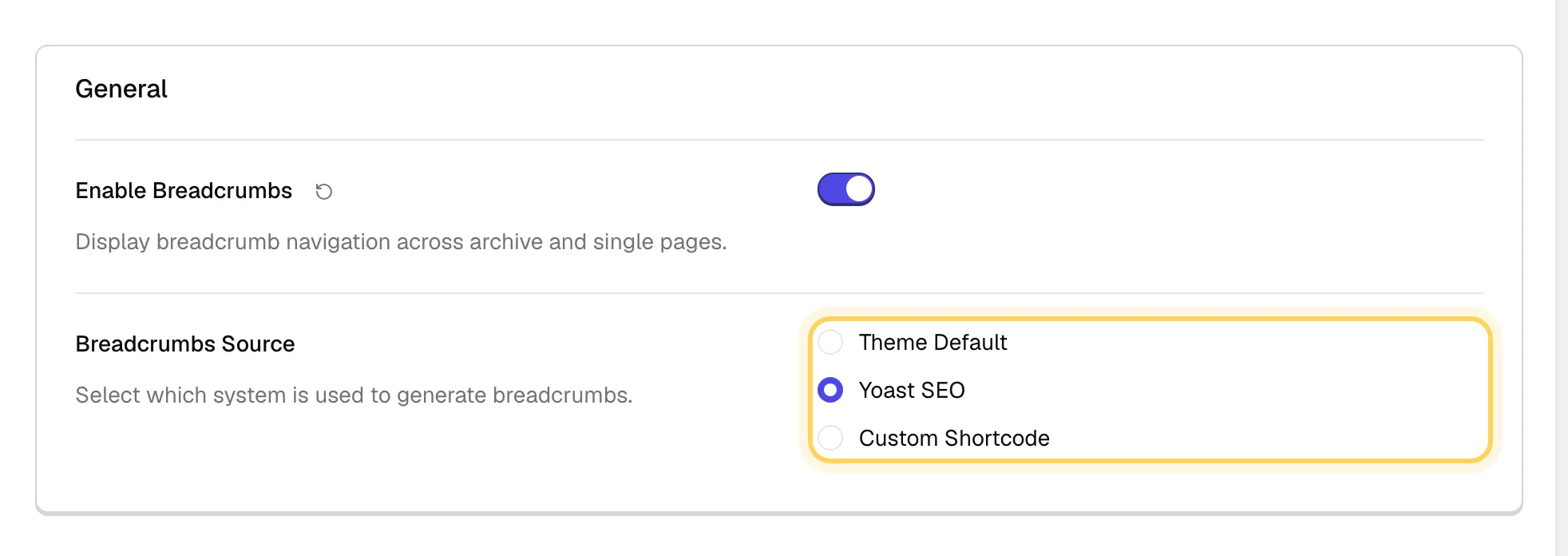
Pro uses Yoast SEO for breadcrumbs. On the Fabula ProTheme OptionsGeneral page, Enable Breadcrumbs turns breadcrumbs on, and Breadcrumbs Source picks Theme Default, Yoast SEO, or Custom Shortcode. The default is Yoast SEO. With that source, Pro replaces Yoast's separator with Fabula's arrow icon.
#Easy Table of Contents
The table of contents on single posts lives in Pro. On the Fabula ProTheme OptionsSingle Post page, on the General tab:
Shows the table in the left column of single posts.
native lets Fabula build the table, and shortcode prints a shortcode from a plugin instead.
The shortcode to print. It appears when the source is shortcode, and [ez-toc] is the one Easy Table of Contents uses.
When Easy Table of Contents is active, the table is on, and the page is a single post, Pro switches on Easy Table of Contents' own generate link ids option. That gives the headings the anchors the table in the sidebar links to. The native table also skips any heading inside an element with the class ez-toc-exclude-headings, so content you already marked for Easy Table of Contents keeps working.
#Co-Authors Plus
When Co-Authors Plus is active, Pro reads the co-authors of a post in the post meta. A single guest author appears with their own name and avatar.
#AddToAny
The share item in the post meta uses AddToAny's own link classes and share address, so it works with AddToAny's button. A custom share button can use the Share Shortcode setting on the Fabula ProTheme OptionsSingle Post page instead.
#Forms and marketing
#Contact Form 7
Pro's CF7 Contact Form widget shows one of your forms in Elementor. Fabula's stylesheets also include styles for Contact Form 7 forms.
#Mailchimp for WordPress
Pro's M4WP Form widget shows one of your forms in Elementor, in Style 1 or Style 2. Fabula's stylesheets also include styles for these forms.
#Smash Balloon Instagram Feed
Pro's footer can show an Instagram feed. On the Fabula ProTheme OptionsFooter page, Enable Instagram Section turns the section on and Instagram Shortcode takes the feed's shortcode. The section prints only when the Instagram Feed plugin is active.
#Boxzilla
Pro leaves its Navigation Settings and Footer Settings fields off Boxzilla popups. The Pro stylesheet also includes styles for Boxzilla boxes.
#Members, comments, and cookies
#Paid Memberships Pro
Posts a visitor cannot access show a lock label in the Pro post lists and sliders, and their bookmark button is hidden. The account icon in the header, when you turn on Display Account Icon, leads to your Account URL, then to the WooCommerce My account page, then to the Paid Memberships Pro account page. The free theme's stylesheets include styles for the plugin's pages.
#wpDiscuz and CookieYes
Fabula has no settings for these two. The Pro stylesheet includes styles for wpDiscuz comments, and the theme and Pro stylesheets include styles for the CookieYes banner.
#Translation
#WPML and Polylang
Fabula declares its translatable text in a wpml-config.xml file, in the theme and in Pro:
- Theme
The texts you enter in the Customizer: the section titles, and the call to action badge, heading, text, and button labels and links.
- Pro plugin
The texts you enter in Fabula ProTheme Options, such as the Copyright Notice, the Table of Contents Title, the "Read Also" Text, the footer contact and form titles, the review titles, and the top banner texts. Shortcodes, IDs, CSS classes, and ad image links are left out on purpose.
WPML reads these files directly. For Polylang, the toolkit that comes with Fabula writes a config file in the format Polylang reads when Polylang is active. Both integrations are on by default.
Do these plugins need Pro?
Only the entries that say so. The WooCommerce support and stylesheet, the block patterns, and the plugin styles in the theme's stylesheet are part of the free theme. Theme Options, the widgets, the Elementor features, and the translation of Theme Options texts belong to Pro.
Last updated
Was this article helpful?

On this page
