
Post header styles - Fabula
The header is the top of a post: the featured image, the title, the category, and the author and date. Fabula Pro offers five header styles. You set one for the whole site and can override it on any post. Header styles need the Pro plugin with an active license.
#Set the default style
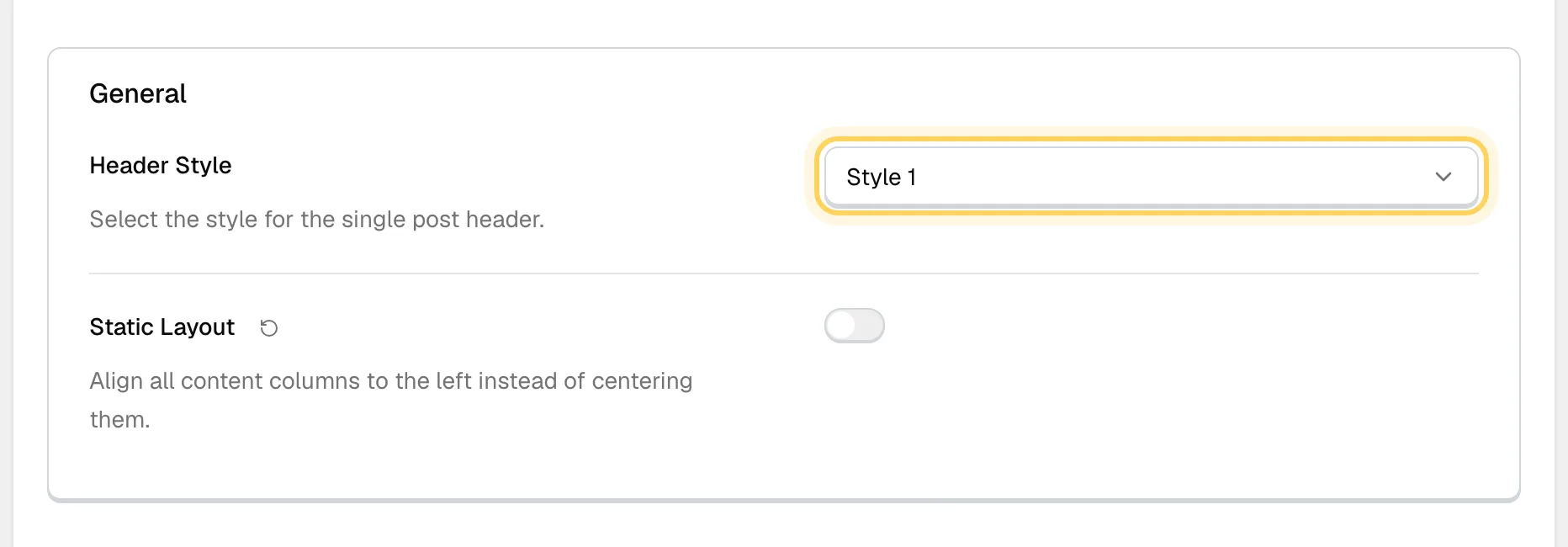
Go to Fabula ProTheme OptionsSingle Post, open the General tab, and choose Header Style (default: Style 1). Every post uses it unless the post says otherwise.
#Override the style on one post
Edit the post and find the Post Settings box. Header Style has these choices:
- Global (use default) (default): The post follows the site-wide style.
- Header Style 1 to Header Style 5: The post uses that style.
#The five styles
- Style 1
The featured image fills the whole header, and the category, title, and meta sit centered over it.
- Style 2
The title block sits left-aligned above the image, and the image follows below it with rounded corners.
- Style 3
The image sits in a rounded box with a dark overlay, and the title block is centered over it.
- Style 4
The header holds the image alone. The title block moves into the content column, left-aligned, above the text of the post.
- Style 5
The header is split in two: the image on one side, the title block on the other. On small screens the halves stack.

#Video and gallery posts
A video post plays its clip in the place of the image, and a gallery post in the Slider layout shows its slideshow there. This holds in all five styles. See Post formats.
Three layouts replace the header and ignore the style: a gallery with Ken Burn, a gallery with Mosaic, and a quote with the Featured layout.
#What the title block holds
The title block is the same in every style. Its parts are switches in Fabula ProTheme OptionsSingle Post on the Meta tab:
The category label above the title.
The look of the label, from Style 1 to Style 6.
The HTML tag of the title, from H1 to H6.
The author's name and avatar.
The author's position under the name.
The publish date.
An estimated reading time in the meta row.
The total number of words, next to the reading time.
The bookmark button beside the meta.
Enable Photo Credits (default: off) is on the Single Post tab. With it on, the caption of the featured image shows under the meta row, with a copyright mark in front of it. Write the credit in the image's caption in the media library.
#Questions
The header image looks blurry or cropped
The header fills its frame, so an image with a very different shape from the frame is cropped to fit. See Why your images look blurry, cropped, or wrong.
Last updated
Was this article helpful?

On this page
