
Menu item options and mega menus - Fabula
Every item in your menu gets a Menu Item Options group with Fabula Pro. It turns a top-level item into a mega menu, a category item into a menu with a panel of recent posts, or any item into one with a label.
#Set the options on an item
Open the menu
Go to AppearanceMenus and expand the menu item you want to change.
Switch on what you need
Use the Menu Item Options fields below, then save the menu.
Check the header
Open your site and hover the item. The header itself must be on. See Menus and the header.
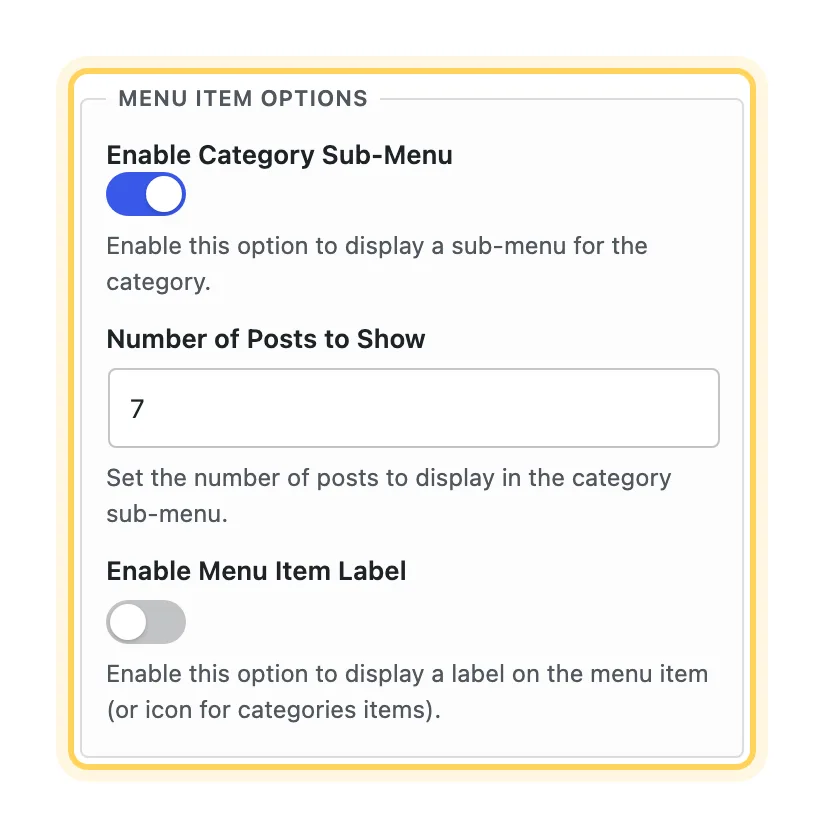
Uses the mega menu layout for this item. It applies to top-level items only.
Opens a panel of posts under a category item.
How many posts the panel loads, from 1 to 100. It appears while Enable Category Sub-Menu is on.
Adds a label to the item, or an icon when the item is a category.
An icon class name. It appears while the label is on.
The label's words. It appears while the label is on.
The label's color. It appears while the label is on.
#How the category sub menu works
The panel belongs to menu items that link to a category and sit at the top level of the menu. A link to a page, or a category inside a drop-down, does not get one.
The posts are not part of the page when it first loads. The first time a visitor moves the pointer over the item, the theme fetches the posts in the background and fills the panel. It fetches once per page view, so the next hover opens instantly.
What each card shows is set at Fabula ProTheme OptionsNavigation, on the Category Sub Menu tab. Everything there is off by default except the title.
Each one adds that detail to the cards.
Style 1 to Style 6. It appears while Show Category Label is on.
The heading level of each card title, H1 to H6.
They appear while Show Post Activity is on.
A category item can also show an icon you set on the category itself. An icon set on the menu item wins over the one set on the category.
#Labels
A label is a small text and icon badge beside a menu item, such as a "New" tag. It shows on items that are not categories. On a category item the same switch adds the icon in front of the name, and the label text is not used.
The free theme has a lighter panel for category items. See Category menu panel and post counts.
Last updated
Was this article helpful?

On this page
