
Custom Animations - Monogram
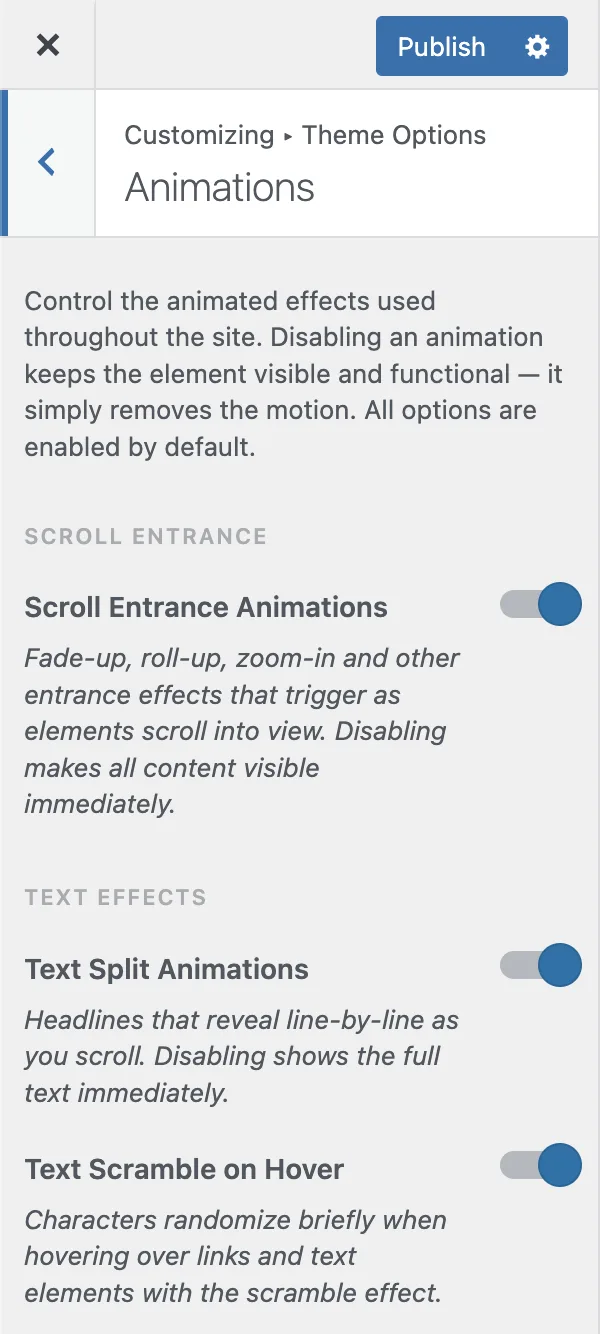
Monogram features a rich animation system powered by GSAP (GreenSock Animation Platform) with ScrollTrigger. All animations are configurable through the Customizer.
#Animation Controls
Navigate to Appearance > Customize > Animations to toggle each animation type independently.
#How Animations Behave
#Desktop vs. Mobile
Most animations are desktop-focused. On mobile devices:
Custom cursor is disabled (touch devices have no hover)
Tilt effects are disabled
Complex scroll animations fall back to simpler fade-in effects
Button scramble and icon ticker are replaced with simple fade animations
#Scroll Entrance Animations
When Scroll Entrance is enabled, elements animate as they scroll into view:
Opacity transitions from 0 to 1
TranslateY moves the element upward into position
ScaleY adds a subtle scaling effect
Animation duration: 0.55 seconds with
power2.outeasingTriggers at 90% viewport offset
Menu items use a staggered animation - each item appears 0.08 seconds after the previous one.
#Body Classes
When animations are disabled, the theme adds CSS classes to the <body> element:
no-scroll-entrance- when scroll entrance is offno-hover-underline- when hover underline is off
You can use these classes in custom CSS to adjust styles when animations are disabled.
#Accessibility
The grain overlay respects the prefers-reduced-motion: reduce operating system setting. When a user has reduced motion enabled in their OS preferences, the grain animation is automatically disabled.
Tip: To quickly disable all visual movement, turn off Scroll Entrance - this single toggle removes the most noticeable animations across your entire site.
Last updated
Was this article helpful?

On this page
