
Gallery Media Type - Monogram
The Gallery media type lets you showcase multiple images for a single portfolio project in an interactive carousel.
#Setting Up a Gallery
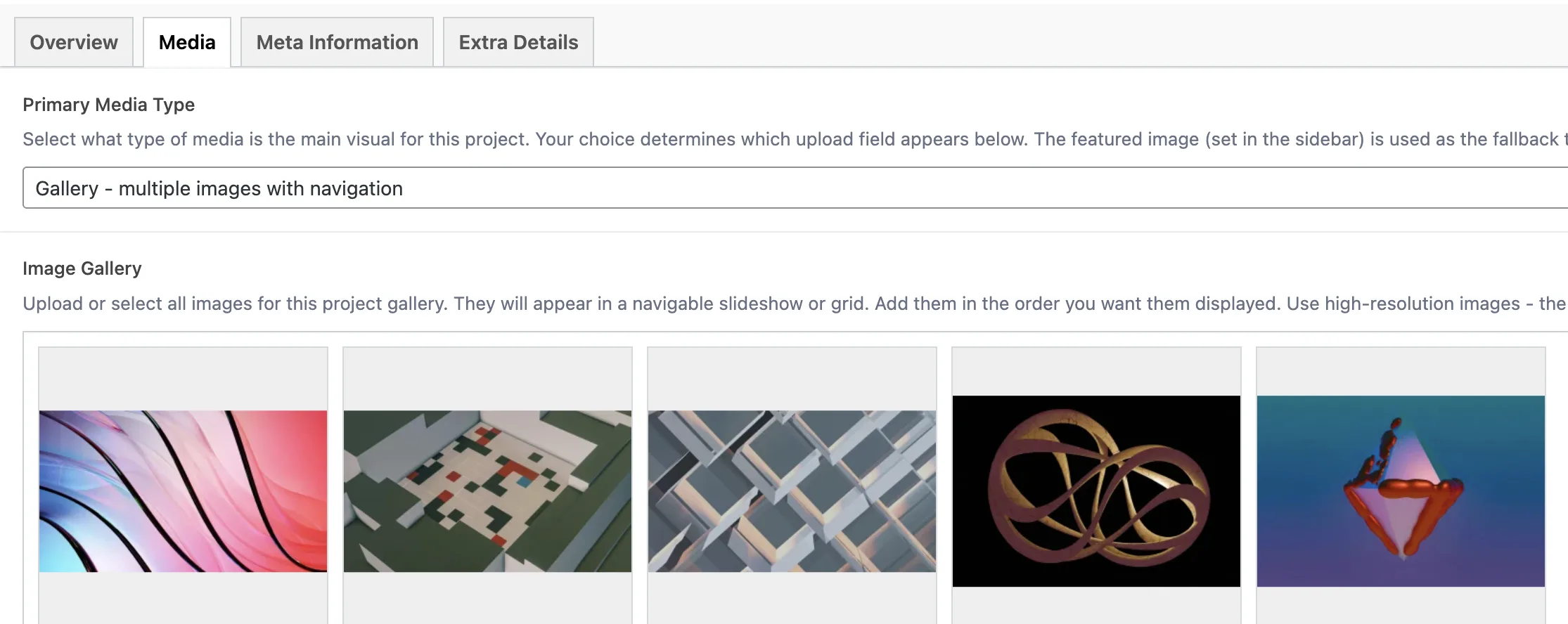
Open your portfolio item and go to the Media tab
Set Primary Media Type to Gallery - multiple images with navigation
The Image Gallery field appears below
Click Add to Gallery to upload new images or select existing ones from the Media Library
Drag and drop images to reorder them - they display in the order shown
#How the Gallery Renders
#On Single Project Pages
The gallery renders as a full Swiper carousel with:
Previous/Next arrows for manual navigation
Slide counter showing the current slide number and total (e.g., "3 / 8")
Smooth transitions between slides
Responsive sizing that adapts to the chosen layout style
#On Portfolio Archive Cards
When a gallery project appears in any portfolio grid or layout, the card thumbnail shows a "+N Images" badge in the corner - letting visitors know there is more to see before they click through.
#Gallery Field Reference
Field | Key | Type | Notes |
|---|---|---|---|
Image Gallery |
| Gallery (array) | Accepts multiple images. The theme serves the appropriate size automatically |
#Best Practices
Use consistent aspect ratios across all images in a gallery. Mixing landscape and portrait shots creates uneven transitions in the carousel.
Optimize images before uploading. Compress JPEGs to 80-85% quality and keep individual files under 500KB when possible. The theme generates responsive sizes automatically, but starting with a clean source helps.
Upload at least 1440px wide for the best result on large screens. The theme will generate smaller versions for tablets and phones.
Order matters. Put your strongest image first - it becomes the default thumbnail on archive pages and the first thing visitors see.
Aim for 4-12 images per gallery. Fewer than 4 makes the carousel feel sparse; more than 12 can slow initial page load.
The featured image (set in the WordPress sidebar) is always used as the card thumbnail in portfolio grids, regardless of which images are in the gallery.
Last updated
Was this article helpful?

On this page
