
SEO - Monogram
Monogram includes built-in SEO features and integrates with popular WordPress SEO plugins.
#Built-in SEO Features
#JSON-LD Structured Data
The theme automatically outputs structured data markup on key pages:
Page Type | Schema Type | Data Included |
|---|---|---|
Homepage | Organization | Site name, URL, logo |
Homepage | WebSite | SearchAction for site search |
Blog posts | Article | Title, author, date, image |
Portfolio items | CreativeWork | Title, author, date, description |
FAQ archives | FAQPage | Questions and answers |
#Meta Tags
The theme outputs essential meta tags:
Viewport - responsive design meta tag
Theme color - matches dark/light color scheme
Robots - noindex on 404 and search result pages
#DNS Prefetch
Performance-optimized DNS prefetch and preconnect for:
Google Maps API
Algolia API
Google Fonts
#SEO Plugin Compatibility
Monogram works with three major SEO plugins:
Plugin | Breadcrumbs | Structured Data | Sitemap |
|---|---|---|---|
Yoast SEO | Supported | Plugin handles | Plugin handles |
Rank Math | Supported | Plugin handles | Plugin handles |
SEOPress | Supported | Plugin handles | Plugin handles |
#Breadcrumb Integration
The theme auto-detects your active SEO plugin and uses its breadcrumb output. Configure the source in Appearance > Customize > Breadcrumbs:
the Breadcrumb Source setting: auto (recommended), yoast, rankmath, seopress, or default (theme built-in)
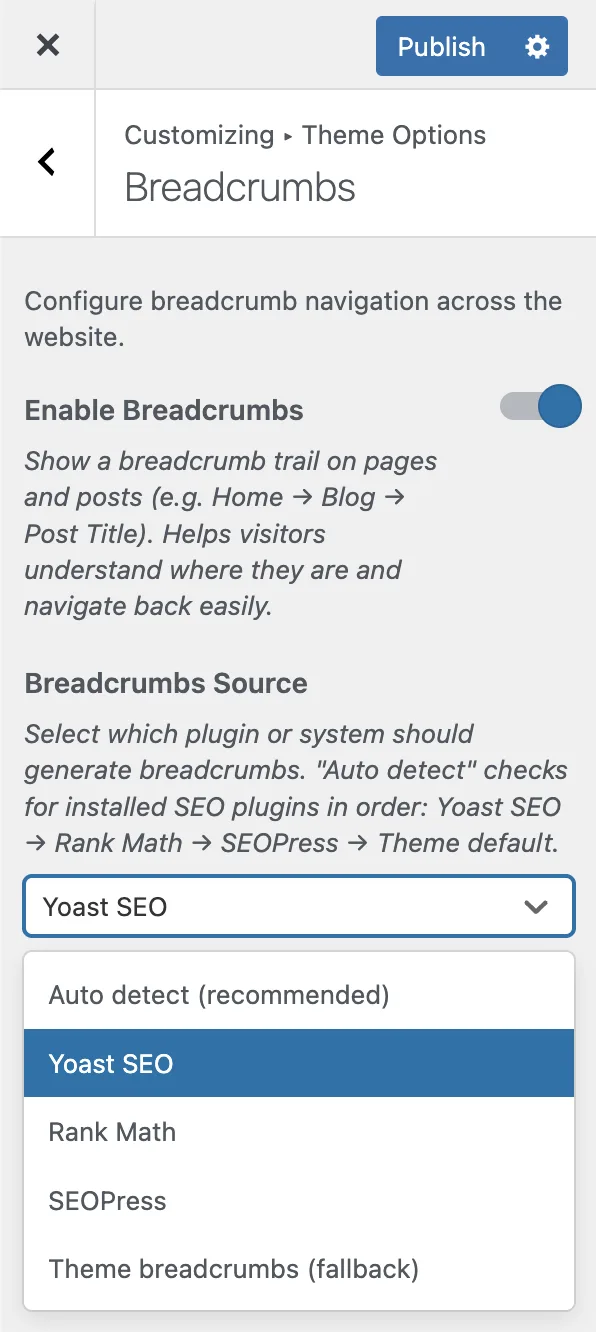
Tip: Set the breadcrumb source to "auto" and the theme will detect whichever SEO plugin is active. If none is installed, the theme uses its own breadcrumb generator.
#SEO Best Practices
Use the
/%postname%/permalink structure (set during demo import)Fill in meta titles and descriptions via your SEO plugin
Use descriptive portfolio titles and summaries
Add alt text to all images
Organize portfolio items with consistent taxonomy usage
Last updated
Was this article helpful?

On this page
